
Python Programs with Output (Basic to Advanced)
100+ Python Programs with Output, Explanation and AKTU Practical Questions
Python Programs Tutorial
Welcome to the complete collection of Python Programs with Output specially prepared for AKTU B.Tech students. This tutorial contains 100+ solved Python programs starting from very basic programs and gradually moving towards advanced programming concepts.
Every program contains
- Problem Statement
- Algorithm (where required)
- Python Program
- Expected Output
- Step-by-Step Explanation
- Time Complexity (where applicable)
- Important Viva Questions
These programs are useful for
- AKTU Practical Examination
- University Examination
- Lab File Preparation
- Placement Preparation
- Interview Preparation
- Beginners Learning Python
Why Practice Python Programs?
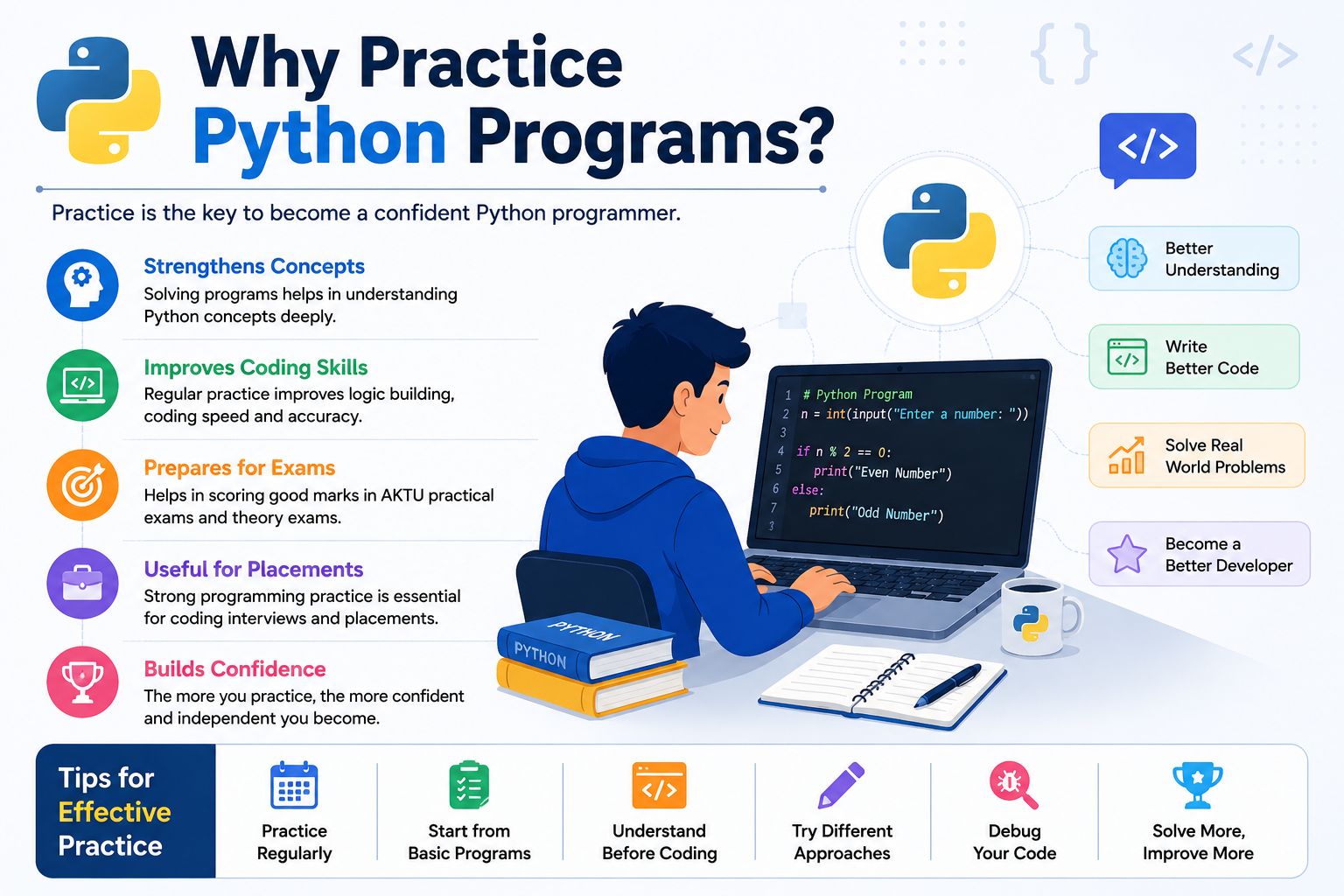
Reading theory is important, but writing programs is the best way to understand Python. The more programs you write, the more confidence you gain. Every successful programmer spends more time writing code than simply reading notes.
Program Difficulty Levels
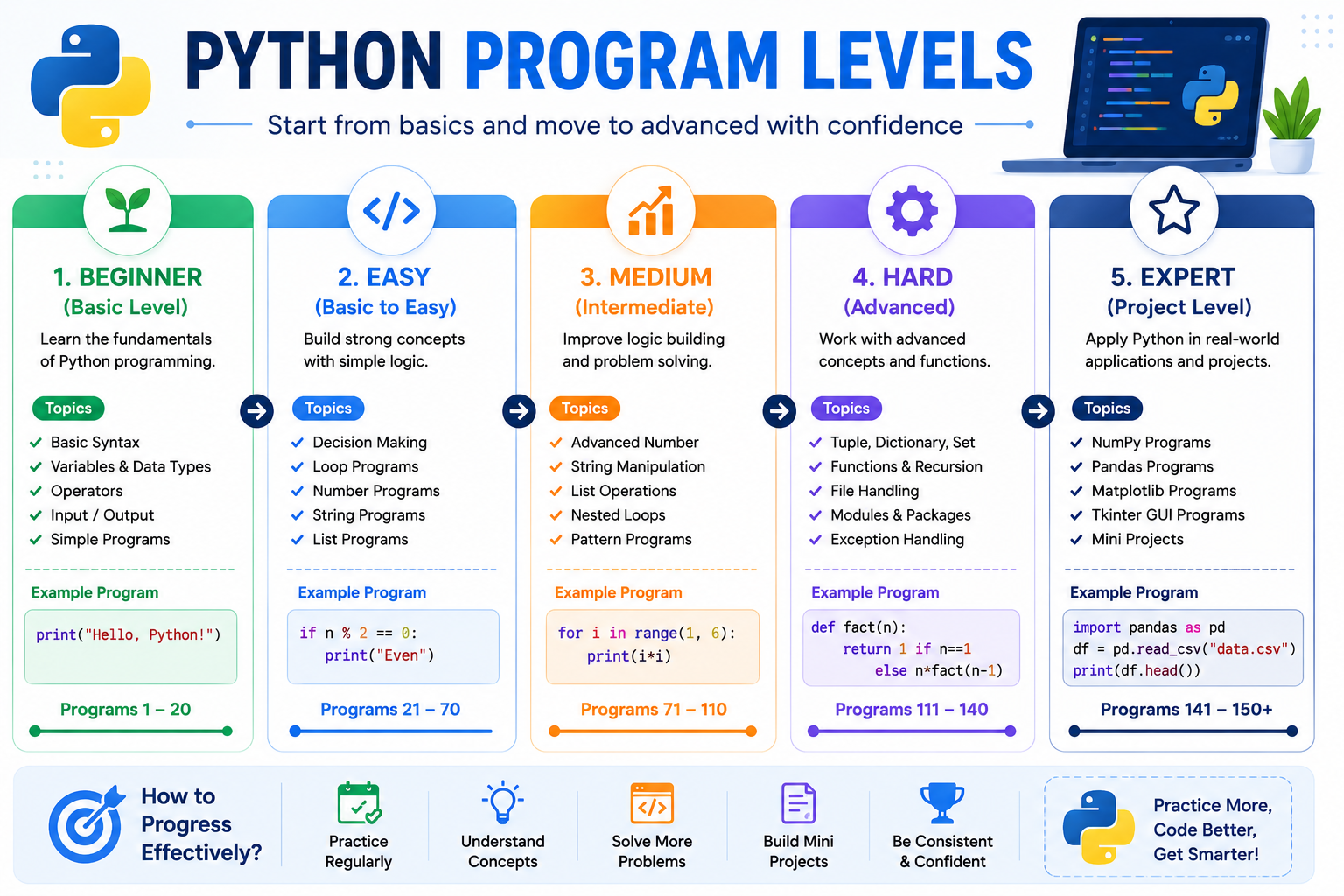
| Level | Description | Programs |
|---|---|---|
| Level 1 | Basic Input / Output Programs | 20+ |
| Level 2 | Decision Making Programs | 20+ |
| Level 3 | Loop Based Programs | 25+ |
| Level 4 | Functions & Collections | 20+ |
| Level 5 | Advanced Programs | 20+ |
Program Index
This tutorial contains more than 150 solved Python programs arranged from basic to advanced level.
- Programs 1–25 : Basic Python Programs
- Programs 26–42 : Decision Making (if, if...else, elif)
- Programs 43–52 : Loop Programs (for & while)
- Programs 53–65 : Advanced Number Programs
- Programs 66–80 : String Programs
- Programs 81–95 : List Programs
- Programs 96–100 : Tuple Programs
- Programs 101–108 : Dictionary Programs
- Programs 109–112 : Set Programs
- Programs 113–125 : Function Programs
- Programs 126–140 : File Handling Programs
- Programs 141–150 : NumPy, Pandas, Matplotlib & Tkinter Programs
Complete Program List
- Program 1 : Print "Hello World"
- Program 2 : Print Your Name
- Program 3 : Add Two Numbers
- Program 4 : Subtract Two Numbers
- Program 5 : Multiply Two Numbers
- Program 6 : Divide Two Numbers
- Program 7 : Find Square of a Number
- Program 8 : Find Cube of a Number
- Program 9 : Swap Two Numbers
- Program 10 : Calculate Simple Interest
- Program 11 : Calculate Area of Rectangle
- Program 12 : Calculate Area of Circle
- Program 13 : Celsius to Fahrenheit
- Program 14 : Fahrenheit to Celsius
- Program 15 : Find Largest of Two Numbers
- Program 16 : Calculate Percentage
- Program 17 : Calculate Average Marks
- Program 18 : Print ASCII Value
- Program 19 : Check Data Type
- Program 20 : Accept User Input
- Program 21 : Calculate BMI
- Program 22 : Calculate Electricity Bill
- Program 23 : Currency Conversion
- Program 24 : Calculate Compound Interest
- Program 25 : Generate Random Number
- Program 26 : Check Even or Odd
- Program 27 : Check Positive, Negative or Zero
- Program 28 : Largest of Two Numbers
- Program 29 : Largest of Three Numbers
- Program 30 : Check Leap Year
- Program 31 : Voting Eligibility
- Program 32 : Pass or Fail
- Program 33 : Absolute Value
- Program 34 : Grade Calculation
- Program 35 : Simple Calculator
- Program 36 : Vowel or Consonant
- Program 37 : Alphabet, Digit or Special Character
- Program 38 : Greatest of Four Numbers
- Program 39 : Divisible by 5 and 11
- Program 40 : Even or Odd using Conditional Expression
- Program 41 : Smallest of Three Numbers
- Program 42 : Profit or Loss
- Program 43 : Print Numbers 1 to 10
- Program 44 : Print Even Numbers
- Program 45 : Print Odd Numbers
- Program 46 : Sum of N Natural Numbers
- Program 47 : Multiplication Table
- Program 48 : Reverse Counting
- Program 49 : Factorial
- Program 50 : Fibonacci Series
- Program 51 : Prime Number
- Program 52 : Armstrong Number
- Program 53 : Reverse Number
- Program 54 : Palindrome Number
- Program 55 : Sum of Digits
- Program 56 : Product of Digits
- Program 57 : Count Digits
- Program 58 : Perfect Number
- Program 59 : Strong Number
- Program 60 : Automorphic Number
- Program 61 : Neon Number
- Program 62 : Duck Number
- Program 63 : Harshad Number
- Program 64 : GCD of Two Numbers
- Program 65 : LCM of Two Numbers
- Program 66 : Length of String
- Program 67 : Reverse String
- Program 68 : Palindrome String
- Program 69 : Count Vowels
- Program 70 : Count Consonants
- Program 71 : Count Words
- Program 72 : Convert to Uppercase
- Program 73 : Convert to Lowercase
- Program 74 : Convert to Title Case
- Program 75 : Remove Spaces
- Program 76 : Count Character Occurrences
- Program 77 : Replace Characters
- Program 78 : Check Anagram
- Program 79 : Sort Characters
- Program 80 : Concatenate Strings
- Program 81 : Create and Display List
- Program 82 : Traverse List
- Program 83 : Sum of List Elements
- Program 84 : Largest Element in List
- Program 85 : Smallest Element in List
- Program 86 : Second Largest Element
- Program 87 : Search Element in List
- Program 88 : Sort List
- Program 89 : Reverse List
- Program 90 : Remove Duplicates
- Program 91 : Merge Two Lists
- Program 92 : Count Occurrences in List
- Program 93 : Insert Element
- Program 94 : Delete Element
- Program 95 : List Comprehension
- Program 96 : Create Tuple
- Program 97 : Length of Tuple
- Program 98 : Maximum and Minimum in Tuple
- Program 99 : Count Occurrences in Tuple
- Program 100 : Search Element in Tuple
- Program 101 : Create Dictionary
- Program 102 : Access Dictionary Values
- Program 103 : Add Dictionary Item
- Program 104 : Update Dictionary Item
- Program 105 : Delete Dictionary Item
- Program 106 : Display Dictionary Keys
- Program 107 : Display Dictionary Values
- Program 108 : Traverse Dictionary
- Program 109 : Create Set
- Program 110 : Add Element to Set
- Program 111 : Remove Element from Set
- Program 112 : Union and Intersection of Sets
- Program 113 : User Defined Function
- Program 114 : Function with Arguments
- Program 115 : Function Returning Value
- Program 116 : Default Arguments
- Program 117 : Keyword Arguments
- Program 118 : Variable Length Arguments
- Program 119 : Lambda Function
- Program 120 : Recursive Factorial
- Program 121 : Recursive Fibonacci
- Program 122 : Function to Check Prime Number
- Program 123 : Function to Find Maximum
- Program 124 : Function to Calculate Area of Circle
- Program 125 : Function to Check Even or Odd
- Program 126 : Create and Write File
- Program 127 : Read File
- Program 128 : Read File Line by Line
- Program 129 : Append Data to File
- Program 130 : Count Number of Lines
- Program 131 : Count Number of Words
- Program 132 : Count Characters
- Program 133 : Search Word in File
- Program 134 : Copy File
- Program 135 : Check File Exists
- Program 136 : Read CSV File
- Program 137 : Write CSV File
- Program 138 : Binary File Example
- Program 139 : Exception Handling with File
- Program 140 : Mini File Management Program
- Program 141 : Create NumPy Array
- Program 142 : Addition of Two NumPy Arrays
- Program 143 : Create Pandas DataFrame
- Program 144 : Display First Five Records
- Program 145 : Plot Line Graph using Matplotlib
- Program 146 : Plot Bar Chart
- Program 147 : Tkinter Hello World
- Program 148 : Tkinter Button Example
- Program 149 : Student Record Mini Project
- Program 150 : Employee Salary Calculator
Basic Python Programs
Let us begin with the simplest Python programs. Each program includes the complete source code, expected output and explanation.
Program 1 : Print "Hello World"
This is the first program that every Python programmer writes.
Program 1 : Print "Hello World"
This is the first Python program written by almost every beginner. The print() function is used to display output on the screen.
print("Hello World")
Output
Hello World
Explanation
- print() is a built-in Python function.
- It displays the text written inside double quotes.
- Anything inside quotes is treated as a string.
Program 2 : Print Your Name
Write a Python program to display your name.
print("Aadarsh Malviya")
Output
Aadarsh Malviya
Explanation
The print() function displays the specified text exactly as written.
Program 3 : Print Multiple Lines
Write a Python program to print multiple lines.
print("Welcome")
print("To")
print("NoidaTut")
Output
Welcome
To
NoidaTut
Explanation
- Each print() statement prints on a new line.
- Python automatically moves the cursor to the next line.
Program 4 : Print Using Escape Character
Write a program to print text using newline and tab escape characters.
print("Python\nProgramming")
print("AKTU\tTutorial")
Output
Python
Programming
AKTU    Tutorial
Explanation
| Escape Character | Meaning |
|---|---|
| \n | Moves cursor to next line. |
| \t | Provides horizontal tab space. |
Program 5 : Print Using Variables
Write a program to print values stored inside variables.
name = "Rahul"
age = 20

print(name)
print(age)
Output
Rahul
20
Explanation
- The variable name stores a string.
- The variable age stores an integer.
- print() displays the value stored inside variables.
Program 6 : Print Using Separator
Write a Python program using the sep parameter.
print("Python","Programming","Tutorial",sep="-")
Output
Python-Programming-Tutorial
Explanation
The sep parameter specifies the separator placed between multiple values.
Program 7 : Print Using End Parameter
Write a program using the end parameter.
print("Python",end=" ")
print("Programming")
Output
Python Programming
Explanation
- Normally print() ends with a newline.
- The end parameter changes the ending character.
- Here a blank space is printed instead of a new line.
Programs Using User Input
Now let us learn programs that take input from the keyboard using the input() function.
Program 8 : Read and Display User Name
Write a Python program to accept the user's name and display it.
name = input("Enter your name : ")

print("Welcome", name)
Sample Output
Enter your name : Rahul
Welcome Rahul
Explanation
- input() accepts input from the keyboard.
- The entered value is stored in the variable name.
- The print() function displays the stored value.
Program 9 : Add Two Numbers
Write a Python program to add two numbers entered by the user.
a = int(input("Enter first number : "))
b = int(input("Enter second number : "))

sum = a + b

print("Sum =", sum)
Sample Output
Enter first number : 25
Enter second number : 15
Sum = 40
Explanation
- input() returns data as a string.
- int() converts the input into an integer.
- The + operator performs addition.
Program 10 : Subtract Two Numbers
Write a Python program to subtract two numbers.
a = int(input("Enter first number : "))
b = int(input("Enter second number : "))

print("Difference =", a-b)
Sample Output
Enter first number : 40
Enter second number : 15

Difference = 25
Program 11 : Multiply Two Numbers
Write a Python program to multiply two numbers.
a = int(input("Enter first number : "))
b = int(input("Enter second number : "))

print("Product =", a*b)
Sample Output
Enter first number : 12
Enter second number : 6

Product = 72
Program 12 : Divide Two Numbers
Write a Python program to divide two numbers.
a = int(input("Enter first number : "))
b = int(input("Enter second number : "))

print("Division =", a/b)
Sample Output
Enter first number : 20
Enter second number : 5

Division = 4.0
Note: The / operator always returns a floating-point value.
Program 13 : Find Average of Three Numbers
Write a Python program to calculate the average of three numbers.
a = int(input("Enter first number : "))
b = int(input("Enter second number : "))
c = int(input("Enter third number : "))

average = (a+b+c)/3

print("Average =", average)
Sample Output
Enter first number : 10
Enter second number : 20
Enter third number : 30

Average = 20.0
Program 14 : Calculate Area of Rectangle
Write a Python program to calculate the area of a rectangle.
length = float(input("Enter Length : "))
breadth = float(input("Enter Breadth : "))

area = length * breadth

print("Area =", area)
Sample Output
Enter Length : 10
Enter Breadth : 5

Area = 50.0
Program 15 : Calculate Area of Circle
Write a Python program to calculate the area of a circle.
radius = float(input("Enter Radius : "))

area = 3.14159 * radius * radius

print("Area =", area)
Sample Output
Enter Radius : 7

Area = 153.93791
Formula Used: Area = π × r × r
Program 16 : Calculate Simple Interest
Write a Python program to calculate Simple Interest.
p = float(input("Principal : "))
r = float(input("Rate : "))
t = float(input("Time : "))

si = (p*r*t)/100

print("Simple Interest =", si)
Sample Output
Principal : 5000
Rate : 8
Time : 2

Simple Interest = 800.0
Temperature Conversion Programs
Now let us learn programs for converting temperatures between different units.
Program 17 : Convert Celsius to Fahrenheit
Write a Python program to convert temperature from Celsius to Fahrenheit.
celsius = float(input("Enter Temperature in Celsius : "))

fahrenheit = (celsius * 9/5) + 32

print("Temperature in Fahrenheit =", fahrenheit)
Sample Output
Enter Temperature in Celsius : 37

Temperature in Fahrenheit = 98.6
Formula: F = (C × 9/5) + 32
Program 18 : Convert Fahrenheit to Celsius
Write a Python program to convert Fahrenheit into Celsius.
fahrenheit = float(input("Enter Temperature in Fahrenheit : "))

celsius = (fahrenheit - 32) * 5/9

print("Temperature in Celsius =", celsius)
Sample Output
Enter Temperature in Fahrenheit : 98.6

Temperature in Celsius = 37.0
Program 19 : Swap Two Numbers Using Third Variable
Write a Python program to interchange two numbers using a temporary variable.
a = int(input("Enter First Number : "))
b = int(input("Enter Second Number : "))

temp = a
a = b
b = temp

print("After Swapping")

print("First Number =", a)
print("Second Number =", b)
Sample Output
Enter First Number : 10
Enter Second Number : 20

After Swapping

First Number = 20
Second Number = 10
Program 20 : Swap Two Numbers Without Third Variable
Write a Python program to swap two numbers without using a third variable.
a = int(input("Enter First Number : "))
b = int(input("Enter Second Number : "))

a, b = b, a

print("First Number =", a)
print("Second Number =", b)
Sample Output
Enter First Number : 15
Enter Second Number : 40

First Number = 40
Second Number = 15
Program 21 : Find ASCII Value of a Character
Write a Python program to display the ASCII value of a character.
ch = input("Enter any character : ")

print("ASCII Value =", ord(ch))
Sample Output
Enter any character : A

ASCII Value = 65
ord() returns the ASCII (Unicode) value of a character.
Program 22 : Find Square and Cube of a Number
Write a Python program to calculate the square and cube of a number.
num = int(input("Enter Number : "))

print("Square =", num ** 2)

print("Cube =", num ** 3)
Sample Output
Enter Number : 5

Square = 25

Cube = 125
Program 23 : Calculate Percentage of Five Subjects
Write a Python program to calculate percentage.
m1 = float(input("Subject 1 : "))
m2 = float(input("Subject 2 : "))
m3 = float(input("Subject 3 : "))
m4 = float(input("Subject 4 : "))
m5 = float(input("Subject 5 : "))

total = m1 + m2 + m3 + m4 + m5

percentage = total / 5

print("Total Marks =", total)

print("Percentage =", percentage)
Sample Output
Subject 1 : 75
Subject 2 : 80
Subject 3 : 90
Subject 4 : 82
Subject 5 : 88

Total Marks = 415

Percentage = 83.0
Program 24 : Calculate Body Mass Index (BMI)
Write a Python program to calculate BMI.
weight = float(input("Enter Weight (kg) : "))

height = float(input("Enter Height (m) : "))

bmi = weight / (height * height)

print("BMI =", bmi)
Sample Output
Enter Weight (kg) : 65

Enter Height (m) : 1.70

BMI = 22.49
Program 25 : Calculate Electricity Bill
Write a Python program to calculate the electricity bill. Assume the cost per unit is ₹8.
units = float(input("Enter Units Consumed : "))

bill = units * 8

print("Electricity Bill = ₹", bill)
Sample Output
Enter Units Consumed : 125

Electricity Bill = ₹ 1000.0
Decision Making Programs (if, if...else, elif)
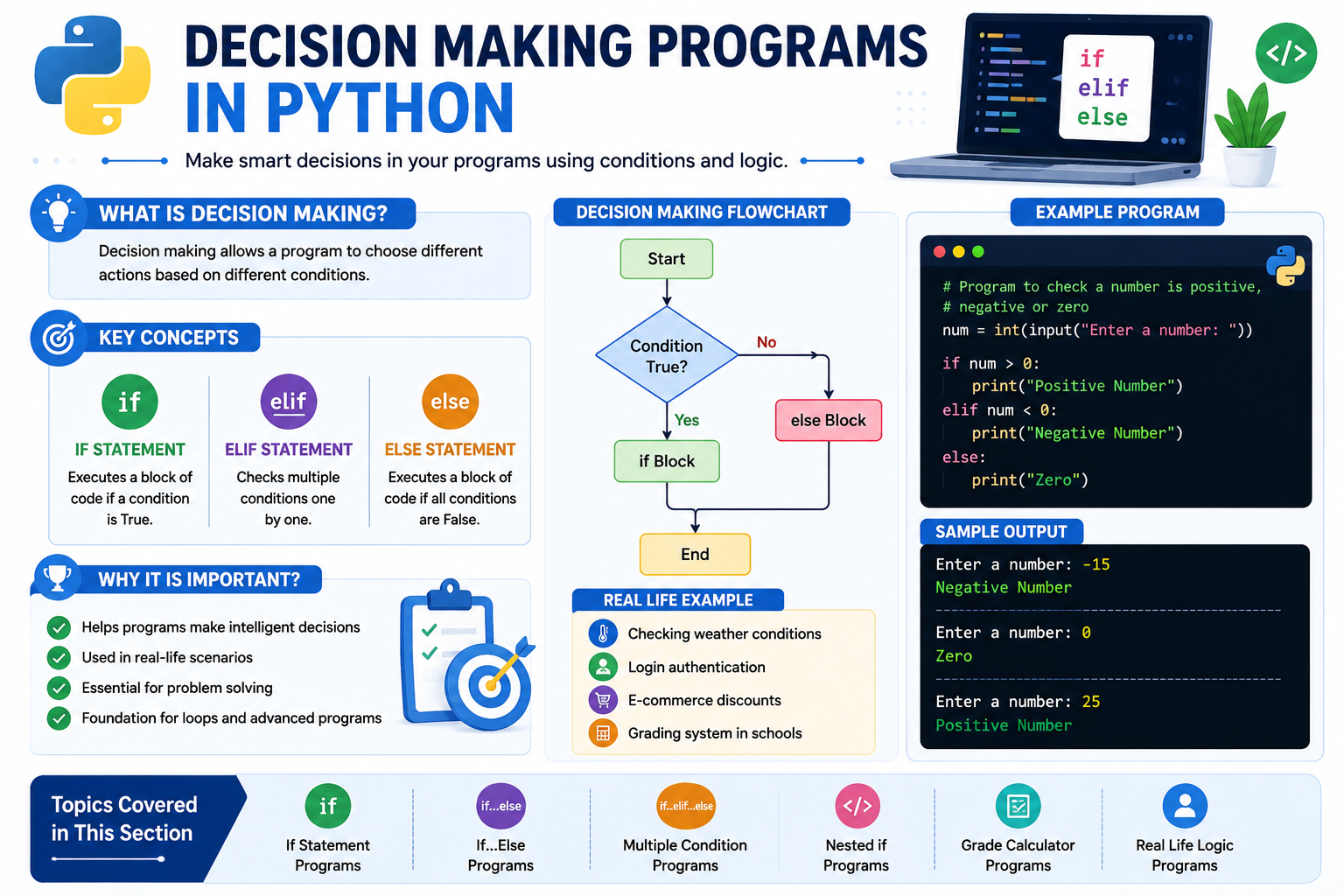
Decision making allows a program to choose one action from multiple alternatives based on a condition. Python provides the following decision-making statements.
- if Statement
- if...else Statement
- Nested if
- elif Ladder
Program 26 : Check Whether a Number is Even or Odd
Write a Python program to check whether a number is even or odd.
num = int(input("Enter Number : "))

if num % 2 == 0:

    print("Even Number")

else:

    print("Odd Number")
Sample Output
Enter Number : 24

Even Number
Explanation
- The modulus (%) operator gives the remainder.
- If remainder is 0, the number is even.
- Otherwise, it is odd.
Program 27 : Check Positive, Negative or Zero
Write a Python program to determine whether a number is positive, negative or zero.
num = int(input("Enter Number : "))

if num > 0:

    print("Positive Number")

elif num < 0:

    print("Negative Number")

else:

    print("Zero")
Sample Output
Enter Number : -12

Negative Number
Program 28 : Find the Largest of Two Numbers
Write a Python program to find the largest of two numbers.
a = int(input("Enter First Number : "))
b = int(input("Enter Second Number : "))

if a > b:

    print("Largest =", a)

else:

    print("Largest =", b)
Sample Output
Enter First Number : 75

Enter Second Number : 32

Largest = 75
Program 29 : Find the Largest of Three Numbers
Write a Python program to find the largest among three numbers.
a = int(input("Enter First Number : "))
b = int(input("Enter Second Number : "))
c = int(input("Enter Third Number : "))

if a>b and a>c:

    print("Largest =",a)

elif b>c:

    print("Largest =",b)

else:

    print("Largest =",c)
Sample Output
Enter First Number : 35

Enter Second Number : 82

Enter Third Number : 70

Largest = 82
Program 30 : Check Leap Year
Write a Python program to check whether a year is a leap year.
year = int(input("Enter Year : "))

if year % 4 == 0:

    print("Leap Year")

else:

    print("Not a Leap Year")
Sample Output
Enter Year : 2024

Leap Year
Program 31 : Check Voting Eligibility
Write a Python program to check whether a person is eligible to vote.
age = int(input("Enter Age : "))

if age >= 18:

    print("Eligible for Voting")

else:

    print("Not Eligible")
Sample Output
Enter Age : 20

Eligible for Voting
Program 32 : Check Pass or Fail
Write a Python program to check whether a student has passed.
marks = int(input("Enter Marks : "))

if marks >= 40:

    print("Pass")

else:

    print("Fail")
Sample Output
Enter Marks : 65

Pass
Program 33 : Find Absolute Value
Write a Python program to find the absolute value of a number.
num = int(input("Enter Number : "))

if num < 0:

    num = -num

print("Absolute Value =", num)
Sample Output
Enter Number : -25

Absolute Value = 25
Grade Calculation Programs
The next section covers Grade Calculation, Income Tax, Electricity Bill using if...elif...else, Calculator Program, Character Checking and many more important AKTU practical programs.
Program 34 : Calculate Grade of a Student
Write a Python program to calculate the grade based on percentage.
per = float(input("Enter Percentage : "))

if per >= 90:

    print("Grade : A+")

elif per >= 80:

    print("Grade : A")

elif per >= 70:

    print("Grade : B")

elif per >= 60:

    print("Grade : C")

elif per >= 40:

    print("Grade : D")

else:

    print("Fail")
Sample Output
Enter Percentage : 86

Grade : A
Program 35 : Simple Calculator
Write a Python program to perform addition, subtraction, multiplication and division.
a = float(input("Enter First Number : "))
b = float(input("Enter Second Number : "))

print("1.Add")
print("2.Subtract")
print("3.Multiply")
print("4.Divide")

choice = int(input("Enter Choice : "))

if choice == 1:

    print("Result =",a+b)

elif choice == 2:

    print("Result =",a-b)

elif choice == 3:

    print("Result =",a*b)

elif choice == 4:

    print("Result =",a/b)

else:

    print("Invalid Choice")
Sample Output
Enter First Number : 20
Enter Second Number : 5

1.Add
2.Subtract
3.Multiply
4.Divide

Enter Choice : 3

Result = 100
Program 36 : Check Vowel or Consonant
Write a Python program to check whether a character is a vowel or consonant.
ch = input("Enter Character : ")

if ch in ('a','e','i','o','u',
          'A','E','I','O','U'):

    print("Vowel")

else:

    print("Consonant")
Output
Enter Character : E

Vowel
Program 37 : Check Alphabet or Digit
Write a Python program to check whether the entered character is an alphabet or digit.
ch = input("Enter Character : ")

if ch.isalpha():

    print("Alphabet")

elif ch.isdigit():

    print("Digit")

else:

    print("Special Character")
Output
Enter Character : 7

Digit
Program 38 : Find Greatest of Four Numbers
Write a Python program to find the largest among four numbers.
a = int(input("A : "))
b = int(input("B : "))
c = int(input("C : "))
d = int(input("D : "))

largest = max(a,b,c,d)

print("Largest =",largest)
Output
A : 15
B : 40
C : 75
D : 50

Largest = 75
Program 39 : Check Divisibility by 5 and 11
Write a Python program to check whether a number is divisible by both 5 and 11.
num = int(input("Enter Number : "))

if num%5==0 and num%11==0:

    print("Divisible")

else:

    print("Not Divisible")
Output
Enter Number : 55

Divisible
Program 40 : Check Even/Odd using Conditional Expression
Write a Python program to check whether a number is even or odd using a conditional expression.
num = int(input("Enter Number : "))

print("Even") if num%2==0 else print("Odd")
Output
Enter Number : 18

Even
Program 41 : Find the Smallest of Three Numbers
Write a Python program to find the smallest among three numbers.
a = int(input("A : "))
b = int(input("B : "))
c = int(input("C : "))

print("Smallest =",min(a,b,c))
Output
A : 40
B : 12
C : 25

Smallest = 12
Program 42 : Find Profit or Loss
Write a Python program to calculate profit or loss.
cp = float(input("Enter Cost Price : "))
sp = float(input("Enter Selling Price : "))

if sp > cp:

    print("Profit =",sp-cp)

elif cp > sp:

    print("Loss =",cp-sp)

else:

    print("No Profit No Loss")
Output
Enter Cost Price : 2500
Enter Selling Price : 3200

Profit = 700
Loop Programs (for Loop & while Loop)
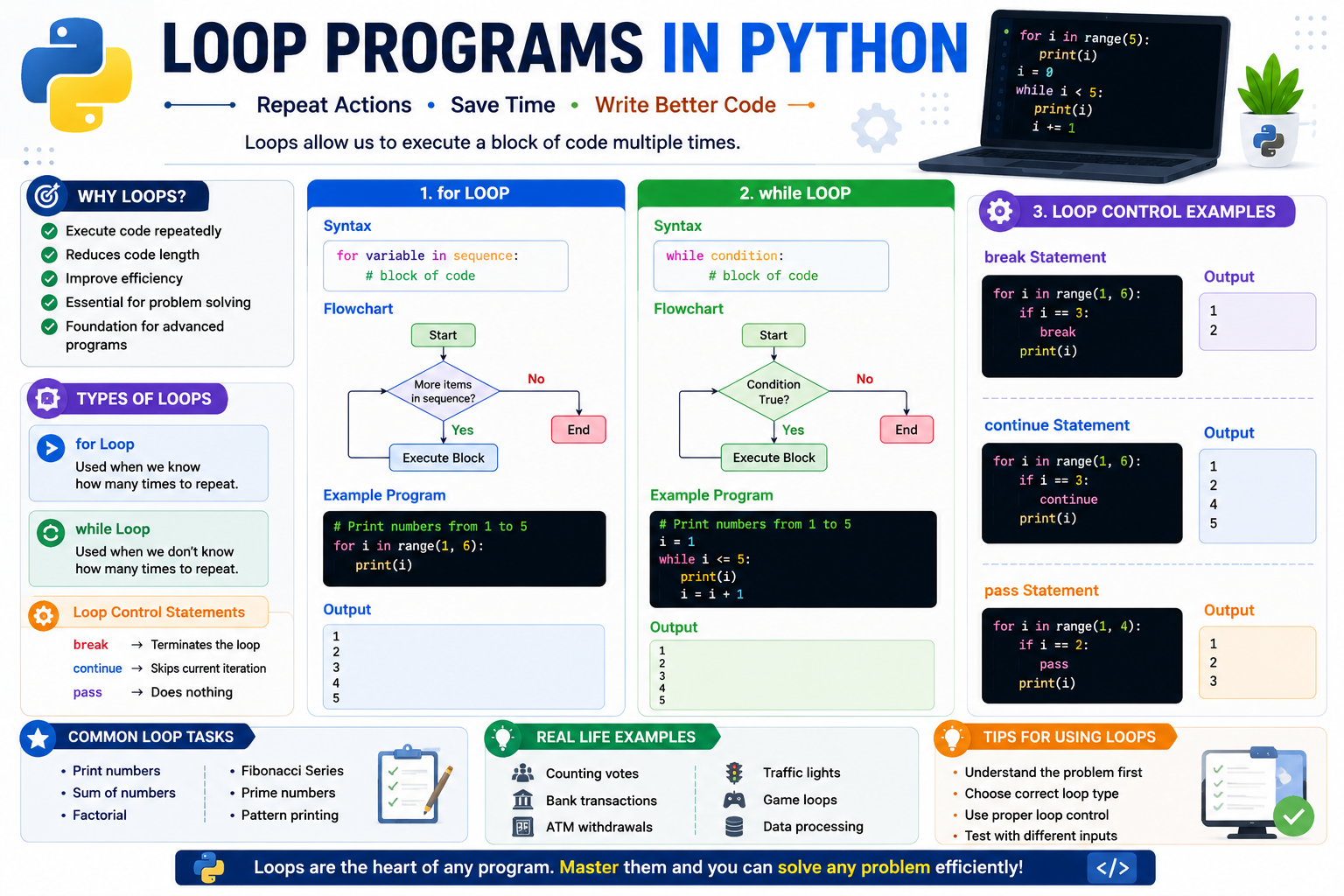
Loops are used to execute a block of code repeatedly until a specified condition becomes false. Python provides two important looping statements:
- for Loop
- while Loop
Program 43 : Print Numbers from 1 to 10
Write a Python program to print numbers from 1 to 10.
for i in range(1,11):

    print(i)
Output
1
2
3
4
5
6
7
8
9
10
Program 44 : Print Even Numbers from 1 to 100
for i in range(2,101,2):

    print(i)
Output
2
4
6
8
10
...
100
Program 45 : Print Odd Numbers from 1 to 100
for i in range(1,100,2):

    print(i)
Output
1
3
5
7
9
...
99
Program 46 : Sum of First N Natural Numbers
n = int(input("Enter N : "))

sum = 0

for i in range(1,n+1):

    sum = sum + i

print("Sum =",sum)
Sample Output
Enter N : 10

Sum = 55
Program 47 : Multiplication Table
num = int(input("Enter Number : "))

for i in range(1,11):

    print(num,"x",i,"=",num*i)
Sample Output
Enter Number : 5

5 x 1 = 5
5 x 2 = 10
5 x 3 = 15
...
5 x 10 = 50
Program 48 : Reverse Counting
for i in range(10,0,-1):

    print(i)
Output
10
9
8
7
6
5
4
3
2
1
Program 49 : Find Factorial of a Number
num = int(input("Enter Number : "))

fact = 1

for i in range(1,num+1):

    fact = fact*i

print("Factorial =",fact)
Sample Output
Enter Number : 5

Factorial = 120
Program 50 : Fibonacci Series
n = int(input("Enter Terms : "))

a = 0
b = 1

for i in range(n):

    print(a)

    c = a + b

    a = b

    b = c
Sample Output
Enter Terms : 8

0
1
1
2
3
5
8
13
Program 51 : Check Prime Number
num = int(input("Enter Number : "))

count = 0

for i in range(1,num+1):

    if num%i==0:

        count=count+1

if count==2:

    print("Prime Number")

else:

    print("Not Prime")
Sample Output
Enter Number : 17

Prime Number
Program 52 : Armstrong Number
num = int(input("Enter Number : "))

temp = num

sum = 0

while temp>0:

    digit = temp%10

    sum = sum + digit**3

    temp = temp//10

if sum==num:

    print("Armstrong Number")

else:

    print("Not Armstrong")
Sample Output
Enter Number : 153

Armstrong Number
Advanced Number Programs
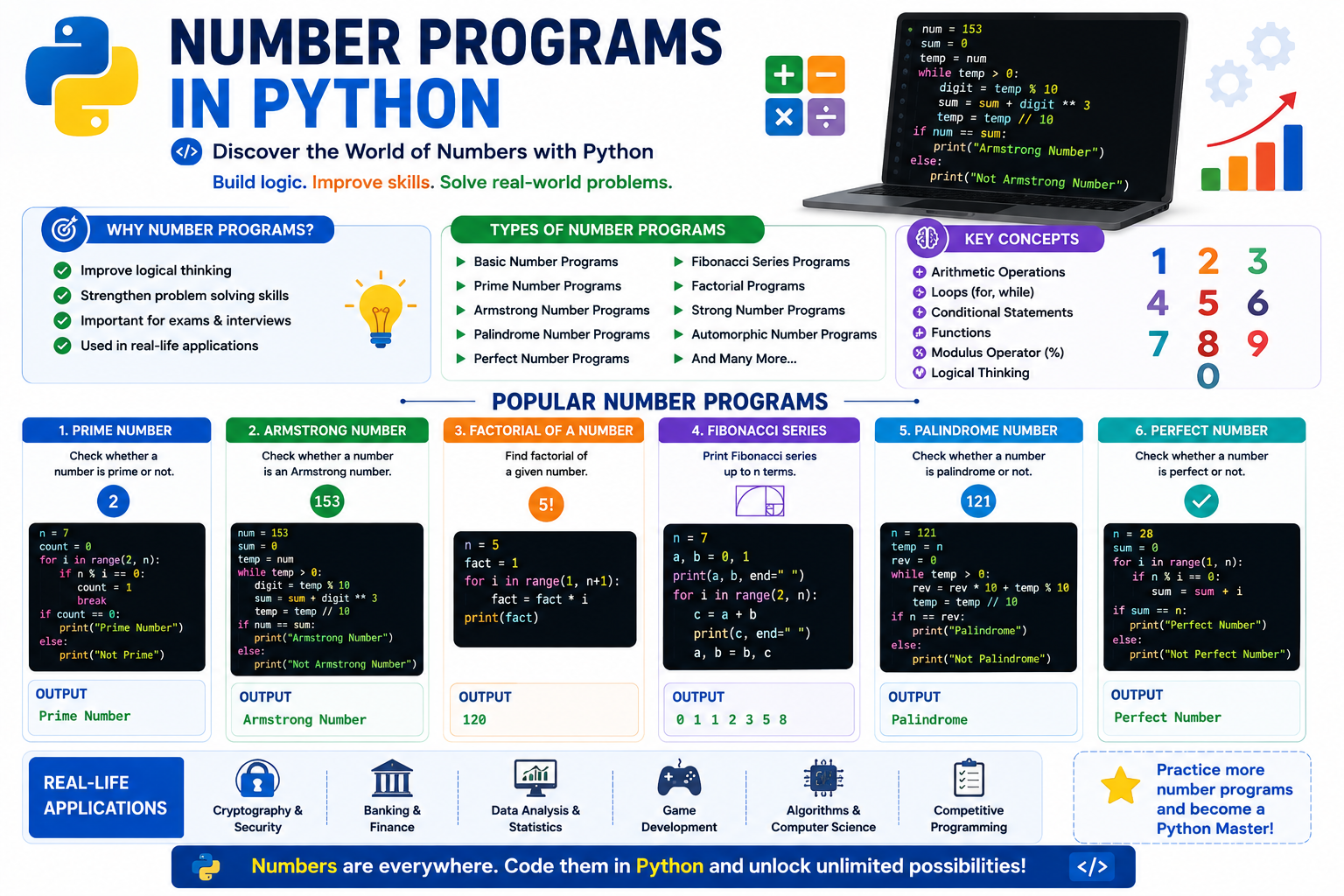
Number programs improve logical thinking and programming skills. These programs mainly use loops, conditional statements and arithmetic operators. They are frequently asked in AKTU practical examinations and coding interviews.
Program 53 : Reverse a Number
Write a Python program to reverse a given number.
num = int(input("Enter Number : "))

reverse = 0

while num > 0:

    digit = num % 10

    reverse = reverse * 10 + digit

    num = num // 10

print("Reverse Number =", reverse)
Sample Output
Enter Number : 12345

Reverse Number = 54321
Program 54 : Check Palindrome Number
Write a Python program to check whether a number is palindrome.
num = int(input("Enter Number : "))

temp = num

reverse = 0

while temp > 0:

    digit = temp % 10

    reverse = reverse * 10 + digit

    temp = temp // 10

if num == reverse:

    print("Palindrome Number")

else:

    print("Not a Palindrome Number")
Sample Output
Enter Number : 121

Palindrome Number
Program 55 : Sum of Digits
Write a Python program to find the sum of digits of a number.
num = int(input("Enter Number : "))

sum = 0

while num > 0:

    digit = num % 10

    sum = sum + digit

    num = num // 10

print("Sum of Digits =", sum)
Sample Output
Enter Number : 456

Sum of Digits = 15
Program 56 : Product of Digits
num = int(input("Enter Number : "))

product = 1

while num > 0:

    digit = num % 10

    product = product * digit

    num = num // 10

print("Product =", product)
Output
Enter Number : 234

Product = 24
Program 57 : Count Number of Digits
num = int(input("Enter Number : "))

count = 0

while num > 0:

    count = count + 1

    num = num // 10

print("Total Digits =", count)
Output
Enter Number : 987654

Total Digits = 6
Program 58 : Perfect Number
Write a Python program to check whether a number is a perfect number.
num = int(input("Enter Number : "))

sum = 0

for i in range(1, num):

    if num % i == 0:

        sum = sum + i

if sum == num:

    print("Perfect Number")

else:

    print("Not a Perfect Number")
Output
Enter Number : 28

Perfect Number
Program 59 : Strong Number
import math

num = int(input("Enter Number : "))

temp = num

sum = 0

while temp > 0:

    digit = temp % 10

    sum = sum + math.factorial(digit)

    temp = temp // 10

if sum == num:

    print("Strong Number")

else:

    print("Not a Strong Number")
Output
Enter Number : 145

Strong Number
Program 60 : Automorphic Number
num = int(input("Enter Number : "))

square = num * num

if str(square).endswith(str(num)):

    print("Automorphic Number")

else:

    print("Not an Automorphic Number")
Output
Enter Number : 25

Automorphic Number
Program 61 : Neon Number
num = int(input("Enter Number : "))

square = num * num

sum = 0

while square > 0:

    digit = square % 10

    sum = sum + digit

    square = square // 10

if sum == num:

    print("Neon Number")

else:

    print("Not a Neon Number")
Output
Enter Number : 9

Neon Number
Program 62 : Duck Number
num = input("Enter Number : ")

if '0' in num[1:]:

    print("Duck Number")

else:

    print("Not a Duck Number")
Output
Enter Number : 1205

Duck Number
Program 63 : Harshad Number
num = int(input("Enter Number : "))

temp = num

sum = 0

while temp > 0:

    digit = temp % 10

    sum = sum + digit

    temp = temp // 10

if num % sum == 0:

    print("Harshad Number")

else:

    print("Not a Harshad Number")
Output
Enter Number : 18

Harshad Number
Program 64 : Find GCD of Two Numbers
a = int(input("Enter First Number : "))
b = int(input("Enter Second Number : "))

while b != 0:

    a, b = b, a % b

print("GCD =", a)
Output
Enter First Number : 24
Enter Second Number : 18

GCD = 6
Program 65 : Find LCM of Two Numbers
a = int(input("Enter First Number : "))
b = int(input("Enter Second Number : "))

greater = max(a, b)

while True:

    if greater % a == 0 and greater % b == 0:

        print("LCM =", greater)

        break

    greater = greater + 1
Output
Enter First Number : 12
Enter Second Number : 18

LCM = 36
String Programs
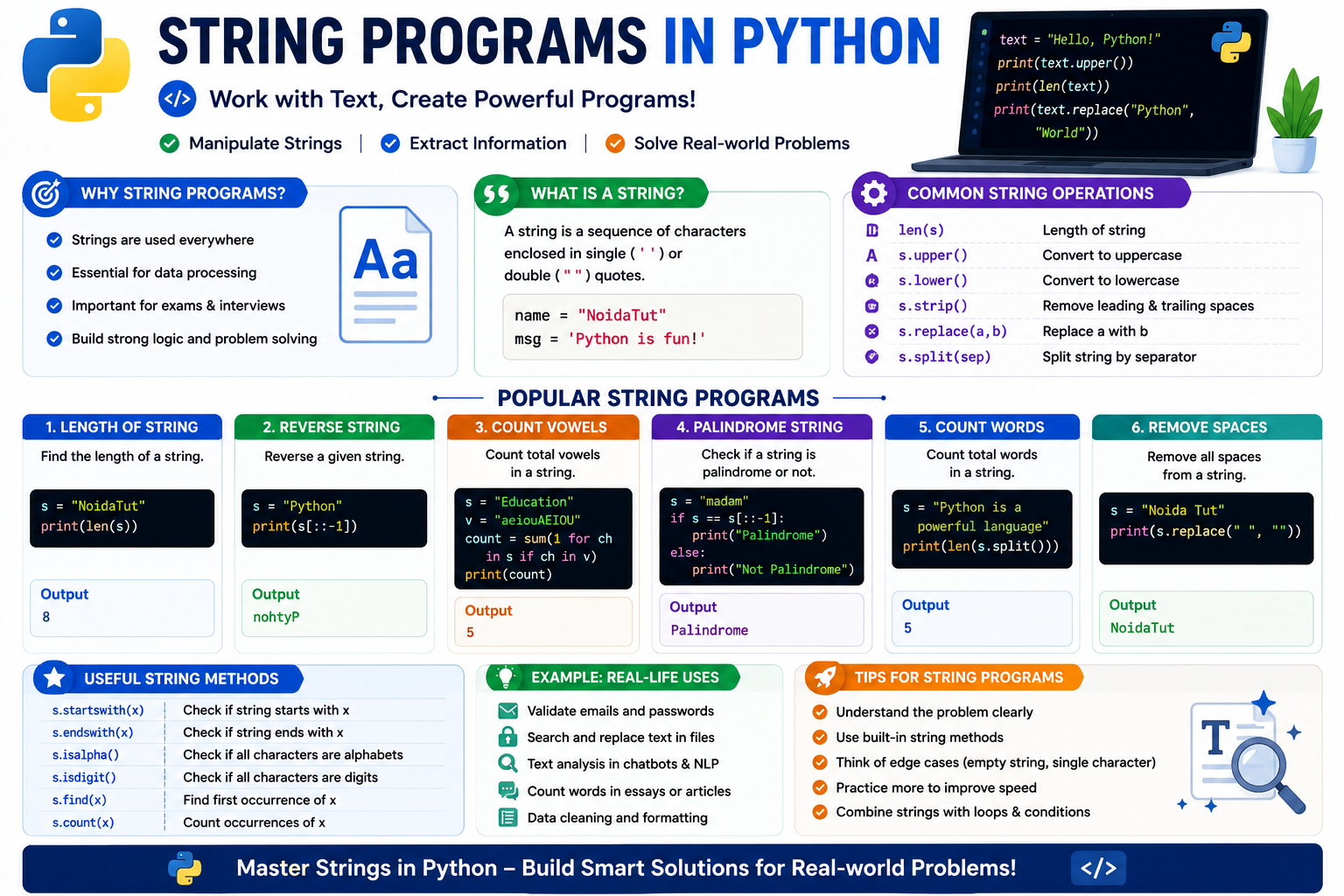
Strings are one of the most widely used data types in Python. A string is a sequence of characters enclosed within single or double quotation marks. Python provides numerous built-in functions and methods for working with strings.
Program 66 : Find Length of a String
text = input("Enter String : ")

print("Length =", len(text))
Sample Output
Enter String : NoidaTut

Length = 8
Program 67 : Reverse a String
text = input("Enter String : ")

print("Reverse =", text[::-1])
Sample Output
Enter String : Python

Reverse = nohtyP
Program 68 : Check Palindrome String
text = input("Enter String : ")

if text == text[::-1]:

    print("Palindrome")

else:

    print("Not Palindrome")
Output
Enter String : madam

Palindrome
Program 69 : Count Vowels
text = input("Enter String : ")

count = 0

for ch in text.lower():

    if ch in "aeiou":

        count += 1

print("Total Vowels =", count)
Output
Enter String : Education

Total Vowels = 5
Program 70 : Count Consonants
text = input("Enter String : ")

count = 0

for ch in text.lower():

    if ch.isalpha() and ch not in "aeiou":

        count += 1

print("Total Consonants =", count)
Output
Enter String : Python

Total Consonants = 5
Program 71 : Count Words
text = input("Enter Sentence : ")

words = text.split()

print("Total Words =", len(words))
Output
Enter Sentence : Welcome to NoidaTut

Total Words = 3
Program 72 : Convert String into Uppercase
text = input("Enter String : ")

print(text.upper())
Output
Enter String : python programming

PYTHON PROGRAMMING
Program 73 : Convert String into Lowercase
text = input("Enter String : ")

print(text.lower())
Output
Enter String : PYTHON

python
Program 74 : Convert String into Title Case
text = input("Enter String : ")

print(text.title())
Output
Enter String : python programming tutorial

Python Programming Tutorial
Program 75 : Remove Spaces from a String
text = input("Enter String : ")

print(text.replace(" ",""))
Output
Enter String : Python Programming

PythonProgramming
Program 76 : Count Occurrence of a Character
text = input("Enter String : ")

ch = input("Enter Character : ")

print("Occurrence =", text.count(ch))
Output
Enter String : banana

Enter Character : a

Occurrence = 3
Program 77 : Replace a Character
text = input("Enter String : ")

old = input("Replace : ")

new = input("With : ")

print(text.replace(old,new))
Output
Enter String : python

Replace : p

With : P

Python
Program 78 : Check Anagram Strings
str1 = input("Enter First String : ")

str2 = input("Enter Second String : ")

if sorted(str1)==sorted(str2):

    print("Anagram")

else:

    print("Not Anagram")
Output
Enter First String : listen

Enter Second String : silent

Anagram
Program 79 : Sort Characters of a String
text = input("Enter String : ")

print("".join(sorted(text)))
Output
Enter String : python

hnopty
Program 80 : Concatenate Two Strings
str1 = input("Enter First String : ")

str2 = input("Enter Second String : ")

print("Result =", str1 + str2)
Output
Enter First String : Hello

Enter Second String : World

Result = HelloWorld
List Programs
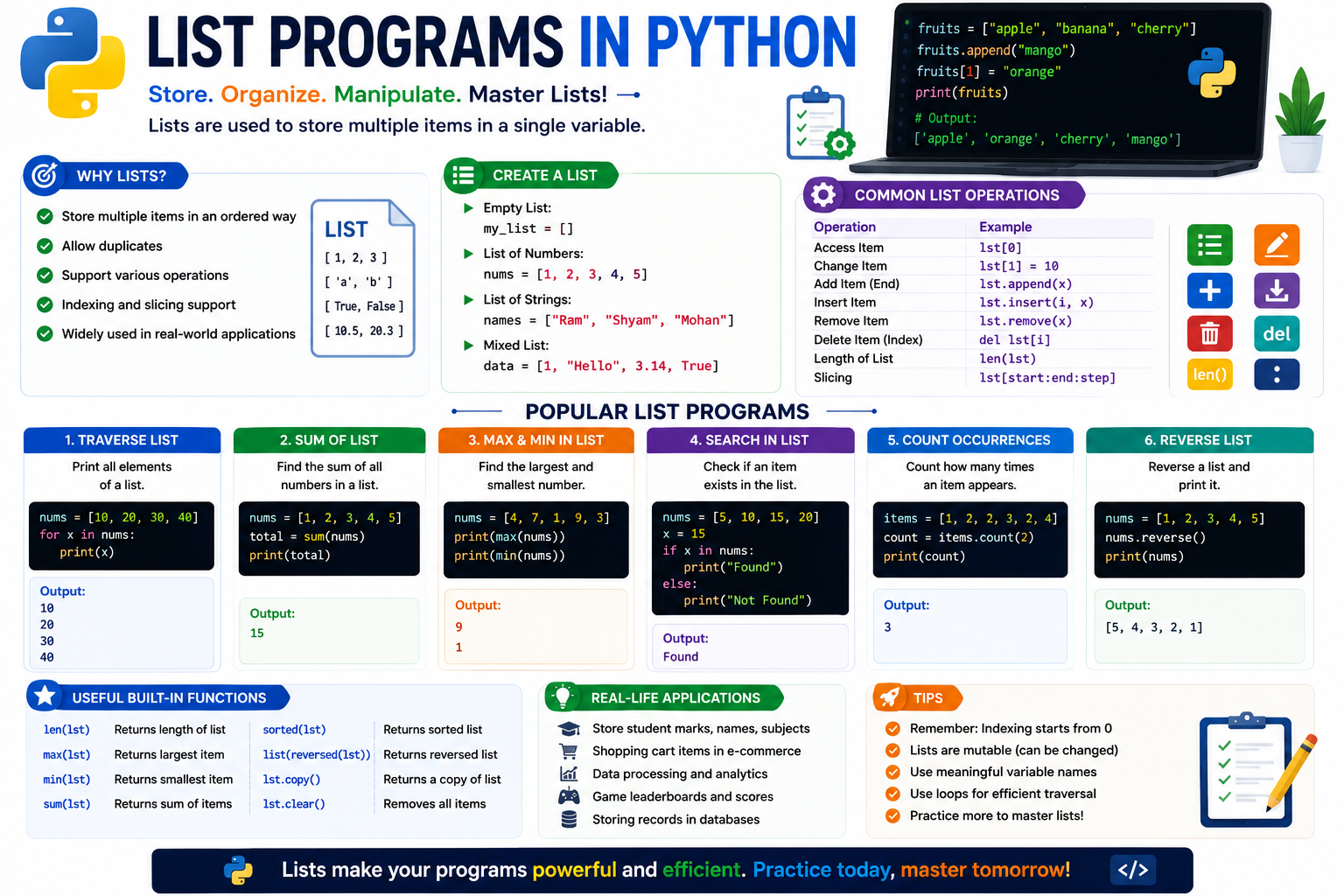
A List is one of the most useful data structures in Python. Lists can store multiple values of different data types and are mutable, which means their elements can be modified after creation. The following programs cover the most frequently asked List programs in AKTU practical examinations and placement interviews.
Program 81 : Create and Display a List
numbers = [10,20,30,40,50]

print(numbers)
Output
[10, 20, 30, 40, 50]
Program 82 : Traverse a List
numbers=[10,20,30,40,50]

for i in numbers:

    print(i)
Output
10
20
30
40
50
Program 83 : Sum of List Elements
numbers=[10,20,30,40,50]

print("Sum =",sum(numbers))
Output
Sum = 150
Program 84 : Find Largest Element
numbers=[15,90,25,40,60]

print("Largest =",max(numbers))
Output
Largest = 90
Program 85 : Find Smallest Element
numbers=[15,90,25,40,60]

print("Smallest =",min(numbers))
Output
Smallest = 15
Program 86 : Find Second Largest Element
numbers=[15,90,25,40,60]

numbers.sort()

print("Second Largest =",numbers[-2])
Output
Second Largest = 60
Program 87 : Search an Element
numbers=[10,20,30,40,50]

item=int(input("Enter Element : "))

if item in numbers:

    print("Element Found")

else:

    print("Element Not Found")
Output
Enter Element : 30

Element Found
Program 88 : Sort a List
numbers=[50,10,70,25,40]

numbers.sort()

print(numbers)
Output
[10,25,40,50,70]
Program 89 : Reverse a List
numbers=[10,20,30,40,50]

numbers.reverse()

print(numbers)
Output
[50,40,30,20,10]
Program 90 : Remove Duplicate Elements
numbers=[10,20,30,20,40,10,50]

numbers=list(set(numbers))

print(numbers)
Output
[40,10,50,20,30]
Note: Since set is unordered, the element order may change.
Program 91 : Merge Two Lists
list1=[10,20,30]

list2=[40,50,60]

list3=list1+list2

print(list3)
Output
[10,20,30,40,50,60]
Program 92 : Count Occurrences in a List
numbers=[10,20,30,20,40,20]

print(numbers.count(20))
Output
3
Program 93 : Insert an Element
numbers=[10,20,40,50]

numbers.insert(2,30)

print(numbers)
Output
[10,20,30,40,50]
Program 94 : Delete an Element
numbers=[10,20,30,40,50]

numbers.remove(30)

print(numbers)
Output
[10,20,40,50]
Program 95 : List Comprehension
Write a Python program using list comprehension to generate the squares of numbers from 1 to 10.
squares=[x*x for x in range(1,11)]

print(squares)
Output
[1,4,9,16,25,36,49,64,81,100]
Tuple, Dictionary and Set Programs
Python provides powerful built-in collection data types such as Tuple, Dictionary and Set. These data structures help programmers store and manipulate multiple values efficiently. The following programs cover the most important practical questions asked in AKTU examinations.
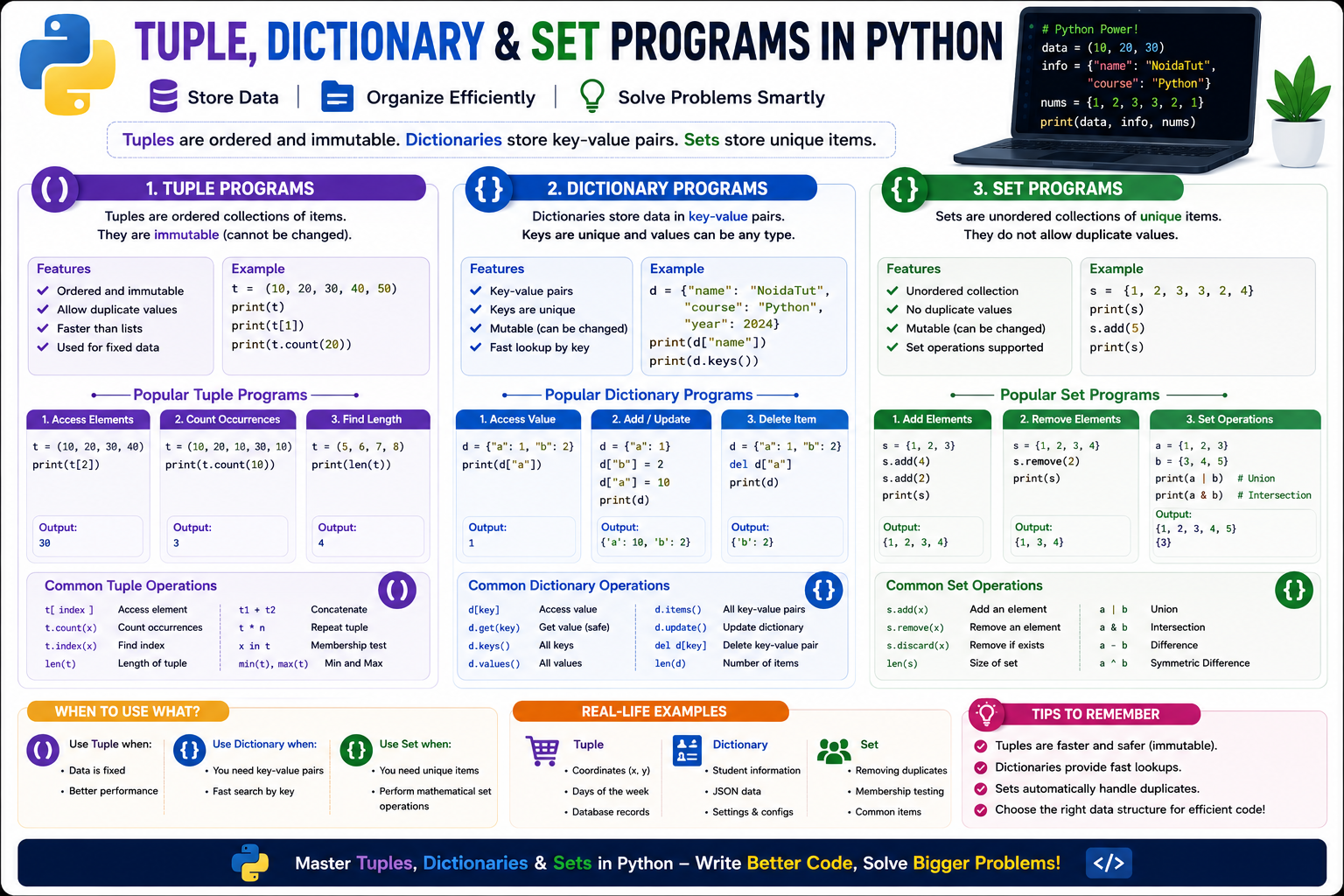
Tuple Programs
Program 96 : Create and Display a Tuple
numbers = (10,20,30,40,50)

print(numbers)
Output
(10, 20, 30, 40, 50)
Program 97 : Find Length of a Tuple
numbers=(10,20,30,40,50)

print("Length =",len(numbers))
Output
Length = 5
Program 98 : Find Maximum and Minimum Element
numbers=(15,40,10,90,55)

print("Maximum =",max(numbers))

print("Minimum =",min(numbers))
Output
Maximum = 90

Minimum = 10
Program 99 : Count Occurrence in Tuple
numbers=(10,20,30,20,40,20)

print(numbers.count(20))
Output
3
Program 100 : Search an Element in Tuple
numbers=(10,20,30,40,50)

item=int(input("Enter Number : "))

if item in numbers:

    print("Found")

else:

    print("Not Found")
Output
Enter Number : 30

Found
Dictionary Programs
Program 101 : Create a Dictionary
student={

"Name":"Rahul",

"Age":20,

"Branch":"CSE"

}

print(student)
Output
{'Name':'Rahul','Age':20,'Branch':'CSE'}
Program 102 : Access Dictionary Values
student={

"Name":"Rahul",

"Age":20

}

print(student["Name"])

print(student["Age"])
Output
Rahul

20
Program 103 : Add a New Key
student={

"Name":"Rahul"

}

student["City"]="Noida"

print(student)
Output
{'Name':'Rahul','City':'Noida'}
Program 104 : Update Dictionary Value
student={

"Age":20

}

student["Age"]=21

print(student)
Output
{'Age':21}
Program 105 : Delete a Dictionary Item
student={

"Name":"Rahul",

"Age":20

}

del student["Age"]

print(student)
Output
{'Name':'Rahul'}
Program 106 : Display Dictionary Keys
student={

"Name":"Rahul",

"Age":20,

"City":"Delhi"

}

print(student.keys())
Output
dict_keys(['Name','Age','City'])
Program 107 : Display Dictionary Values
student={

"Name":"Rahul",

"Age":20,

"City":"Delhi"

}

print(student.values())
Output
dict_values(['Rahul',20,'Delhi'])
Program 108 : Traverse Dictionary
student={

"Name":"Rahul",

"Age":20,

"City":"Delhi"

}

for key,value in student.items():

    print(key,":",value)
Output
Name : Rahul

Age : 20

City : Delhi
Set Programs
Program 109 : Create a Set
numbers={10,20,30,40,50}

print(numbers)
Output
{10,20,30,40,50}
Program 110 : Add an Element into Set
numbers={10,20,30}

numbers.add(40)

print(numbers)
Output
{10,20,30,40}
Program 111 : Remove an Element from Set
numbers={10,20,30,40}

numbers.remove(20)

print(numbers)
Output
{10,30,40}
Program 112 : Union and Intersection of Sets
set1={10,20,30}

set2={20,30,40}

print("Union =",set1|set2)

print("Intersection =",set1&set2)
Output
Union = {10,20,30,40}

Intersection = {20,30}
Function Programs
A function is a reusable block of code that performs a specific task. Instead of writing the same code multiple times, we can define a function once and call it whenever required. Python supports built-in functions as well as user-defined functions.
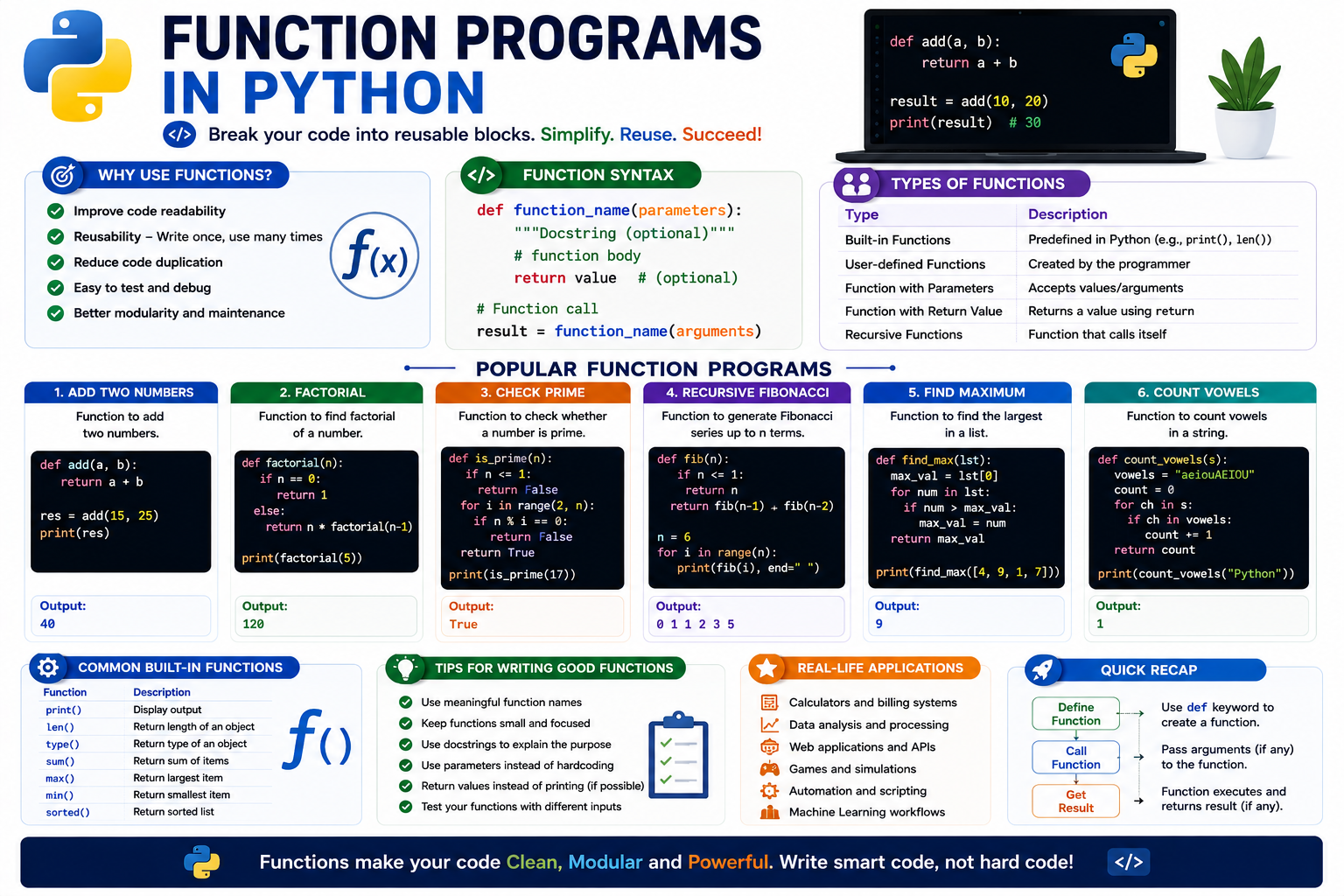
Program 113 : User Defined Function
def welcome():

    print("Welcome to NoidaTut")

welcome()
Output
Welcome to NoidaTut
Program 114 : Function with Arguments
def add(a,b):

    print("Sum =",a+b)

add(10,20)
Output
Sum = 30
Program 115 : Function Returning Value
def square(num):

    return num*num

result = square(8)

print(result)
Output
64
Program 116 : Default Arguments
def student(name,city="Noida"):

    print(name,city)

student("Rahul")

student("Amit","Delhi")
Output
Rahul Noida

Amit Delhi
Program 117 : Keyword Arguments
def employee(name,age):

    print(name,age)

employee(age=25,name="Rohan")
Output
Rohan 25
Program 118 : Variable Length Arguments
def total(*numbers):

    print(sum(numbers))

total(10,20)

total(10,20,30,40)
Output
30

100
Program 119 : Lambda Function
square = lambda x : x*x print(square(9))
Output
81
Program 120 : Recursive Factorial
def factorial(n):
if n==1:
return 1
return n*factorial(n-1)
print(factorial(5))
Output
120
Program 121 : Recursive Fibonacci Series
def fibonacci(n):
if n<=1:
return n
return fibonacci(n-1)+fibonacci(n-2)
for i in range(8):
print(fibonacci(i))
Output
0 1 1 2 3 5 8 13
Program 122 : Function to Check Prime Number
def prime(num):
count=0
for i in range(1,num+1):
if num%i==0:
count+=1
if count==2:
print("Prime")
else:
print("Not Prime")
prime(17)
Output
Prime
Program 123 : Function to Find Maximum Number
def maximum(a,b,c):
print(max(a,b,c))
maximum(25,80,60)
Output
80
Program 124 : Function to Calculate Area of Circle
def area(radius):
return 3.14159*radius*radius
print(area(7))
Output
153.93791
Program 125 : Function to Check Even or Odd
def evenOdd(num):
if num%2==0:
print("Even Number")
else:
print("Odd Number")
evenOdd(25)
Output
Odd Number
File Handling Programs
Python provides powerful file handling functions that allow programmers to create, read, write, update and delete files. File handling is one of the most important practical topics in the AKTU syllabus. The following programs cover the most frequently asked file handling questions in practical examinations.
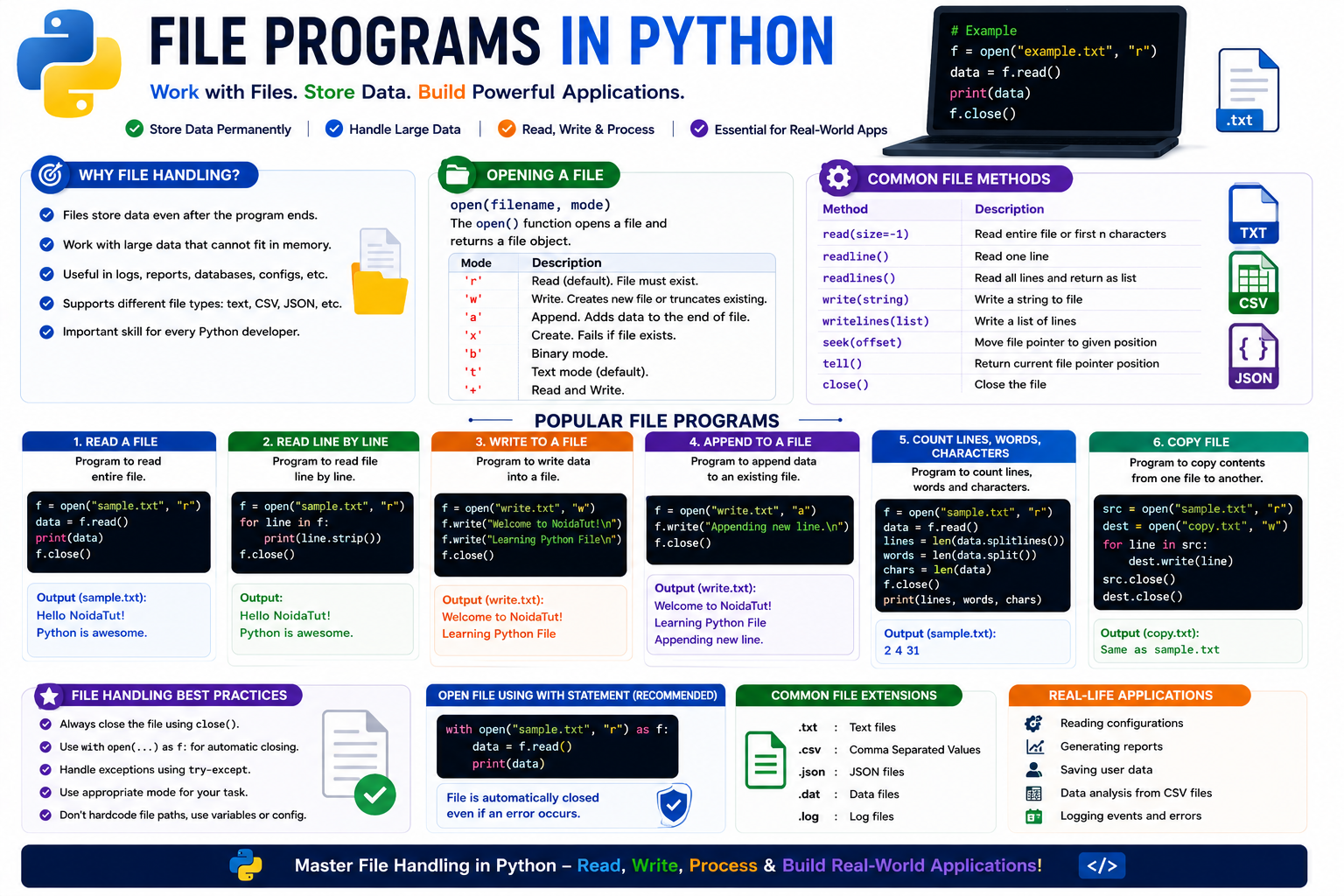
Program 126 : Create and Write into a File
file = open("student.txt","w")
file.write("Welcome to NoidaTut")
file.close()
print("File Created Successfully")
Output
File Created Successfully
Program 127 : Read Complete File
file = open("student.txt","r")
print(file.read())
file.close()
Output
Welcome to NoidaTut
Program 128 : Read File Line by Line
file = open("student.txt","r")
for line in file:
print(line)
file.close()
Output
Welcome to NoidaTut
Program 129 : Append Data into File
file = open("student.txt","a")
file.write("\nPython Programming")
file.close()
print("Data Appended")
Output
Data Appended
Program 130 : Count Number of Lines
file = open("student.txt","r")
count = len(file.readlines())
print("Total Lines =",count)
file.close()
Output
Total Lines = 2
Program 131 : Count Number of Words
file = open("student.txt","r")
text = file.read()
words = text.split()
print("Total Words =",len(words))
file.close()
Output
Total Words = 4
Program 132 : Count Characters in File
file = open("student.txt","r")
text = file.read()
print("Characters =",len(text))
file.close()
Output
Characters = 37
Program 133 : Search a Word in File
file = open("student.txt","r")
text = file.read()
if "Python" in text:
print("Word Found")
else:
print("Word Not Found")
file.close()
Output
Word Found
Program 134 : Copy One File into Another
source = open("student.txt","r")
destination = open("copy.txt","w")
destination.write(source.read())
source.close()
destination.close()
print("File Copied Successfully")
Output
File Copied Successfully
Program 135 : Check Whether File Exists
import os
if os.path.exists("student.txt"):
print("File Exists")
else:
print("File Not Found")
Output
File Exists
Program 136 : Read CSV File
import csv
file = open("student.csv")
reader = csv.reader(file)
for row in reader:
print(row)
file.close()
Sample Output
['Name','Age'] ['Rahul','20'] ['Amit','21']
Program 137 : Write CSV File
import csv
file = open("student.csv","w",newline="")
writer = csv.writer(file)
writer.writerow(["Name","Age"])
writer.writerow(["Rahul",20])
file.close()
print("CSV File Created")
Output
CSV File Created
Program 138 : Binary File Example
file = open("data.bin","wb")
file.write(b"NoidaTut")
file.close()
print("Binary File Created")
Output
Binary File Created
Program 139 : Exception Handling with File
try:
file = open("student.txt","r")
print(file.read())
file.close()
except FileNotFoundError:
print("File Not Found")
Output
Welcome to NoidaTut Python Programming
Program 140 : Mini File Management Program
choice = input("1.Write 2.Read : ")
if choice=="1":
text = input("Enter Text : ")
file = open("notes.txt","w")
file.write(text)
file.close()
print("Saved Successfully")
elif choice=="2":
file = open("notes.txt","r")
print(file.read())
file.close()
else:
print("Invalid Choice")
Sample Output
1.Write 2.Read : 1 Enter Text : Welcome to Python Saved Successfully
NumPy, Pandas, Matplotlib and Tkinter Programs
Python provides several powerful libraries for scientific computing, data analysis, visualization and graphical user interface (GUI) development. The following practical programs introduce the most important Python libraries included in the AKTU syllabus.
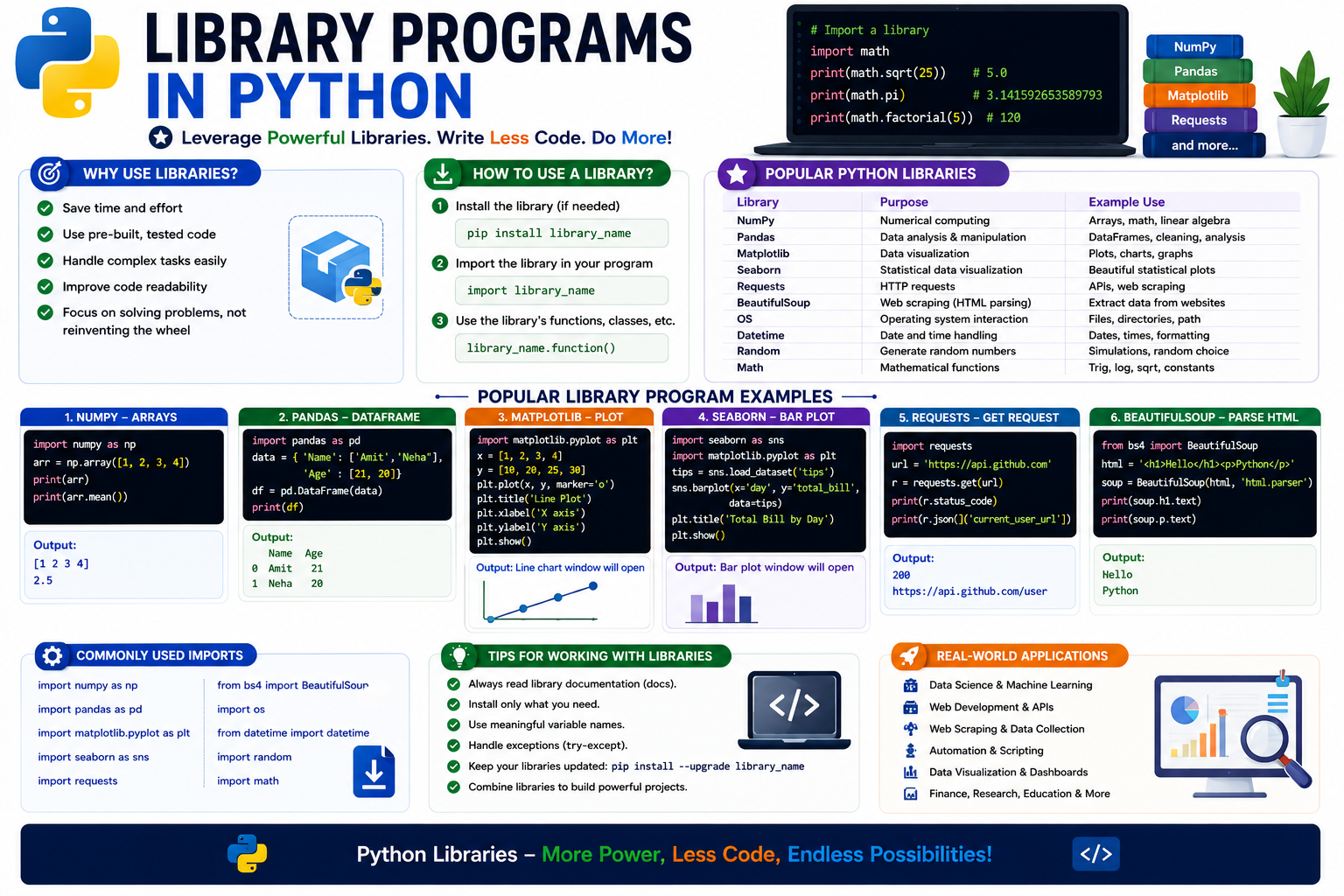
Program 141 : Create NumPy Array
Write a Python program to create a NumPy array.
import numpy as np arr = np.array([10,20,30,40,50]) print(arr)
Output
[10 20 30 40 50]
Program 142 : Addition of Two NumPy Arrays
import numpy as np a = np.array([10,20,30]) b = np.array([5,10,15]) print(a+b)
Output
[15 30 45]
Program 143 : Create a Pandas DataFrame
import pandas as pd
data = {
"Name":["Rahul","Amit"],
"Age":[20,21]
}
df = pd.DataFrame(data)
print(df)
Output
Name Age
0 Rahul 20
1 Amit 21
Program 144 : Display First Five Records
import pandas as pd
df = pd.read_csv("student.csv")
print(df.head())
Output
Displays first five records of the CSV file.
Program 145 : Plot a Line Graph using Matplotlib
import matplotlib.pyplot as plt x=[1,2,3,4,5] y=[10,20,30,40,50] plt.plot(x,y) plt.show()
Output
A Line Graph Window Appears
Program 146 : Plot a Bar Chart
import matplotlib.pyplot as plt subjects=["Python","Java","C"] marks=[90,75,80] plt.bar(subjects,marks) plt.show()
Output
Bar Chart Displayed
Program 147 : Tkinter Hello World
from tkinter import *
root=Tk()
root.title("NoidaTut")
Label(root,text="Hello World").pack()
root.mainloop()
Output
A GUI Window displaying Hello World appears.
Program 148 : Tkinter Button Example
from tkinter import * root=Tk() Button(root,text="Click Here").pack() root.mainloop()
Output
GUI Window with Button
Program 149 : Student Record Mini Project
Develop a simple student record system using Python.
students=[]
name=input("Enter Student Name : ")
students.append(name)
print(students)
Sample Output
Enter Student Name : Rahul ['Rahul']
Program 150 : Employee Salary Calculator
Write a Python program to calculate employee salary.
basic=float(input("Basic Salary : "))
hra=basic*0.20
da=basic*0.10
gross=basic+hra+da
print("Gross Salary =",gross)
Output
Basic Salary : 50000 Gross Salary = 65000.0
Python Programming Viva Questions
The following viva questions are frequently asked during AKTU Practical Examinations.
- What is Python?
- Who developed Python?
- Why is Python called a high-level language?
- What are the features of Python?
- What is a variable?
- What is dynamic typing?
- Difference between List and Tuple?
- Difference between List and Dictionary?
- What is a function?
- What is recursion?
- What is lambda function?
- Difference between break and continue?
- What is file handling?
- What is NumPy?
- What is Pandas?
- What is Matplotlib?
- What is Tkinter?
- Difference between Python 2 and Python 3?
- What is PEP 8?
- What is indentation in Python?
Python Interview Questions
- Why should we use Python?
- What are Python's advantages over C and Java?
- What are mutable and immutable objects?
- Explain shallow copy and deep copy.
- What are decorators?
- What are generators?
- What are iterators?
- Explain exception handling.
- What is __name__ == "__main__"?
- Explain modules and packages.
Practice Programming Questions
Try solving the following programs yourself without looking at the solutions.
- Print Prime Numbers between 1 and 100.
- Find the Greatest Common Divisor (GCD).
- Print Pascal's Triangle.
- Generate Fibonacci Series.
- Check Perfect Number.
- Check Strong Number.
- Check Neon Number.
- Check Automorphic Number.
- Sort a List without using sort().
- Create a Student Record Management System.
- Create a Library Management Program.
- Create a Bank Account Program.
- Create a Simple Calculator using Tkinter.
- Read a CSV file and display its contents.
- Plot marks of students using Matplotlib.