Python Interview Questions for Freshers
Python Interview Questions for Freshers ( Download in PDF with answers - at the end of answer set )
Python is one of the most widely used programming languages in software development, data science, artificial intelligence, automation and web development. For freshers, a good understanding of Python fundamentals is important for technical interviews and placement examinations.
This page contains a carefully selected set of Python interview and placement questions for freshers. The questions cover important Python concepts such as data types, dynamic typing, interpretation, PEP 8, scope, lists, tuples, modules, packages, object-oriented programming, loops, testing, docstrings, slicing and Python arrays.
Students are advised to first read all the questions given below. Detailed answers, explanations, examples and Python programs are provided immediately after the question list.
Python Freshers Questions – Quick View
The following table contains the complete set of questions covered in this fresher-level Python interview tutorial. Students can first review the questions and then study the detailed answers given below.
| No. | Python Interview Question |
|---|---|
| 1 | What is Python? What are the benefits of using Python? |
| 2 | What is a dynamically typed language? |
| 3 | What is an interpreted language? |
| 4 | What is PEP 8 and why is it important? |
| 5 | What is Scope in Python? |
| 6 | What are lists and tuples? What is the key difference between the two? |
| 7 | What are the common built-in data types in Python? |
| 8 | What is pass in Python? |
| 9 | What are modules and packages in Python? |
| 10 | What are global, protected and private attributes in Python? |
| 11 | What is the use of self in Python? |
| 12 | What is __init__? |
| 13 | What is break, continue and pass in Python? |
| 14 | What are unit tests in Python? |
| 15 | What is docstring in Python? |
| 16 | What is slicing in Python? |
| 17 | Explain how can you make a Python Script executable on Unix? |
| 18 | What is the difference between Python Arrays and lists? |
Question 1: What is Python? What are the Benefits of Using Python?
Answer: Python is a high-level, general-purpose programming language that is widely used for developing different types of software and applications. Python was designed with an emphasis on readability, simplicity and programmer productivity.
Python supports several programming approaches, including procedural programming, object-oriented programming and functional programming. Its simple and readable syntax makes it suitable for beginners, while its extensive ecosystem makes it useful for professional software development.
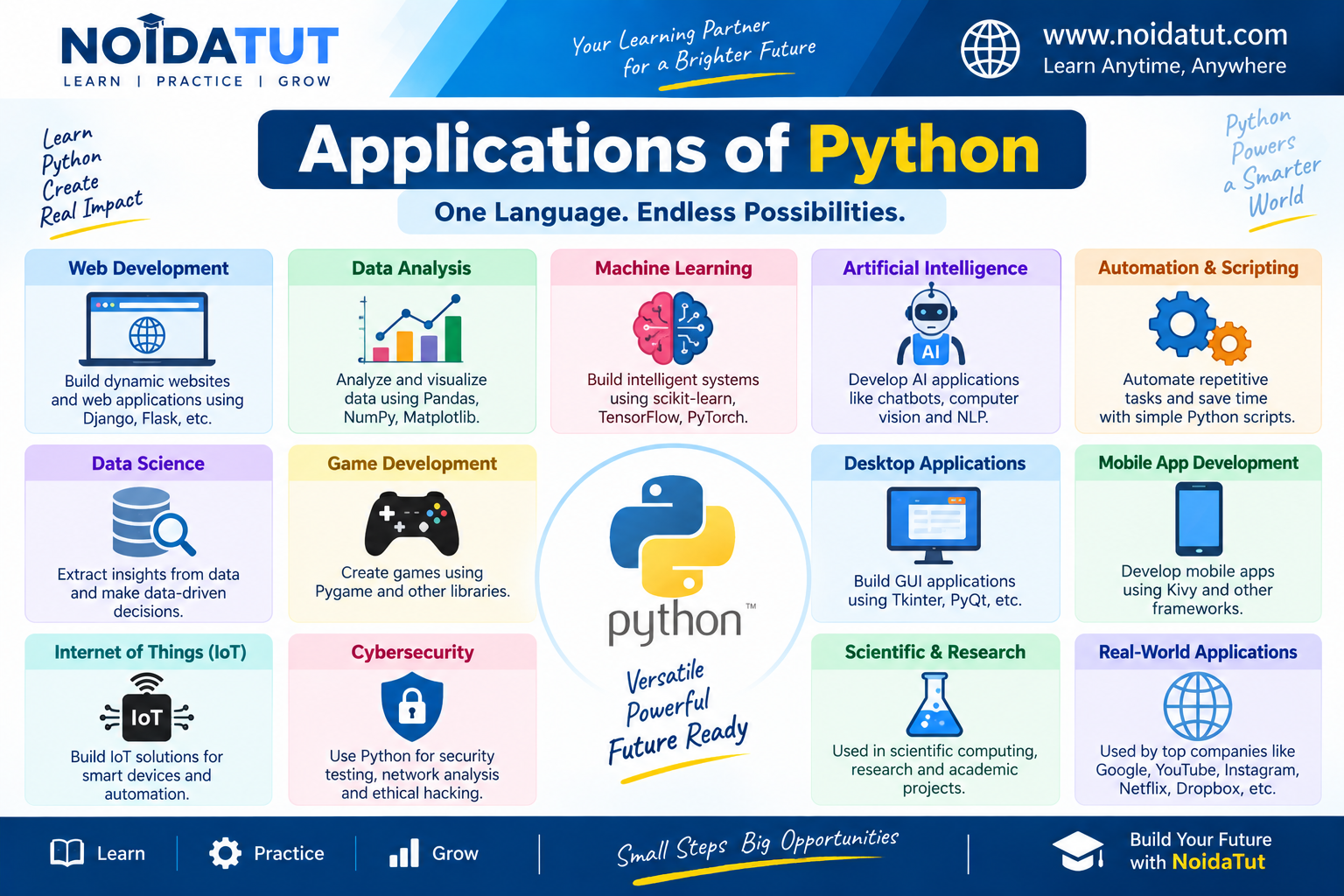
Python is used in many areas of computer science and information technology, including web development, data science, artificial intelligence, machine learning, automation, scientific computing, software testing and scripting.
Simple Python Example
The following is one of the simplest Python programs:
print("Hello, Python!")
Output
Hello, Python!
The print() function displays the specified message on the screen. This example demonstrates the simplicity of Python syntax. A useful program can be written using only a single statement.
Important Characteristics of Python
| Characteristic | Explanation |
|---|---|
| High-Level Language | Python provides abstractions that allow programmers to write programs without directly managing low-level machine instructions in ordinary Python programming. |
| Easy-to-Read Syntax | Python syntax is designed to be relatively clear and readable. |
| Dynamically Typed | Python determines object types during program execution rather than requiring traditional explicit type declarations for ordinary variable assignments. |
| Object-Oriented | Python supports classes, objects, inheritance, encapsulation and other object-oriented programming concepts. |
| Interpreted | Python is commonly classified as an interpreted language and is executed through a Python runtime. |
| Cross-Platform | Python implementations are available for operating systems such as Windows, Linux and macOS. |
| Extensible Ecosystem | Python has a large collection of standard-library and third-party modules and packages. |
Benefits of Using Python
1. Simple and Readable Syntax
One of the major benefits of Python is its relatively simple and readable syntax. Python programs can often express a task using fewer lines of code compared with some other programming languages.
2. Easy to Learn
Python is widely used for teaching programming because its syntax is relatively easy for beginners to understand. Students can focus on programming concepts without having to deal with excessive syntactic complexity.
3. Large Standard Library
Python provides a large standard library containing modules for working with files, dates, mathematics, operating-system services, text processing, networking and many other tasks.
4. Large Collection of Third-Party Libraries
Python has a large ecosystem of third-party packages. Libraries such as NumPy, Pandas, Matplotlib and many others provide functionality for specialized applications.
5. Cross-Platform Support
Python is available on several major operating systems. A Python program written using portable features can often be used on more than one operating system with little or no modification.
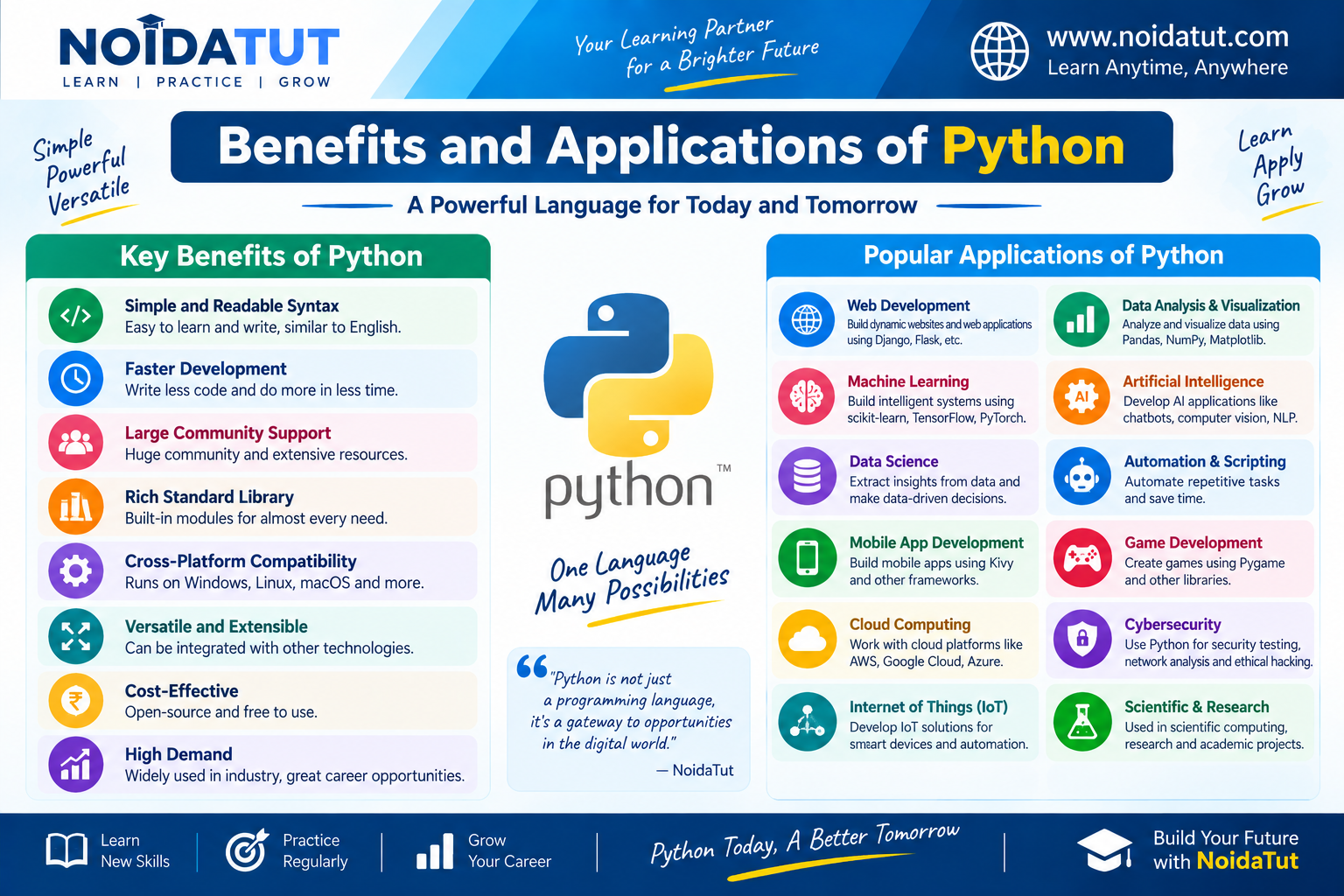
6. Wide Range of Applications
Python is used in many technical fields. Some important applications include:
- Web Development
- Data Science
- Artificial Intelligence
- Machine Learning
- Automation
- Scientific Computing
- Software Testing
- System Administration and Scripting
- Educational Applications
Example: Python for Automation
Python can be used to automate repetitive tasks. For example, a Python script can process files in a folder, rename files, generate reports or perform repetitive data-processing operations.
Example: Python for Data Processing
marks = [75, 82, 68, 91, 88]

total = sum(marks)

print("Total Marks:", total)
Output
Total Marks: 404
This simple example shows how Python can be used to perform calculations on a collection of values.
Example: Python for Decision Making
marks = 75

if marks >= 40:
    print("Pass")
else:
    print("Fail")
Output
Pass
Python provides control statements such as if and else for implementing decision-making logic.
Why is Python Popular Among Freshers?
Python is widely taught in academic courses and is used across several areas of the software industry. Its readable syntax allows students to concentrate on programming logic, while its extensive libraries provide opportunities to work on real-world applications.
For placement preparation, students should understand not only the definition of Python but also its characteristics, applications and basic programming syntax.
Short Interview Answer
Python is a high-level, general-purpose programming language known for its readable syntax and extensive ecosystem. It supports procedural, object-oriented and functional programming and is widely used in areas such as web development, automation, data science, artificial intelligence and machine learning.
Question 1 – Quick Revision
| Point | Answer |
|---|---|
| What is Python? | A high-level, general-purpose programming language. |
| Is Python easy to learn? | Its relatively simple and readable syntax makes it suitable for beginners. |
| Is Python dynamically typed? | Yes. Python determines object types during program execution. |
| Does Python support OOP? | Yes. Python supports object-oriented programming. |
| Where is Python used? | Web development, automation, data science, AI, machine learning, scientific computing and many other areas. |
Question 2: What is a Dynamically Typed Language?
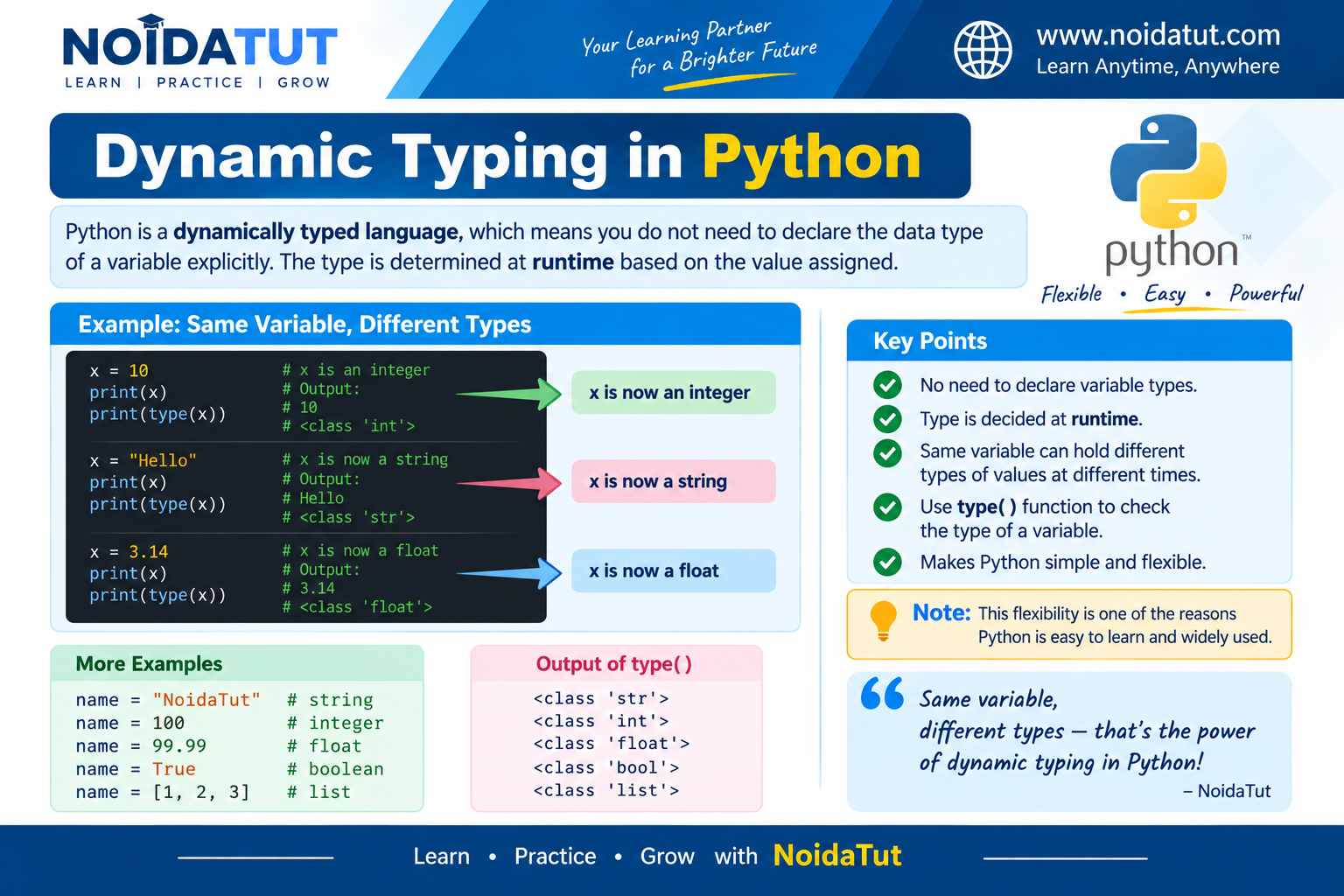
Answer: A dynamically typed language is a programming language in which the type associated with a variable or name is determined during program execution rather than being explicitly declared in the usual way before the program runs.
Python is a dynamically typed language. In Python, the programmer generally does not need to specify the data type of a variable while assigning a value to it. Python determines the type of the object at runtime.
Example of Dynamic Typing
x = 10

print(x)

x = "Python"

print(x)
Output
10
Python
In the above example, the name x first refers to an integer object containing the value 10. Later, the same name refers to a string object containing "Python".
The programmer does not have to write separate type declarations such as int x or string x for these assignments.
Checking the Type of a Value
Python provides the built-in type() function to determine the type of an object.
number = 100

print(type(number))

number = 25.5

print(type(number))

number = "Python"

print(type(number))
Output
<class 'int'>
<class 'float'>
<class 'str'>
The first value is an integer, the second value is a floating-point number and the third value is a string.
Dynamic Typing Does Not Mean No Data Types
An important point for an interview is that dynamic typing does not mean that Python has no data types. Python objects have types. The difference is that the programmer generally does not have to declare the type of a name before assigning an object to it.
For example:
value = 50

print(type(value))

value = "Hello"

print(type(value))
Output
<class 'int'>
<class 'str'>
The type of the object referred to by value changes because the name is assigned a different object.
Dynamic Typing vs Static Typing
| Dynamic Typing | Static Typing |
|---|---|
| Types are associated with objects and are handled during program execution. | Types are generally declared or determined before execution and are checked by the language tooling/compiler. |
| Explicit type declaration is generally not required for ordinary Python variable assignments. | Explicit type declarations are commonly used. |
| Python is dynamically typed. | Languages such as C and Java are commonly described as statically typed. |
Example from a Placement Interview
Question: Can the same Python variable contain an integer and then a string?
Answer: Yes. A Python name can be reassigned to an object of a different type.
data = 100

print(data)

data = "Python"

print(data)
Output
100
Python
Question 2 – Quick Revision
| Question | Short Answer |
|---|---|
| Is Python dynamically typed? | Yes. |
| When is the object type determined? | During program execution. |
| Is type declaration normally required? | No, not for ordinary variable assignments. |
| Does dynamic typing mean Python has no types? | No. Python objects have types. |
Question 3: What is an Interpreted Language?
Answer: An interpreted language is commonly described as a programming language whose code is executed through an interpreter or language runtime rather than requiring the programmer to first create a traditional native executable.
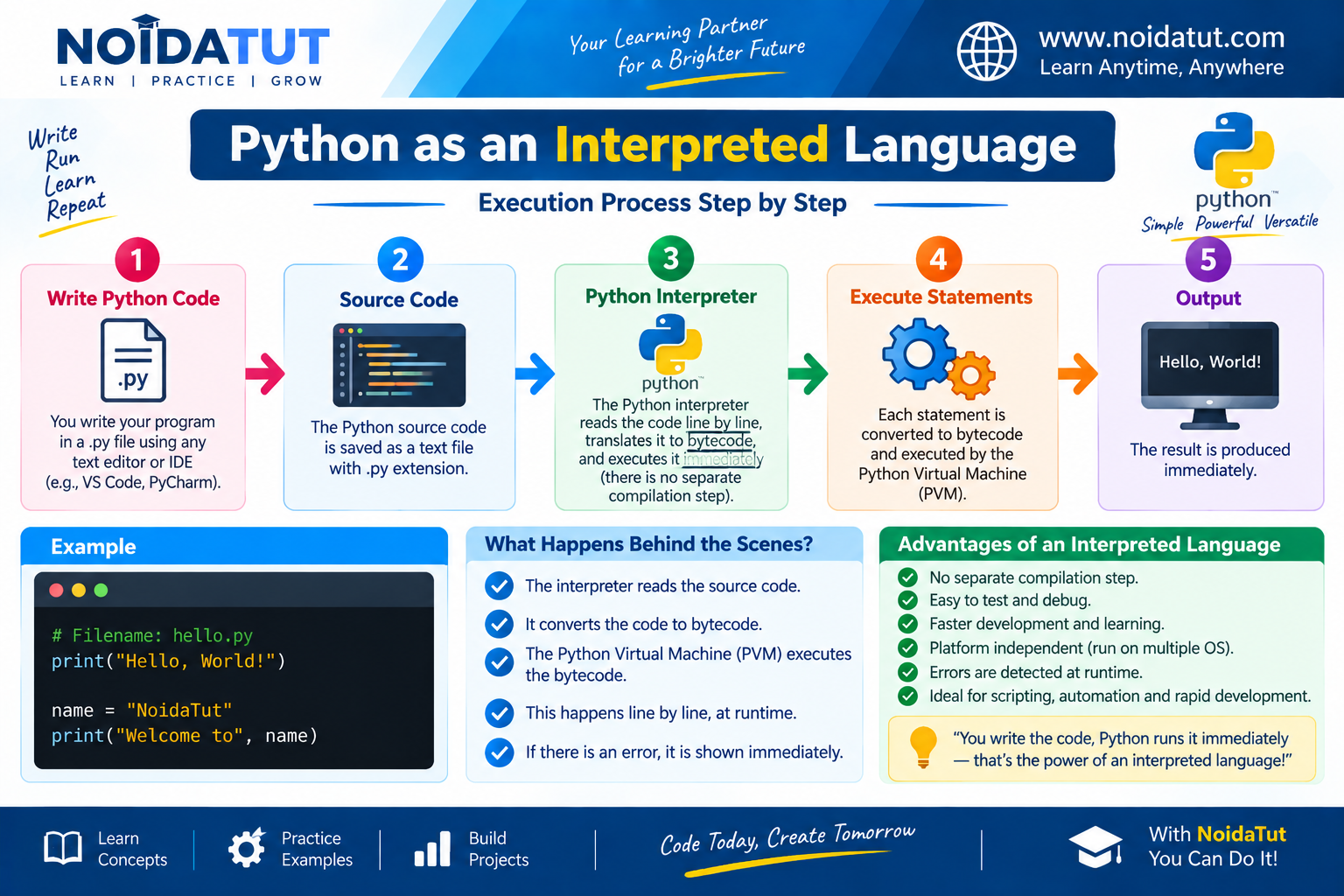
Python is commonly classified as an interpreted language. However, the actual implementation should be understood carefully. For example, in CPython, the commonly used implementation of Python, source code is processed and compiled into an intermediate representation called bytecode. The Python runtime then executes that bytecode.
Basic Python Execution Process
Python Source Code
        |
        v
Python Compiler
        |
        v
Bytecode
        |
        v
Python Virtual Machine
        |
        v
Program Output
Consider the following Python program:
print("Welcome to Python")
When the program is executed using CPython, the source code is processed by the Python runtime. Bytecode is generated and then executed by the Python Virtual Machine.
Why is Python Called an Interpreted Language?
- Python programs are executed through a Python runtime.
- The programmer normally does not manually create a native machine-code executable before running a Python script.
- In CPython, Python source code is compiled into bytecode.
- The Python Virtual Machine executes the generated bytecode.
Interpreted Language vs Traditionally Compiled Language
| Interpreted Approach | Traditional Compiled Approach |
|---|---|
| The program is executed through a language runtime or interpreter. | Source code is typically translated into native machine code before execution. |
| Python is commonly classified as interpreted. | C and C++ are commonly classified as compiled languages. |
| Execution normally requires an appropriate language runtime. | The generated native executable can generally run without the source language compiler. |
Does Python Execute Every Line Completely Independently?
A common beginner-level explanation says that Python executes source code "line by line." This is useful for introducing the concept, but it is not a complete description of CPython's execution process.
In CPython, the source program is compiled into bytecode, and the Python runtime executes that bytecode. Therefore, a more technically accurate interview answer is that Python is commonly called an interpreted language, while CPython uses a compilation-to-bytecode step followed by bytecode execution.
Question 3 – Quick Revision
| Point | Answer |
|---|---|
| Is Python commonly called interpreted? | Yes. |
| Does CPython generate bytecode? | Yes. |
| What executes the bytecode? | The Python runtime, including the Python Virtual Machine concept. |
| Is "Python executes source code line by line" a complete technical explanation? | No. It is a simplified beginner-level description. |
Question 4: What is PEP 8 and Why is it Important?
Answer: PEP stands for Python Enhancement Proposal. PEPs are documents that describe proposed changes, standards, conventions or technical information related to Python.
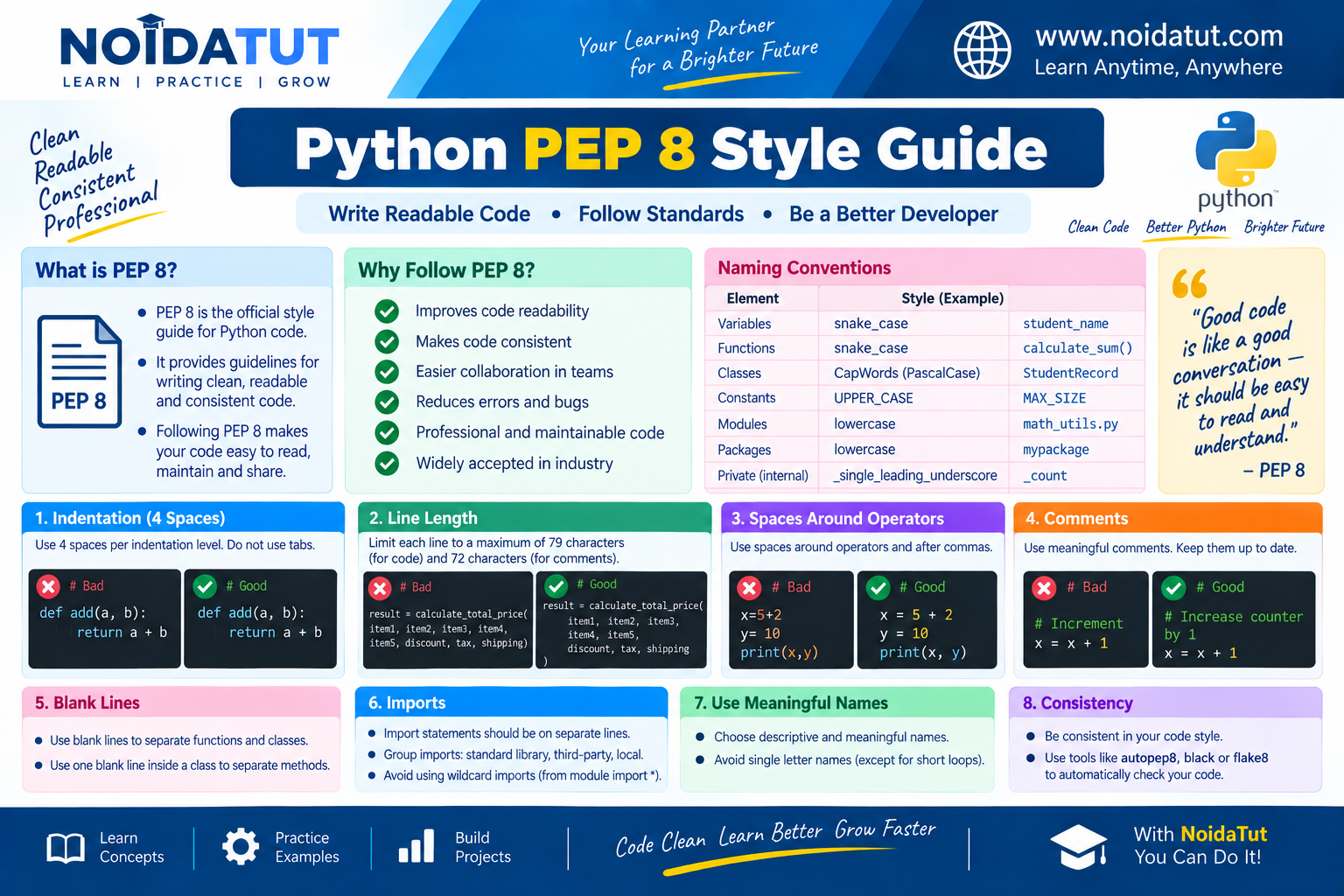
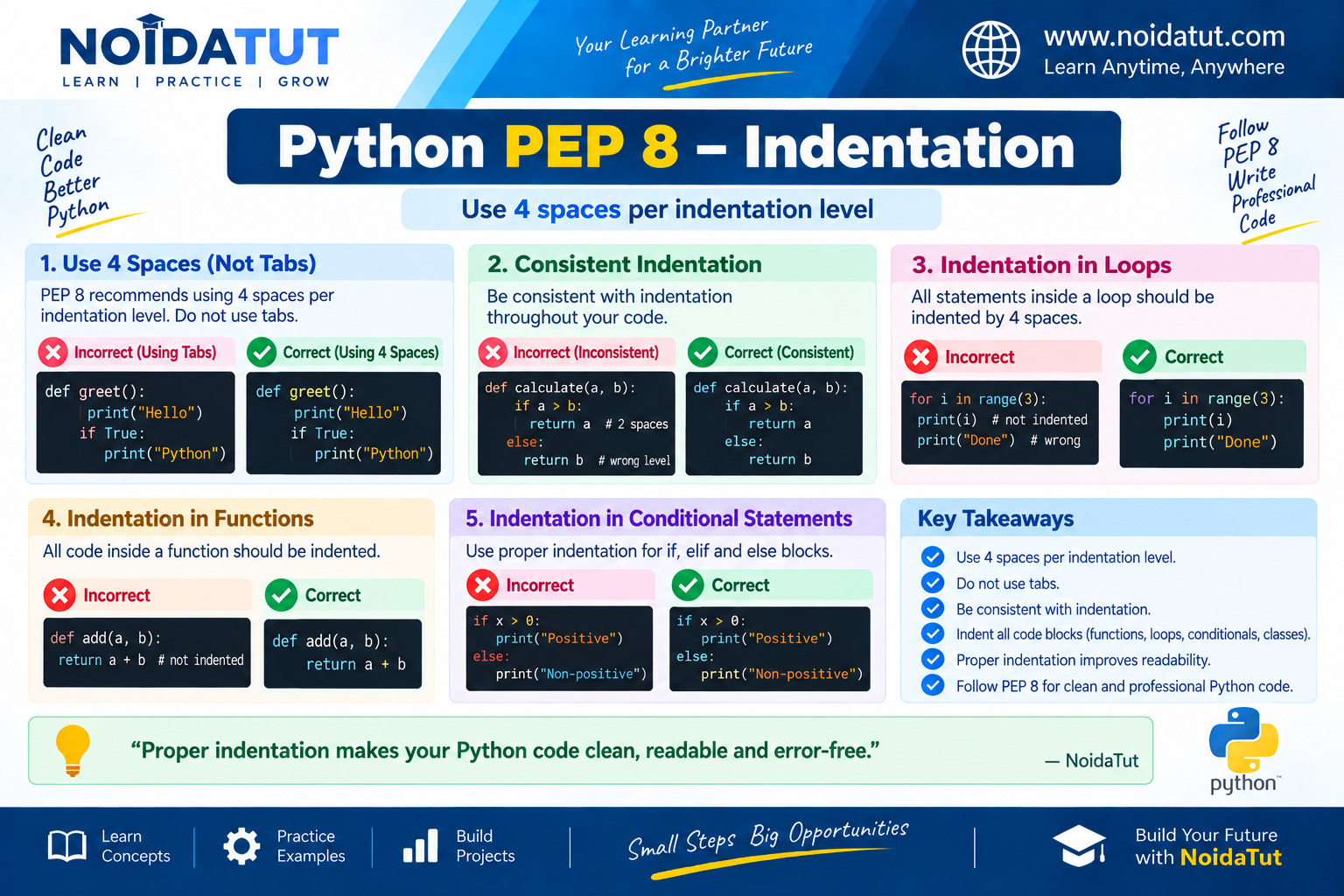
PEP 8 is the Python style guide. It provides recommendations for writing Python code in a consistent, readable and maintainable style.
Why is PEP 8 Important?
In real-world software development, Python programs are often written and maintained by multiple developers. If every developer follows a completely different coding style, the source code can become difficult to understand and maintain.
PEP 8 provides commonly accepted recommendations that help developers write Python code in a consistent and readable manner.
Important PEP 8 Recommendations
| Recommendation | Explanation |
|---|---|
| Indentation | Use consistent indentation. Four spaces are commonly recommended for each indentation level. |
| Meaningful Names | Use meaningful names for variables, functions, classes and other identifiers. |
| Blank Lines | Use blank lines to separate logical sections of a program. |
| Spacing | Use appropriate spaces around operators and after commas to improve readability. |
| Comments | Write useful comments where they help explain code. |
| Function Names | Use a consistent naming style for functions, commonly lowercase words separated by underscores. |
| Class Names | Class names commonly use CapWords naming style. |
Example of PEP 8 Style
student_name = "Rahul"
student_age = 20

print(student_name)
print(student_age)
The variable names student_name and student_age clearly communicate the purpose of the stored values.
Example of Less Readable Naming
x = "Rahul"
y = 20

print(x)
print(y)
The above program is valid Python code, but the names x and y do not clearly describe the information being stored. In a large program, meaningful names generally make the code easier to understand.
PEP 8 and Indentation
Indentation is particularly important in Python because indentation is used to define blocks of code.
age = 20

if age >= 18:
    print("Eligible")
The print() statement is indented because it belongs to the if block.
Example of Spacing Around Operators
PEP 8 recommends readable spacing around most binary operators.
total = marks1 + marks2
average = total / 2
The spaces around the operators make the expressions easier to read.
PEP 8 Does Not Change Python Syntax
PEP 8 is primarily a style guide. Following PEP 8 helps developers maintain readable and consistent code, but it does not turn valid Python syntax into invalid syntax simply because a style recommendation is not followed.
Question 4 – Quick Revision
| Question | Short Answer |
|---|---|
| What does PEP stand for? | Python Enhancement Proposal. |
| What is PEP 8? | The Python style guide. |
| Why is PEP 8 useful? | It promotes consistent, readable and maintainable code. |
| How many spaces are commonly recommended for one indentation level? | Four spaces. |
Question 5: What is Scope in Python?
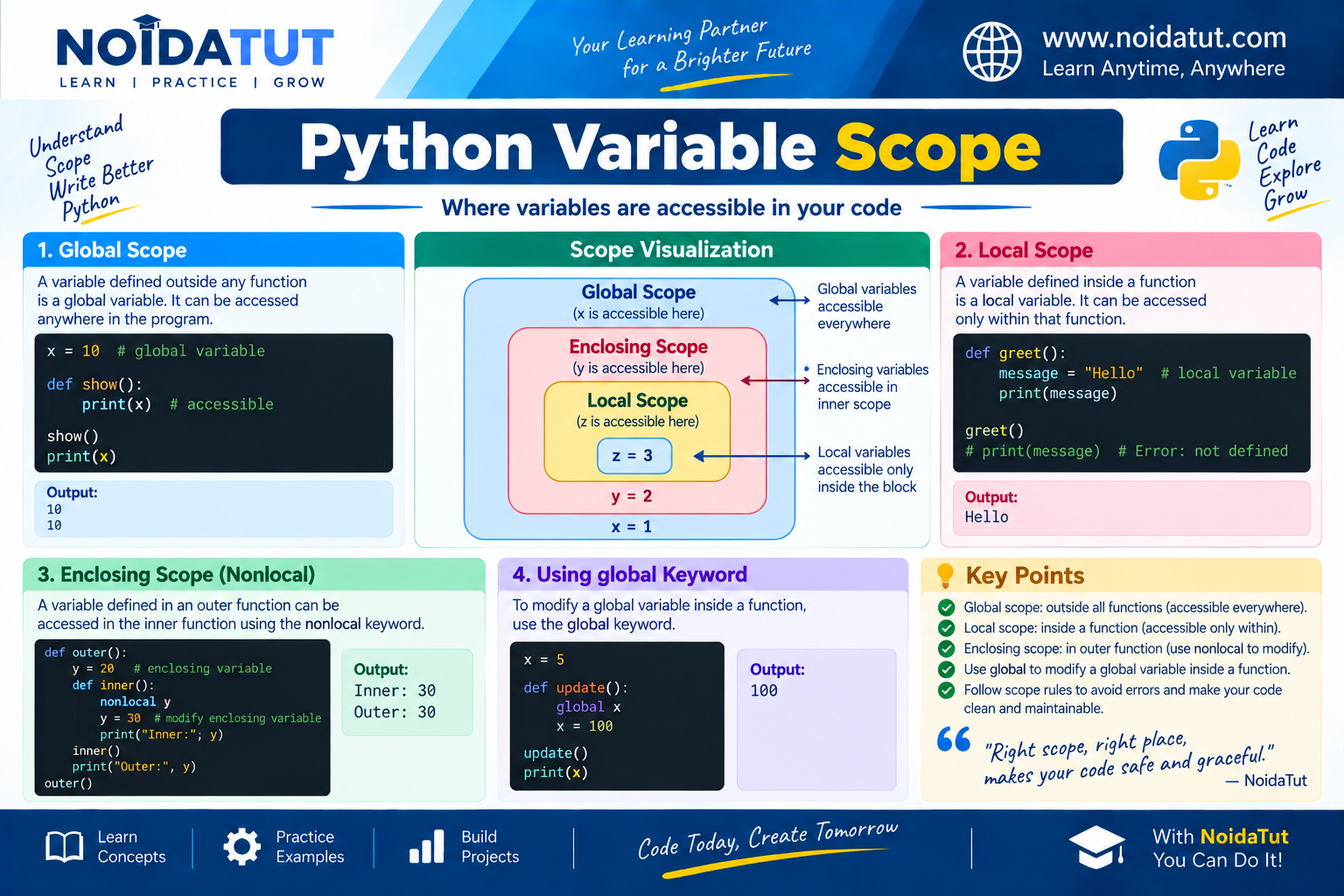
Answer: Scope refers to the region of a Python program in which a particular name can be accessed or referenced.
Python determines where a name can be found using a well-defined namespace and name-resolution mechanism. Understanding scope is important because the same variable name can exist in different parts of a program with different meanings.
Types of Scope in Python
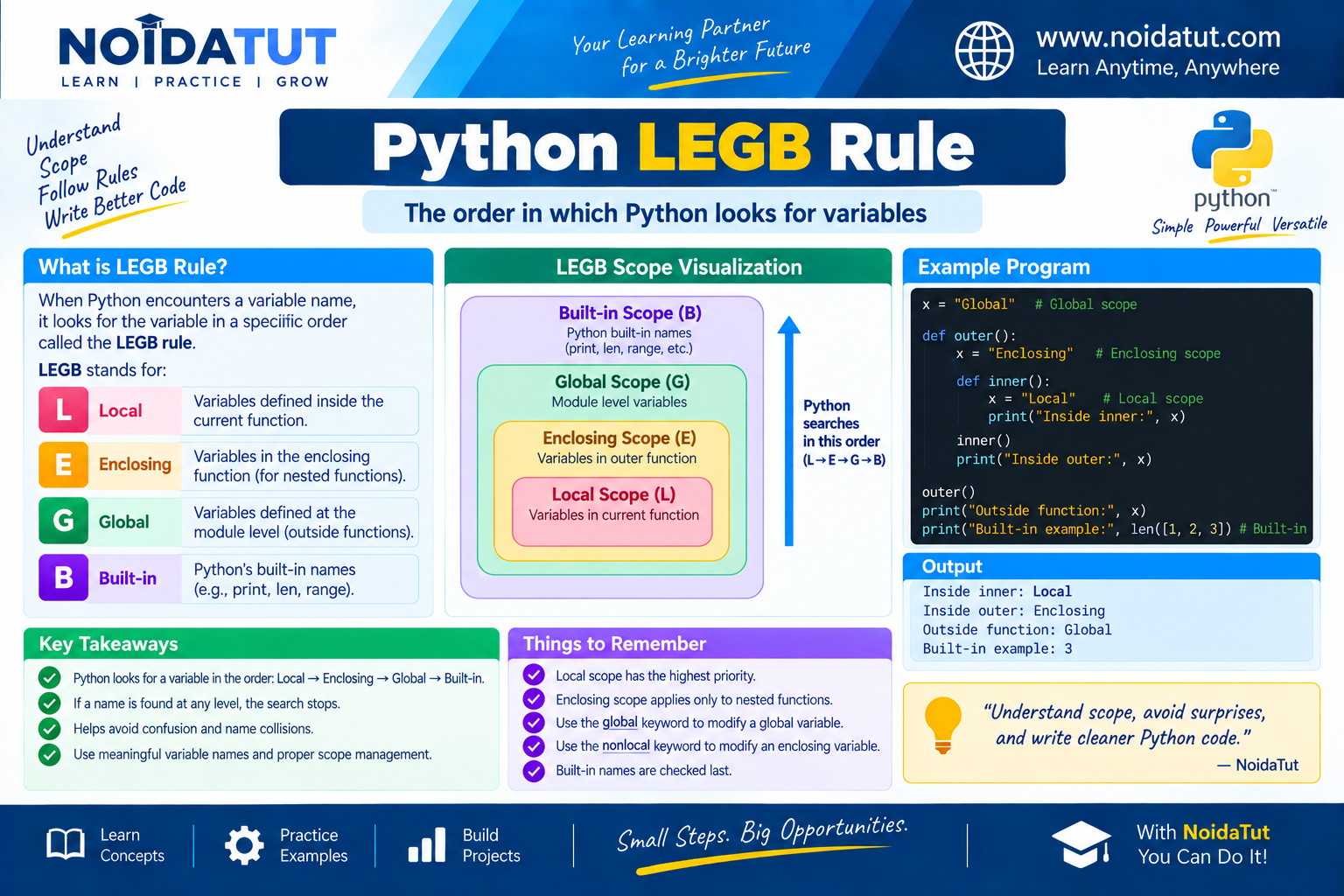
Python commonly explains name resolution using the LEGB rule. LEGB stands for:
- L – Local
- E – Enclosing
- G – Global
- B – Built-in
1. Local Scope
A name defined inside a function generally has local scope. It can normally be accessed only within that function.
Example
def display():
    message = "Hello Python"
    print(message)

display()
Output
Hello Python
Here, message is a local variable of the display() function.
2. Global Scope
A name defined at the top level of a module has global scope within that module.
Example
message = "Python"

def display():
    print(message)

display()
Output
Python
The variable message is defined outside the function, so the function can read it because it is available in the surrounding global scope.
3. Enclosing Scope
Enclosing scope occurs when one function is defined inside another function. The inner function can access names defined in the surrounding outer function.
Example
def outer():
    message = "Hello from outer function"

    def inner():
        print(message)

    inner()

outer()
Output
Hello from outer function
The variable message is not local to inner(), but it is available in the enclosing function outer().
4. Built-in Scope
The built-in scope contains names provided by Python itself. Examples include functions and objects such as print(), len(), type(), sum() and str.
Example
numbers = [10, 20, 30]

print(len(numbers))
Output
3
Here, len() is a built-in function provided by Python.
The LEGB Rule
When Python encounters a name, it searches for that name according to the LEGB rule:
- Local Scope
- Enclosing Scope
- Global Scope
- Built-in Scope
Python searches these scopes in this order to resolve a name.
Example of LEGB
x = "Global"

def outer():

    x = "Enclosing"

    def inner():

        x = "Local"

        print(x)

    inner()

outer()
Output
Local
The name x exists at multiple levels, but the local value is found first when the print(x) statement is executed inside inner().
Global Keyword
The global keyword can be used inside a function when a programmer needs to assign to a variable defined in the module's global scope.
Example
count = 10

def change_count():
    global count
    count = 20

change_count()

print(count)
Output
20
The global statement tells Python that assignments to count inside the function should refer to the module-level variable.
Nonlocal Keyword
The nonlocal keyword is used in a nested function when the programmer wants to assign to a variable in an enclosing function scope rather than create a new local variable.
Example
def outer():

    count = 10

    def inner():

        nonlocal count
        count = 20

    inner()

    print(count)

outer()
Output
20
The nonlocal keyword allows the nested function to modify the variable belonging to the enclosing function.
Local Scope vs Global Scope
| Local Scope | Global Scope |
|---|---|
| Usually created inside a function. | Defined at module level. |
| Normally accessible within the function where it is defined. | Can be accessed throughout the module, subject to normal name resolution. |
| Usually exists as long as the relevant function invocation requires it. | Generally exists for the lifetime of the module namespace. |
Question 5 – Quick Revision
| Scope | Meaning |
|---|---|
| Local | Name defined within the current function. |
| Enclosing | Name found in an enclosing function when functions are nested. |
| Global | Name defined at module level. |
| Built-in | Names supplied by Python itself. |
| LEGB | Local → Enclosing → Global → Built-in. |
Question 6: What are Lists and Tuples? What is the Key Difference Between the Two?
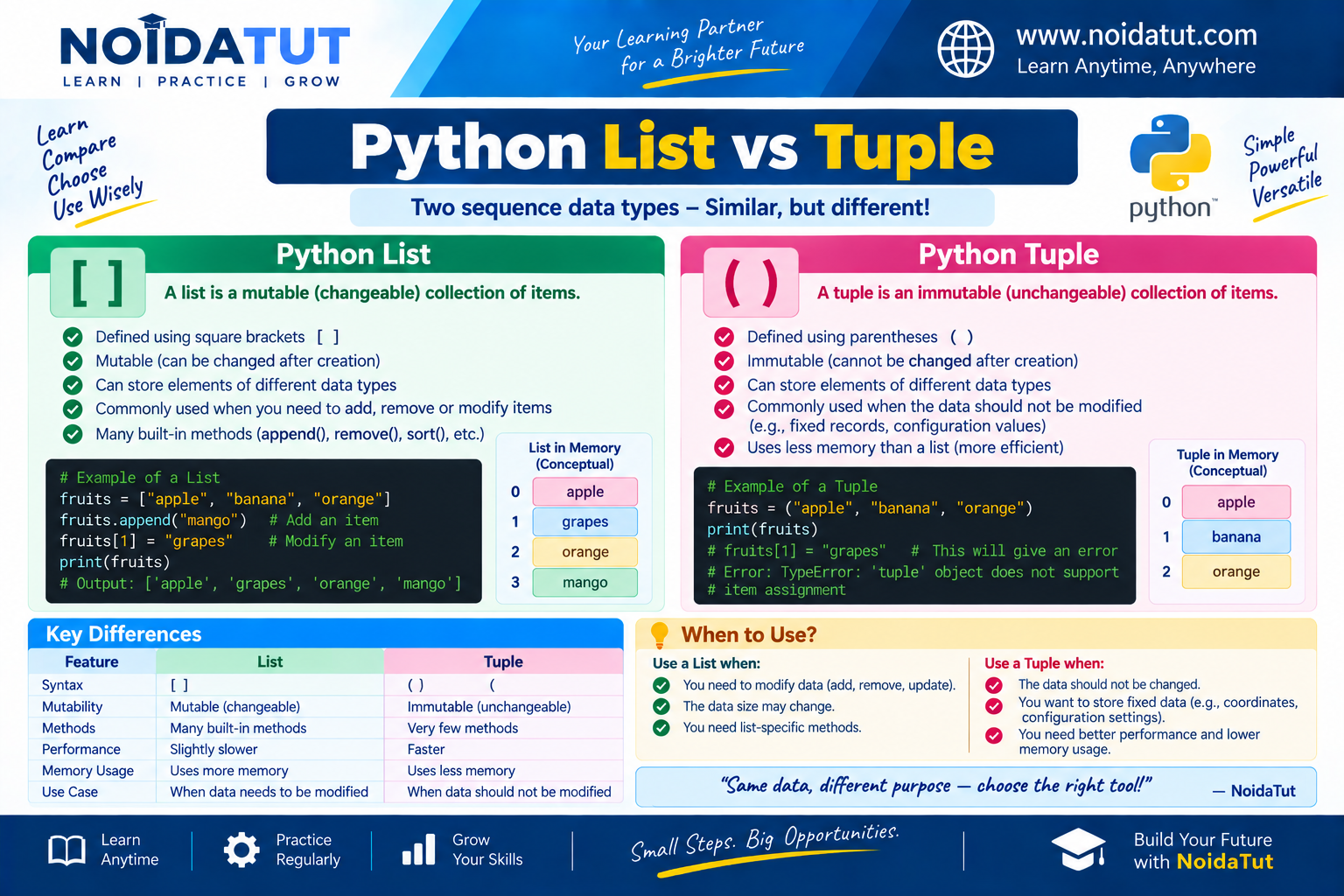
Answer: Both lists and tuples are built-in Python sequence data types used to store multiple values in a single object. They can contain multiple elements and support operations such as indexing, iteration and slicing.
The major difference between a list and a tuple is that a list is mutable, whereas a tuple is immutable.
What is a List?
A list is an ordered and mutable collection of objects. Lists are created using square brackets [ ].
Example
fruits = ["Apple", "Banana", "Mango"]

print(fruits)
Output
['Apple', 'Banana', 'Mango']
A list can contain values of different data types.
data = [10, 25.5, "Python", True]

print(data)
Output
[10, 25.5, 'Python', True]
List is Mutable
Mutable means that the contents of an object can be changed after the object has been created.
Example
fruits = ["Apple", "Banana", "Mango"]

fruits[1] = "Orange"

print(fruits)
Output
['Apple', 'Orange', 'Mango']
The second element of the list was changed from Banana to Orange. This demonstrates that lists are mutable.
What is a Tuple?
A tuple is an ordered and immutable collection of objects. Tuples are generally created using parentheses ( ).
Example
numbers = (10, 20, 30, 40)

print(numbers)
Output
(10, 20, 30, 40)
Like lists, tuples can contain elements of different data types.
data = (10, 25.5, "Python", True)

print(data)
Output
(10, 25.5, 'Python', True)
Tuple is Immutable
Immutable means that the elements of an object cannot be changed through normal item assignment after the object has been created.
Example
numbers = (10, 20, 30)

numbers[1] = 50
The above statement attempts to modify an element of a tuple and therefore results in a TypeError.
Typical Error
TypeError: 'tuple' object does not support item assignment
List vs Tuple
| Feature | List | Tuple |
|---|---|---|
| Syntax | Square brackets [ ] | Parentheses ( ) |
| Mutability | Mutable | Immutable |
| Modification | Elements can be modified | Elements cannot normally be modified |
| Methods | Provides several modification methods such as append(), extend() and remove() | Provides fewer methods because it is immutable |
| Use | Useful when collection contents need to change | Useful when an immutable sequence is appropriate |
Indexing in Lists and Tuples
Both lists and tuples support indexing. Python uses zero-based indexing, meaning that the first element has index 0.
List Example
fruits = ["Apple", "Banana", "Mango"]

print(fruits[0])
print(fruits[2])
Output
Apple
Mango
Tuple Example
numbers = (10, 20, 30)

print(numbers[0])
print(numbers[2])
Output
10
30
Slicing Lists and Tuples
Both lists and tuples support slicing.
Example
numbers = [10, 20, 30, 40, 50]

print(numbers[1:4])
Output
[20, 30, 40]
The expression numbers[1:4] selects elements beginning at index 1 and ending before index 4.
When Should We Use a List?
A list is appropriate when the collection needs to be modified during program execution.
Example
students = ["Amit", "Rahul", "Neha"]

students.append("Priya")

print(students)
Output
['Amit', 'Rahul', 'Neha', 'Priya']
When Should We Use a Tuple?
A tuple can be useful when a collection of values should remain unchanged after creation.
Example
coordinates = (28.6139, 77.2090)

print(coordinates)
Output
(28.6139, 77.209)
The tuple can represent a fixed collection of related values.
Question 6 – Quick Revision
| Point | List | Tuple |
|---|---|---|
| Mutable? | Yes | No |
| Common syntax | [ ] | ( ) |
| Supports indexing? | Yes | Yes |
| Supports slicing? | Yes | Yes |
Question 7: What are the Common Built-in Data Types in Python?
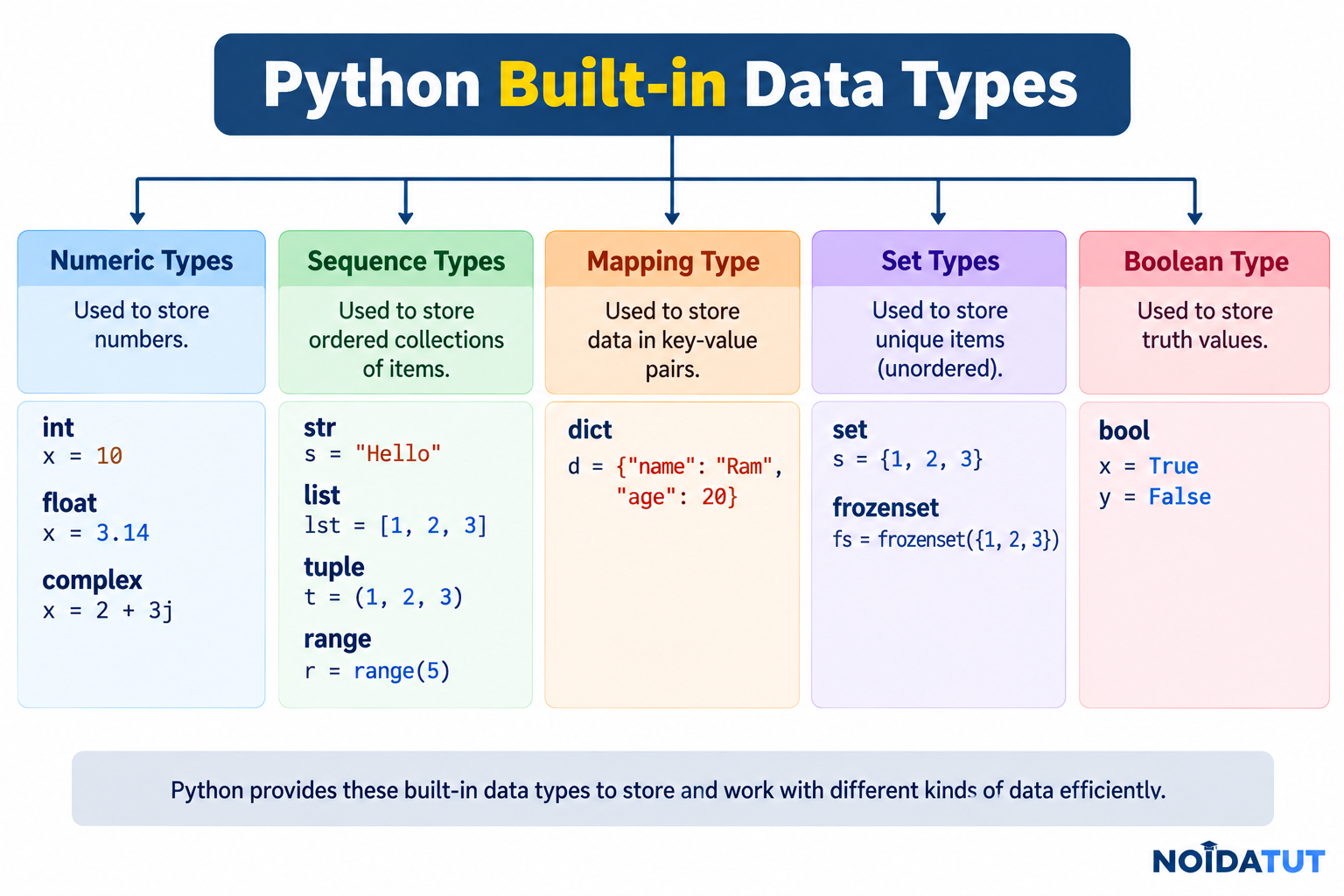
Answer: Python provides several built-in data types for representing different kinds of values. A data type determines the kind of value represented by an object and influences the operations that can be performed on it.
Some of the commonly used built-in Python data types are numeric types, Boolean, string, list, tuple, set, dictionary and NoneType.
Major Built-in Data Types
| Data Type | Example | Description |
|---|---|---|
| int | 100 | Represents integers. |
| float | 25.5 | Represents floating-point numbers. |
| complex | 3 + 4j | Represents complex numbers. |
| bool | True | Represents Boolean values. |
| str | "Python" | Represents text or a sequence of Unicode characters. |
| list | [10, 20, 30] | Ordered, mutable collection. |
| tuple | (10, 20, 30) | Ordered, immutable collection. |
| set | {10, 20, 30} | Unordered collection of distinct hashable objects. |
| dict | {"name": "Rahul"} | Collection of key-value pairs. |
| NoneType | None | Represents the absence of a value. |
1. Integer – int
The int data type represents integer values without a fractional part.
age = 20

print(age)
print(type(age))
Output
20
<class 'int'>
2. Floating-Point Number – float
The float data type represents numbers containing a fractional part.
price = 99.50

print(price)
print(type(price))
Output
99.5
<class 'float'>
3. Complex Number – complex
Python supports complex numbers using the j suffix to represent the imaginary component.
number = 3 + 4j

print(number)
print(type(number))
Output
(3+4j)
<class 'complex'>
4. Boolean – bool
The bool type represents logical truth values. It has two values: True and False.
is_student = True

print(is_student)
print(type(is_student))
Output
True
<class 'bool'>
5. String – str
A string represents text.
name = "Python"

print(name)
print(type(name))
Output
Python
<class 'str'>
6. List – list
numbers = [10, 20, 30]

print(numbers)
print(type(numbers))
Output
[10, 20, 30]
<class 'list'>
7. Tuple – tuple
numbers = (10, 20, 30)

print(numbers)
print(type(numbers))
Output
(10, 20, 30)
<class 'tuple'>
8. Set – set
numbers = {10, 20, 30}

print(numbers)
print(type(numbers))
Output
{10, 20, 30}
<class 'set'>
A set stores distinct hashable objects and does not provide sequence-style indexing.
9. Dictionary – dict
student = {
    "name": "Rahul",
    "age": 20
}

print(student)
print(type(student))
Output
{'name': 'Rahul', 'age': 20}
<class 'dict'>
A dictionary stores information using key-value pairs.
10. NoneType
The special value None represents the absence of a value. Its type is NoneType.
result = None

print(result)
print(type(result))
Output
None
<class 'NoneType'>
Checking Data Types Using type()
The built-in type() function can be used to determine the type of an object.
a = 10
b = 10.5
c = "Python"
d = True

print(type(a))
print(type(b))
print(type(c))
print(type(d))
Output
<class 'int'>
<class 'float'>
<class 'str'>
<class 'bool'>
Question 7 – Quick Revision
| Data Type | Example |
|---|---|
| int | 10 |
| float | 10.5 |
| complex | 2 + 3j |
| bool | True |
| str | "Python" |
| list | [1, 2, 3] |
| tuple | (1, 2, 3) |
| set | {1, 2, 3} |
| dict | {"name": "Amit"} |
| NoneType | None |
Question 8: What is pass in Python?
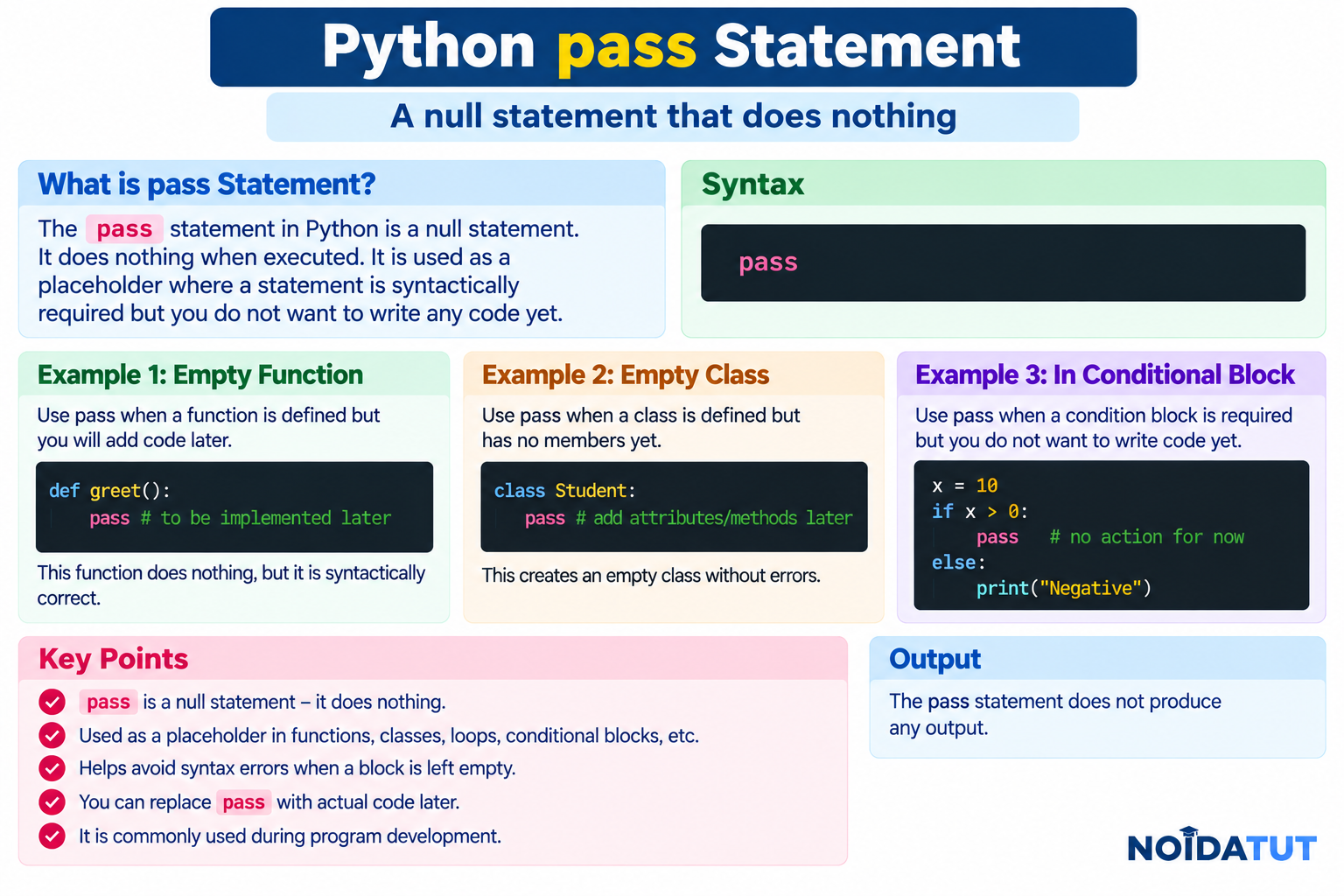
Answer: The pass statement is a null statement in Python. It does nothing when executed. It is used when the Python syntax requires a statement but the programmer does not want any operation to be performed at that point.
The pass statement is particularly useful while developing a program when a function, class, loop or conditional block has been planned but its implementation will be added later.
Syntax of pass
pass
Example 1: pass in a Function
def display():
    pass
The function is syntactically complete even though it currently contains no operational code.
Example 2: pass in an if Statement
age = 20

if age >= 18:
    pass
else:
    print("Minor")
When the condition is true, the pass statement performs no operation.
Example 3: pass in a Loop
for i in range(5):

    if i == 2:
        pass

    print(i)
Output
0
1
2
3
4
When i becomes 2, Python executes pass, which does nothing, and then continues with the next statement in the loop.
pass vs break vs continue
| Statement | Purpose |
|---|---|
| pass | Does nothing. It is used as a placeholder where a statement is syntactically required. |
| break | Immediately terminates the nearest enclosing loop. |
| continue | Skips the remaining statements in the current loop iteration and continues with the next iteration. |
Example Demonstrating pass
for number in range(1, 6):

    if number == 3:
        pass

    print(number)
Output
1
2
3
4
5
The pass statement does not skip the value 3 and does not stop the loop. It simply performs no operation.
Example Demonstrating break
for number in range(1, 6):

    if number == 3:
        break

    print(number)
Output
1
2
The break statement terminates the loop when the value becomes 3.
Example Demonstrating continue
for number in range(1, 6):

    if number == 3:
        continue

    print(number)
Output
1
2
4
5
The continue statement skips the remaining part of the current iteration when the value is 3. The loop then proceeds with the next iteration.
Question 8 – Quick Revision
| Statement | Action |
|---|---|
| pass | Does nothing. |
| continue | Skips the current loop iteration. |
| break | Terminates the loop. |
Question 9: What are Modules and Packages in Python?
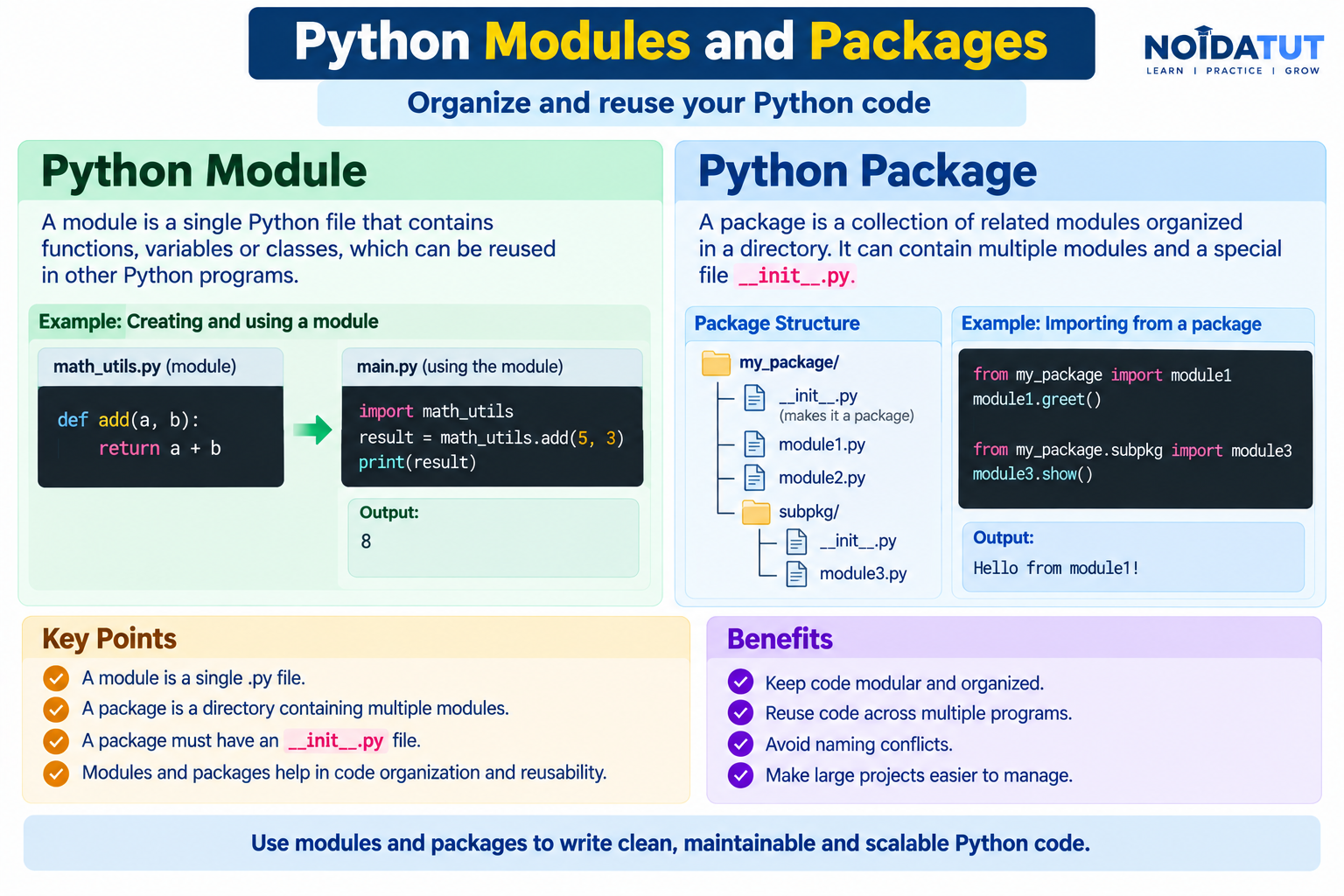
Answer: A module is a Python file containing Python definitions and statements. A module normally has a .py extension and can contain functions, classes, variables and executable statements.
A package is a way of organizing related Python modules into a directory structure. Packages help developers organize larger projects into logical components.
What is a Module?
Suppose we create a Python file named calculator.py:
def add(a, b):

    return a + b


def subtract(a, b):

    return a - b
The file calculator.py is a module. It contains two functions: add() and subtract().
Importing a Module
The import statement can be used to import a module.
import calculator

result = calculator.add(10, 20)

print(result)
Output
30
The expression calculator.add() accesses the add() function defined inside the calculator module.
Using from...import
Python also allows a specific function or name to be imported from a module.
from calculator import add

result = add(10, 20)

print(result)
Output
30
What is a Package?
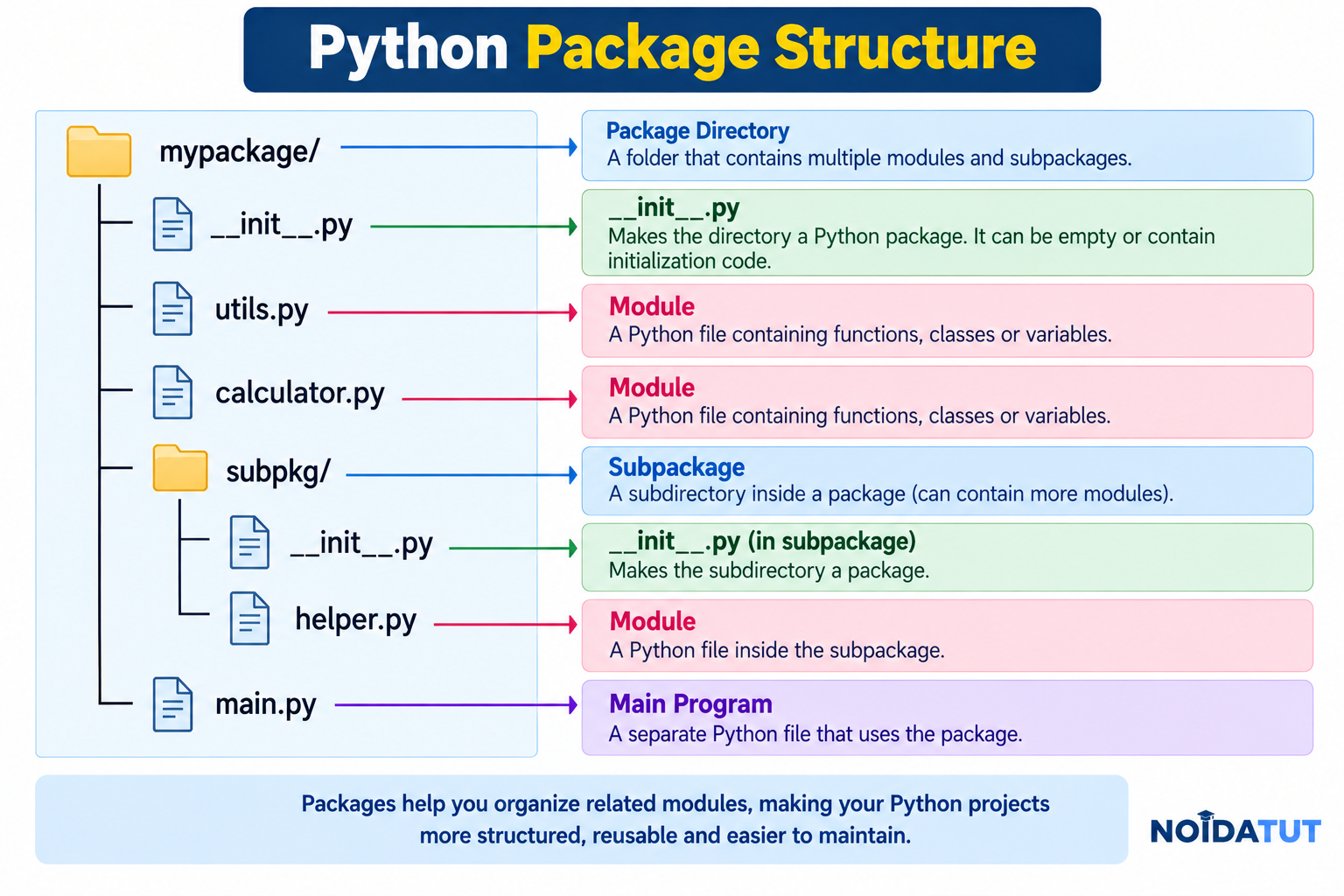
A package is a directory used to organize related Python modules. Packages are particularly useful in large projects because they allow related functionality to be grouped together.
Example Package Structure
myproject/
│
├── main.py
│
└── mathematics/
    │
    ├── __init__.py
    ├── addition.py
    └── subtraction.py
Here, mathematics is a package containing the modules addition.py and subtraction.py.
Module vs Package
| Feature | Module | Package |
|---|---|---|
| Meaning | A Python file containing code. | A directory structure used to organize related modules. |
| Typical Extension | .py | Directory containing Python modules. |
| Purpose | Organizes reusable functions, classes and variables. | Organizes multiple related modules. |
| Example | calculator.py | mathematics/ |
Python Standard Library Modules
Python provides many modules as part of its standard library. These modules provide functionality that programmers can use without implementing everything from scratch.
Example: math Module
import math

print(math.sqrt(25))
Output
5.0
Example: random Module
import random

number = random.randint(1, 10)

print(number)
The randint() function generates a random integer within the specified range. The exact output may differ each time the program is executed.
Advantages of Modules
- Promote code reusability.
- Help organize program functionality.
- Make large programs easier to maintain.
- Reduce unnecessary duplication of code.
- Allow related functions and classes to be grouped together.
Advantages of Packages
- Organize large Python projects.
- Group related modules together.
- Improve project structure.
- Promote code reuse.
- Make large applications easier to maintain.
Question 9 – Quick Revision
| Term | Meaning |
|---|---|
| Module | A Python file containing reusable code. |
| Package | A directory structure used to organize related modules. |
| import | Used to import a module or package component. |
| from...import | Used to import specific names from a module or package. |
Question 10: What are Global, Protected and Private Attributes in Python?
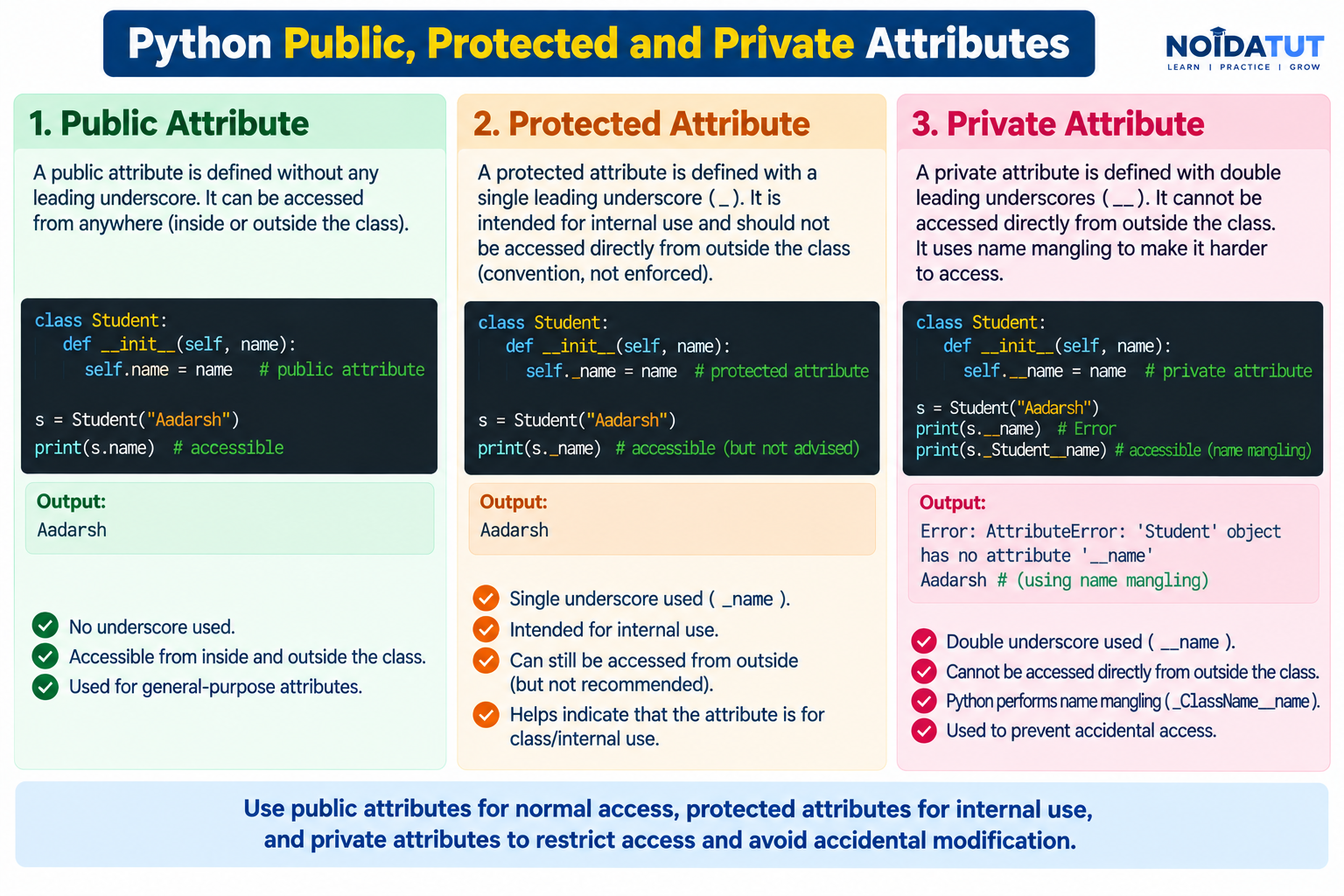
Answer: In Python, the terms global, protected and private are used in different contexts. Global generally refers to names defined at module level, while protected and private are conventions used when naming attributes or methods inside classes.
Python does not enforce access control in exactly the same way as languages such as Java or C++. Instead, Python uses naming conventions and name mangling to communicate and, in the case of double-leading underscore names, implement a degree of name transformation.
1. Global Variable
A variable defined at the top level of a Python module is generally called a global variable within that module.
Example
college = "Dronacharya Group of Institutions"

def display_college():

    print(college)

display_college()
Output
Dronacharya Group of Institutions
The variable college is defined outside the function and can be read inside the function because it is available in the surrounding global scope.
Using the global Keyword
If a function needs to assign a new value to a module-level variable, the global keyword can be used.
Example
count = 10

def change_count():

    global count

    count = 20

change_count()

print(count)
Output
20
The global statement tells Python that the assignment inside the function should refer to the module-level name count.
2. Protected Attribute
A name beginning with a single underscore, such as _salary, is conventionally treated as a protected or internal-use attribute.
The single underscore is primarily a convention. It communicates to other programmers that the attribute is intended for internal use and may not be part of the public interface.
Example
class Employee:

    def __init__(self):

        self._salary = 50000


employee = Employee()

print(employee._salary)
Output
50000
The attribute can still be accessed directly. The leading underscore does not make it inaccessible.
3. Private Attribute
A name beginning with two leading underscores, such as __salary, triggers name mangling inside a class.
Example
class Employee:

    def __init__(self):

        self.__salary = 50000


employee = Employee()

print(employee.__salary)
The above direct access normally produces an AttributeError because the attribute name has been transformed internally through name mangling.
Typical Error
AttributeError: 'Employee' object has no attribute '__salary'
For an attribute defined as __salary inside the Employee class, Python's name-mangling mechanism changes the internal name to a form similar to _Employee__salary.
Accessing a Name-Mangled Attribute
For educational purposes, the name-mangled form can be demonstrated as follows:
class Employee:

    def __init__(self):

        self.__salary = 50000


employee = Employee()

print(employee._Employee__salary)
Output
50000
This demonstrates that double-leading underscores do not provide absolute security or an impenetrable private-access mechanism. Instead, name mangling primarily helps avoid accidental name collisions and discourages direct access.
Global vs Protected vs Private
| Type | Example | Meaning |
|---|---|---|
| Global | college | A name defined at module level and available according to normal Python name-resolution rules. |
| Protected Convention | _salary | A single leading underscore conventionally indicates internal or non-public use. |
| Private / Name-Mangled | __salary | A double leading underscore triggers class-level name mangling. |
Important Naming Patterns in Python
| Syntax | Common Meaning |
|---|---|
| name | Ordinary public name. |
| _name | Internal-use convention; not enforced as private access. |
| __name | Triggers name mangling within a class. |
| __name__ | Usually a special or "dunder" name defined by Python's data model, such as __init__. |
Question 10 – Quick Revision
| Concept | Example | Key Point |
|---|---|---|
| Global | count | Module-level name. |
| Protected convention | _count | Single underscore indicates intended internal use. |
| Private / name-mangled | __count | Double leading underscore triggers name mangling. |
Question 11: What is the Use of self in Python?
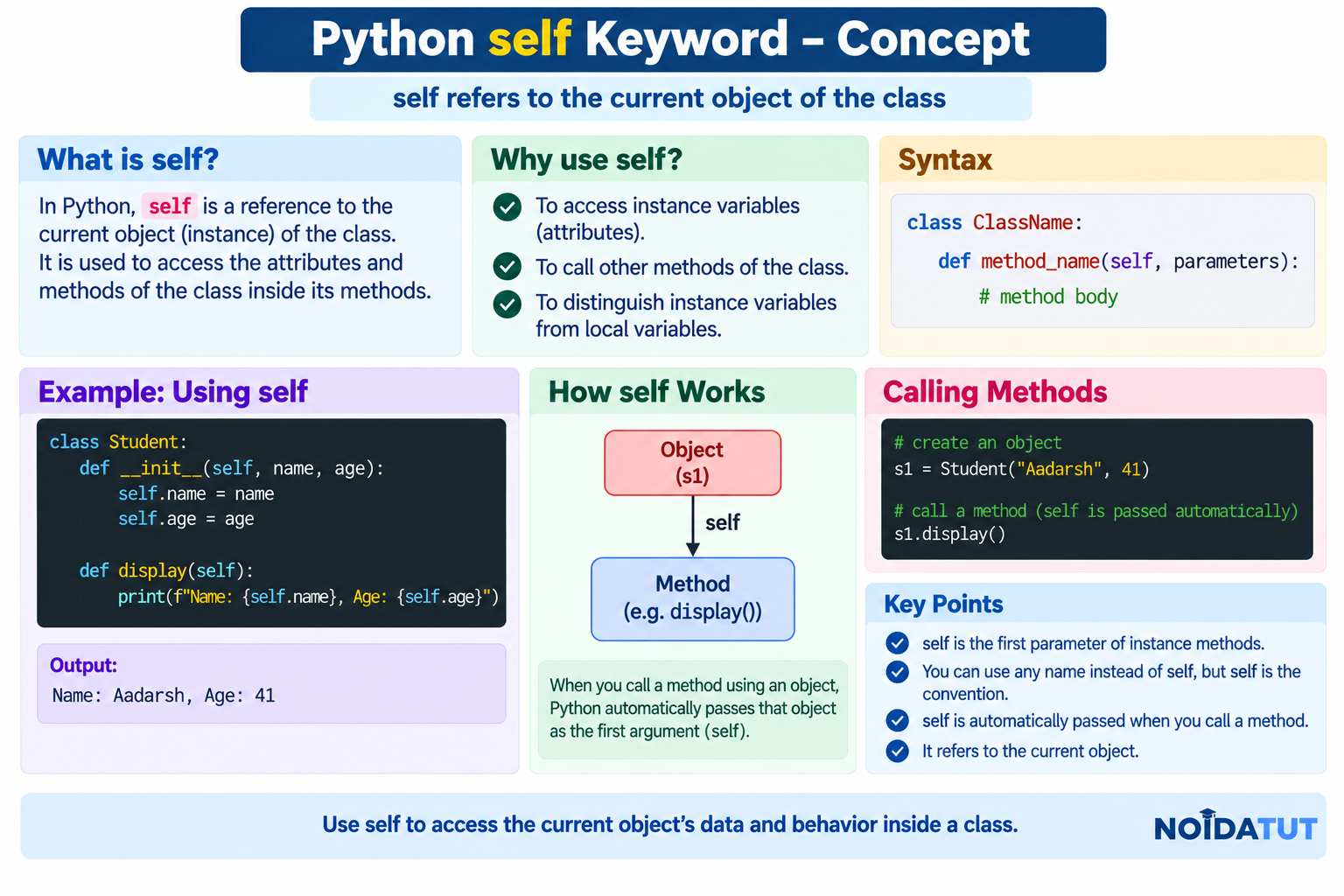
Answer: The self parameter is conventionally used in instance methods to refer to the current object. It allows an instance method to access the attributes and other instance methods belonging to that particular object.
The name self is a convention rather than a special keyword. However, using self is the standard Python programming style for referring to the current instance.
Simple Example
class Student:

    def display(self):

        print("Welcome to Python")


student = Student()

student.display()
Output
Welcome to Python
When student.display() is called, Python passes the student instance to the method as its first argument. The method receives that object through the parameter conventionally named self.
Using self to Access an Instance Variable
class Student:

    def __init__(self, name):

        self.name = name

    def display(self):

        print(self.name)


student = Student("Rahul")

student.display()
Output
Rahul
Here, self.name refers to the name attribute belonging to the current Student object.
Why is self Required?
Consider the following class:
class Student:

    def __init__(self, name):

        self.name = name
The expression self.name means that the value is stored as an attribute of the particular object being initialized.
For example:
student1 = Student("Rahul")
student2 = Student("Amit")
The two objects have separate name attributes:
student1.name
student2.name
They contain:
Rahul
Amit
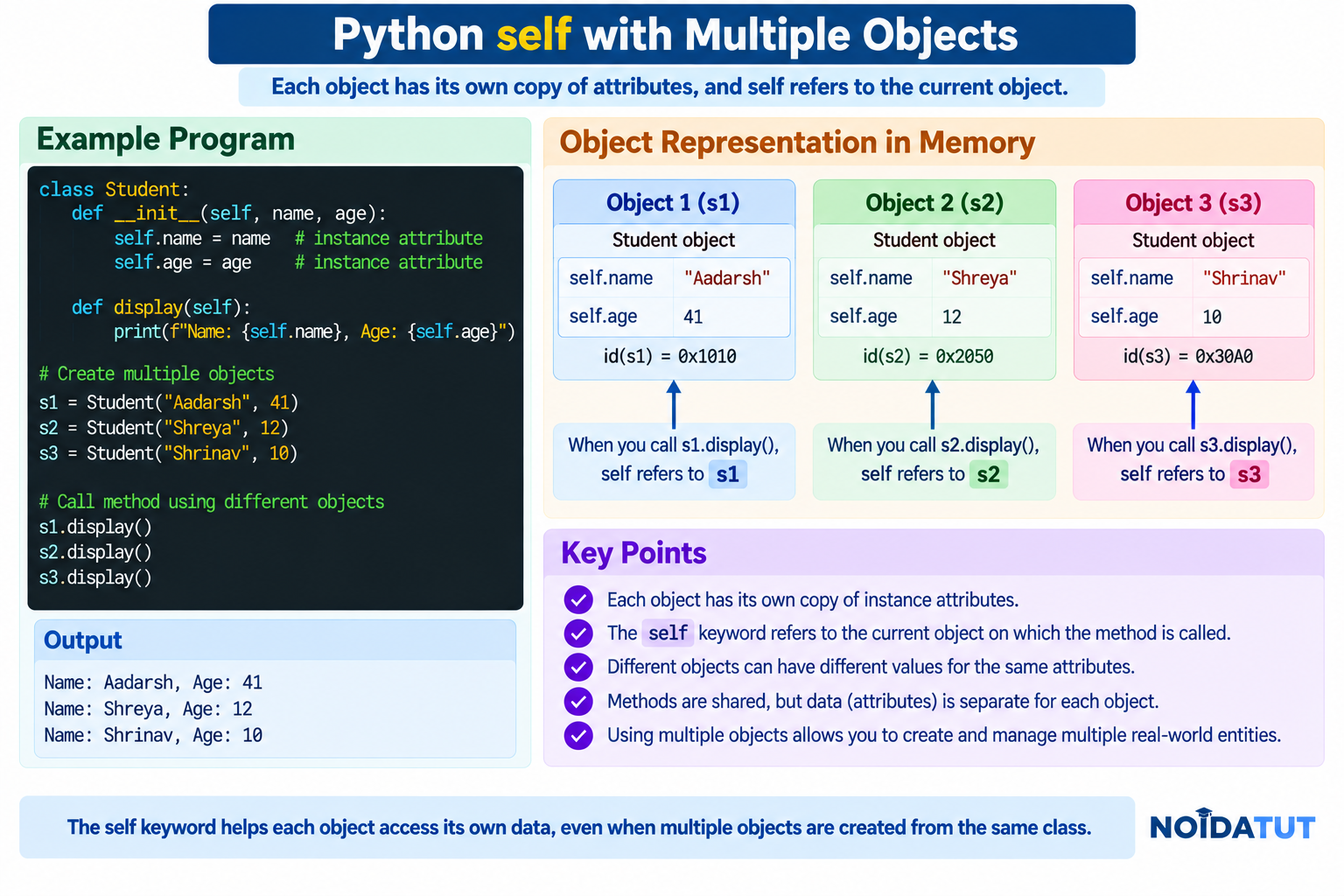
Multiple Objects and self
class Student:

    def __init__(self, name, age):

        self.name = name
        self.age = age

    def display(self):

        print("Name:", self.name)
        print("Age:", self.age)


student1 = Student("Rahul", 20)

student2 = Student("Amit", 21)

student1.display()

student2.display()
Output
Name: Rahul
Age: 20
Name: Amit
Age: 21
The self parameter allows the same method to operate on different objects. When student1.display() is called, self refers to student1. When student2.display() is called, self refers to student2.
self is Not a Keyword
Unlike keywords such as if, for and class, self is not a Python keyword. Another valid parameter name can technically be used.
Example
class Student:

    def display(current_object):

        print("Python")


student = Student()

student.display()
Output
Python
Although this works, using self is strongly preferred because it follows standard Python conventions and makes the code immediately understandable to other Python programmers.
Question 11 – Quick Revision
| Point | Answer |
|---|---|
| What is self? | Conventionally, the first parameter of an instance method. |
| What does self refer to? | The current object instance. |
| Is self a keyword? | No. |
| Why is self used? | To access instance attributes and methods. |
Question 12: What is __init__?
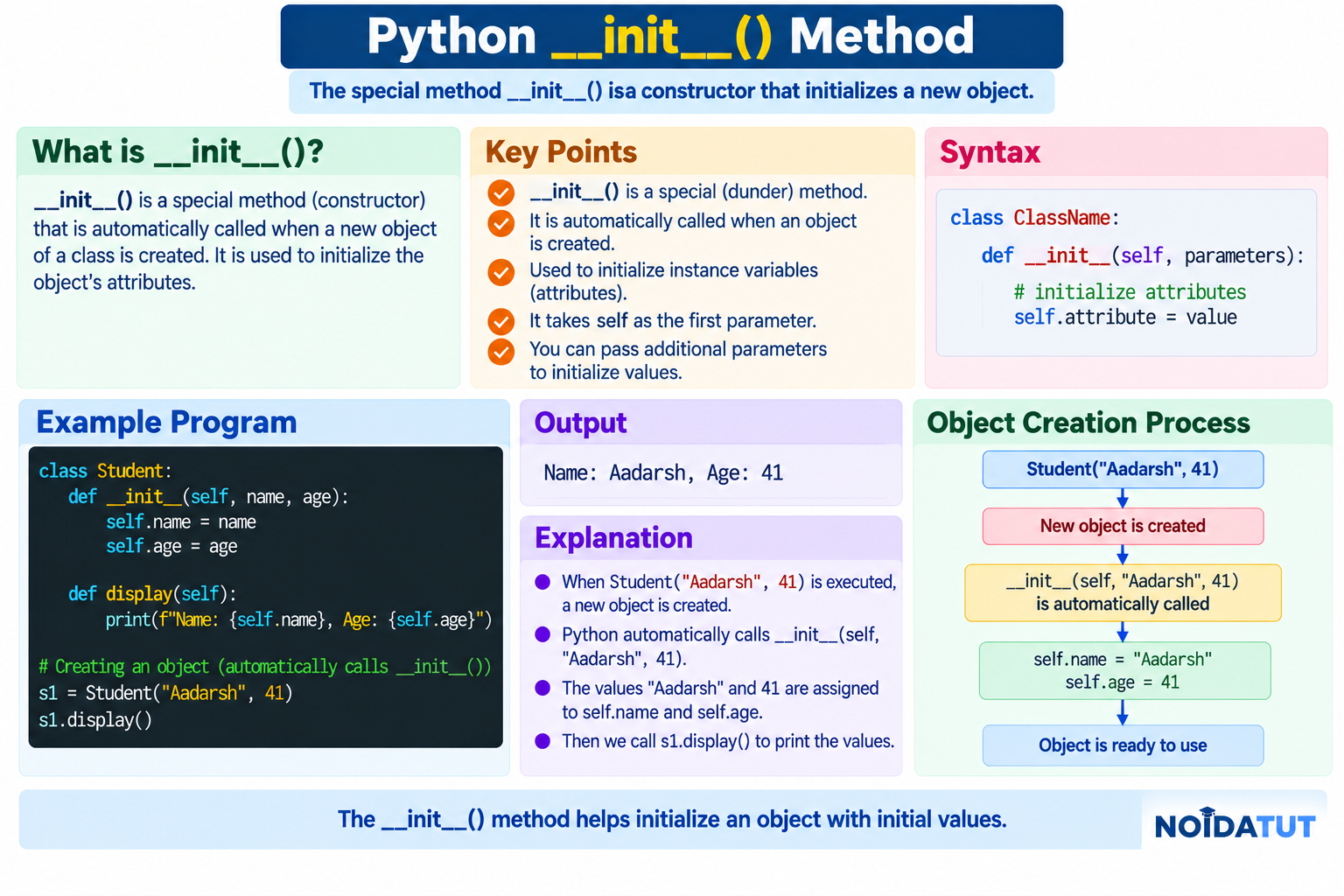
Answer: __init__ is a special method commonly used in Python classes to initialize a newly created object with appropriate initial values.
The name __init__ contains double underscores on both sides and is therefore commonly called a dunder method (short for "double underscore" method).
Simple Example
class Student:

    def __init__(self):

        self.name = "Rahul"


student = Student()

print(student.name)
Output
Rahul
When the Student object is created, the class's __init__ method is invoked as part of the normal object initialization process. It assigns the value "Rahul" to the instance attribute name.
__init__ with Parameters
The __init__ method can receive parameters so that different objects can be initialized with different values.
class Student:

    def __init__(self, name, age):

        self.name = name
        self.age = age


student = Student("Rahul", 20)

print(student.name)
print(student.age)
Output
Rahul
20
Creating Multiple Objects
class Student:

    def __init__(self, name, age):

        self.name = name
        self.age = age


student1 = Student("Rahul", 20)

student2 = Student("Amit", 21)

print(student1.name)
print(student1.age)

print(student2.name)
print(student2.age)
Output
Rahul
20
Amit
21
The same class can be used to create multiple objects, each with its own instance data.
__init__ and self
The self parameter represents the current instance, while __init__ is the special method commonly used to initialize that instance.
class Employee:

    def __init__(self, name, salary):

        self.name = name
        self.salary = salary
In the above example:
- self refers to the current Employee object.
- name and salary are parameters.
- self.name stores the name as an instance attribute.
- self.salary stores the salary as an instance attribute.
Is __init__ a Constructor?
In beginner-level Python discussions, __init__ is often called the constructor. More precisely, object creation and initialization are distinct concepts in Python. The __new__ method is involved in creating a new instance, while __init__ is commonly used to initialize the already-created instance.
For most fresher interviews, it is sufficient to remember that __init__ is the special initialization method that is commonly used to assign initial values to object attributes.
Example with a Calculation
class Rectangle:

    def __init__(self, length, width):

        self.length = length
        self.width = width

    def area(self):

        return self.length * self.width


rectangle = Rectangle(10, 5)

print("Area:", rectangle.area())
Output
Area: 50
The __init__ method initializes length and width. The area() method then uses these instance attributes to calculate the area.
Question 12 – Quick Revision
| Point | Answer |
|---|---|
| What is __init__? | A special method commonly used for object initialization. |
| What is it used for? | Initializing instance attributes and other initial state. |
| Is __init__ a dunder method? | Yes. |
| Which parameter normally refers to the current instance? | self. |
Question 13: What are break, continue and pass in Python?
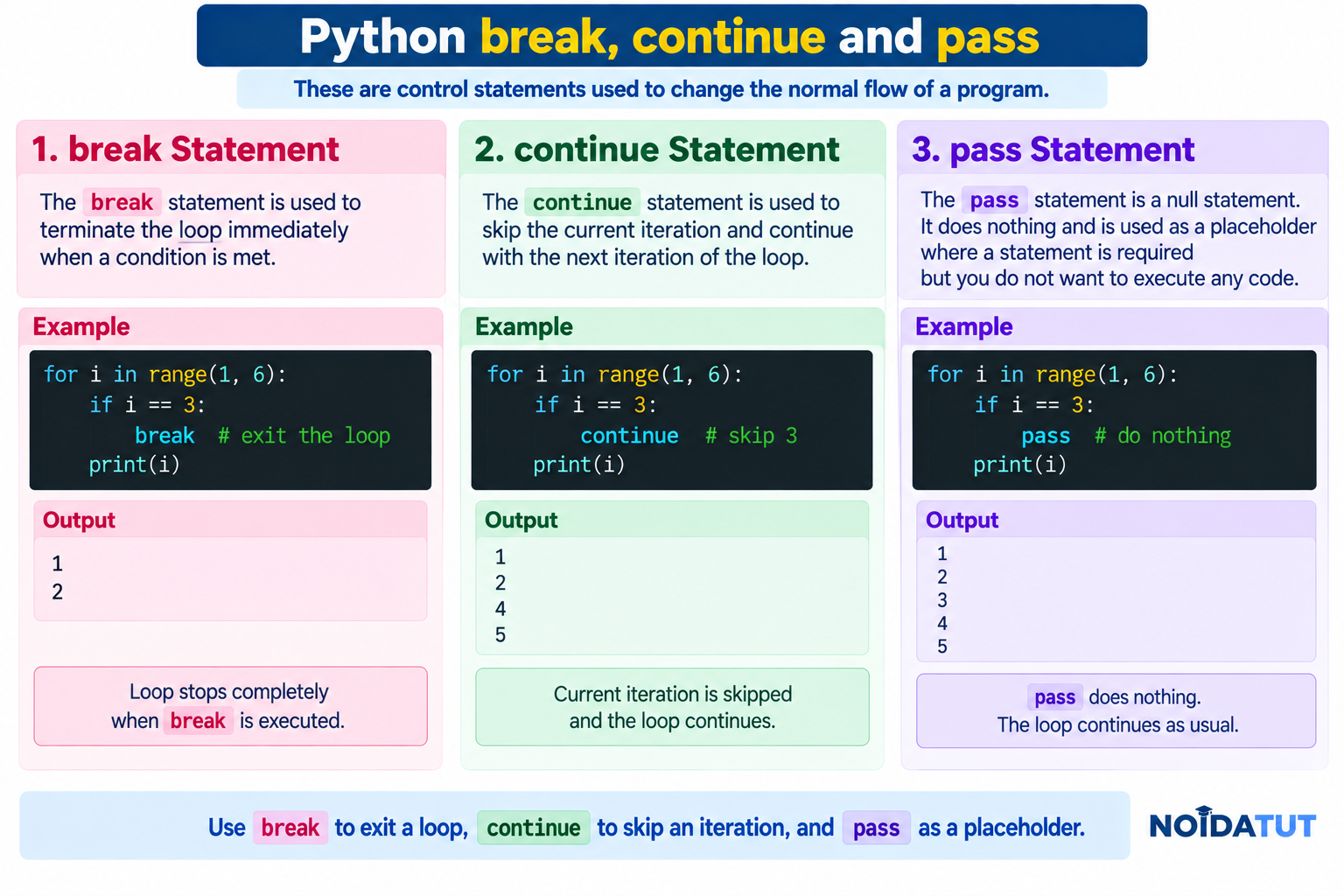
Answer: break, continue and pass are control-flow statements commonly used in Python programs. They have different purposes and should not be confused with one another.
1. break Statement
The break statement terminates the nearest enclosing loop immediately.
Example
for number in range(1, 6):

    if number == 3:
        break

    print(number)
Output
1
2
When number becomes 3, the break statement terminates the loop. Therefore, 3, 4 and 5 are not printed.
2. continue Statement
The continue statement skips the remaining part of the current loop iteration and proceeds with the next iteration.
Example
for number in range(1, 6):

    if number == 3:
        continue

    print(number)
Output
1
2
4
5
When number is 3, the continue statement skips the remaining statements in that iteration. The loop then proceeds with the next value, 4.
3. pass Statement
The pass statement performs no operation. It is useful as a placeholder when Python syntax requires a statement but the programmer does not yet want to implement any action.
Example
for number in range(1, 6):

    if number == 3:
        pass

    print(number)
Output
1
2
3
4
5
Unlike continue, the pass statement does not skip the current iteration. Unlike break, it does not terminate the loop.
Comparison of break, continue and pass
| Statement | Effect | Loop Continues? |
|---|---|---|
| break | Terminates the nearest enclosing loop. | No |
| continue | Skips the remaining part of the current iteration. | Yes |
| pass | Does nothing. | Yes |
Example: break
for i in range(1, 6):

    if i == 4:
        break

    print(i)
Output
1
2
3
Example: continue
for i in range(1, 6):

    if i == 4:
        continue

    print(i)
Output
1
2
3
5
Example: pass
for i in range(1, 6):

    if i == 4:
        pass

    print(i)
Output
1
2
3
4
5
Using break in a while Loop
number = 1

while number <= 10:

    if number == 5:
        break

    print(number)

    number += 1
Output
1
2
3
4
Using continue in a while Loop
When using continue in a while loop, the programmer must ensure that the loop's control variable is updated appropriately before the execution reaches the continue statement. Otherwise, the loop may become infinite.
Example
number = 0

while number < 5:

    number += 1

    if number == 3:
        continue

    print(number)
Output
1
2
4
5
Using pass as a Placeholder
The pass statement is frequently useful while designing a program before implementing a particular function or class.
Example
def calculate_salary():

    pass
The function is syntactically valid and can be implemented later.
Important Difference
| Situation | Use |
|---|---|
| You want to stop the loop completely. | break |
| You want to skip the current iteration. | continue |
| You need a statement that intentionally does nothing. | pass |
Question 13 – Quick Revision
| Statement | Meaning |
|---|---|
| break | Terminates the nearest enclosing loop. |
| continue | Skips the current iteration and proceeds to the next iteration. |
| pass | Does nothing and acts as a placeholder. |
Question 14: What are Unit Tests in Python?
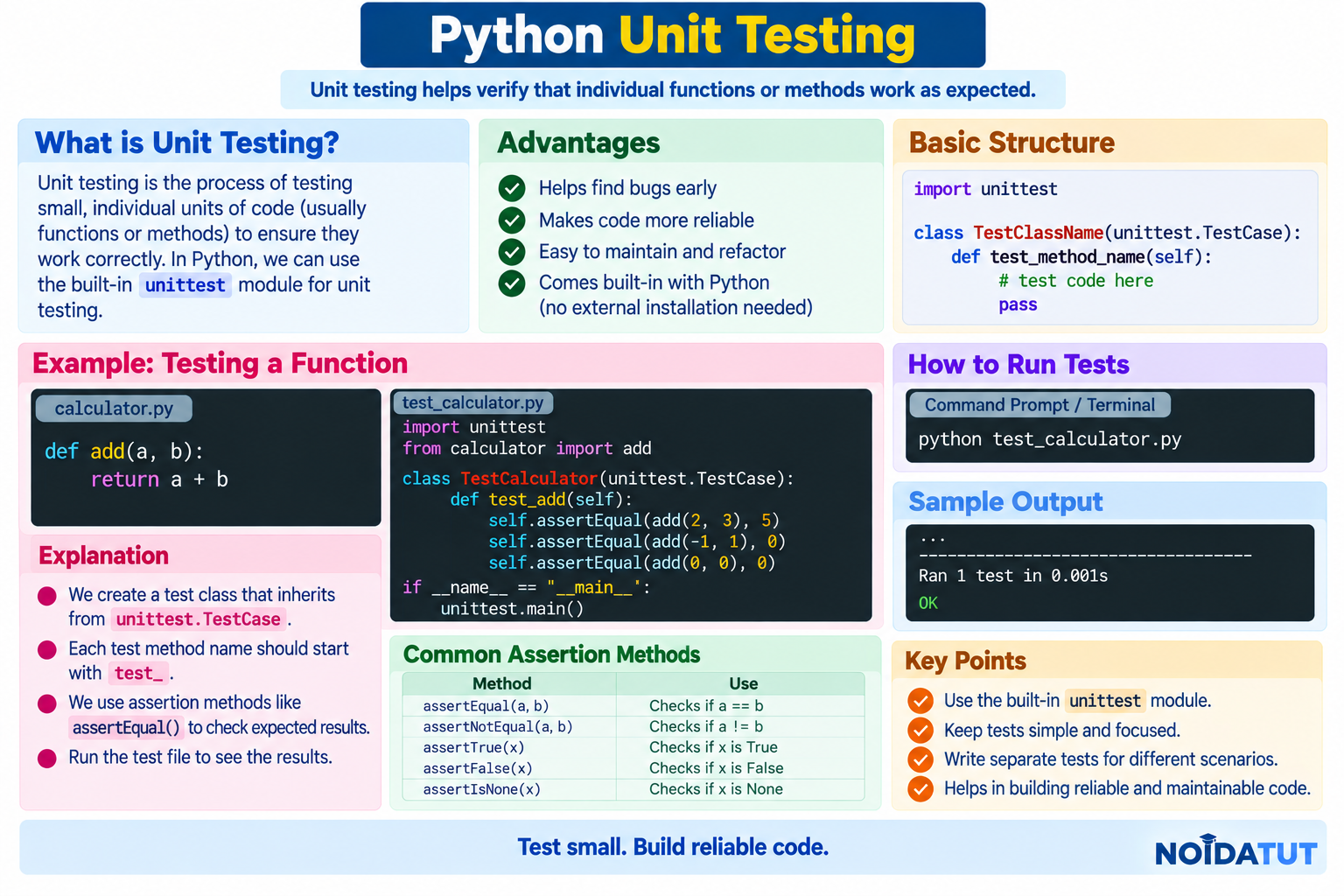
Answer: A unit test is a test designed to verify that a small, isolated part of a program works as expected. The part being tested may be a function, method or another small unit of behaviour.
Unit testing is an important software development practice because it helps programmers detect errors early and verify that changes made to one part of a program have not unintentionally broken another part.
Python provides the built-in unittest framework for writing and running unit tests. Other testing frameworks, such as pytest, are also widely used in Python projects.
Why are Unit Tests Required?
Suppose a program contains a function that calculates the addition of two numbers. Instead of manually checking the function every time the program changes, we can create an automated test that verifies the expected result.
Function to be Tested
def add(a, b):

    return a + b
We can create a test to verify that the function returns the expected value.
Simple Unit Test Using unittest
import unittest


def add(a, b):

    return a + b


class TestAddition(unittest.TestCase):

    def test_addition(self):

        self.assertEqual(add(10, 20), 30)


if __name__ == "__main__":

    unittest.main()
Expected Result
.
----------------------------------------------------------------------
Ran 1 test in 0.000s

OK
The assertEqual() method checks whether the actual result is equal to the expected result. If the values match, the test passes.
Understanding the Unit Test
| Code | Purpose |
|---|---|
| import unittest | Imports Python's built-in unit testing framework. |
| class TestAddition(unittest.TestCase) | Defines a test class based on unittest.TestCase. |
| test_addition() | Defines an individual test method. |
| assertEqual() | Checks whether two values are equal. |
| unittest.main() | Runs the tests when the file is executed directly. |
Example of a Failed Unit Test
import unittest


def add(a, b):

    return a + b


class TestAddition(unittest.TestCase):

    def test_addition(self):

        self.assertEqual(add(10, 20), 40)


if __name__ == "__main__":

    unittest.main()
The function returns 30, but the test expects 40. Therefore, the test fails.
Typical Result
F
======================================================================
FAIL: test_addition (...)
----------------------------------------------------------------------
...
FAILED (failures=1)
Common unittest Assertions
| Assertion | Purpose |
|---|---|
| assertEqual(a, b) | Checks whether a and b are equal. |
| assertNotEqual(a, b) | Checks whether a and b are not equal. |
| assertTrue(x) | Checks whether x evaluates to True. |
| assertFalse(x) | Checks whether x evaluates to False. |
| assertIsNone(x) | Checks whether x is None. |
| assertIsNotNone(x) | Checks whether x is not None. |
Benefits of Unit Testing
- Helps detect errors early.
- Automates repeated testing.
- Improves confidence when modifying code.
- Helps document expected behaviour.
- Makes debugging easier.
- Supports reliable software development.
Question 14 – Quick Revision
| Point | Answer |
|---|---|
| What is unit testing? | Testing small, isolated units of program behaviour. |
| Which built-in framework does Python provide? | unittest. |
| What does assertEqual() do? | Checks whether two values are equal. |
| Name another popular Python testing framework. | pytest. |
Question 15: What is a Docstring in Python?
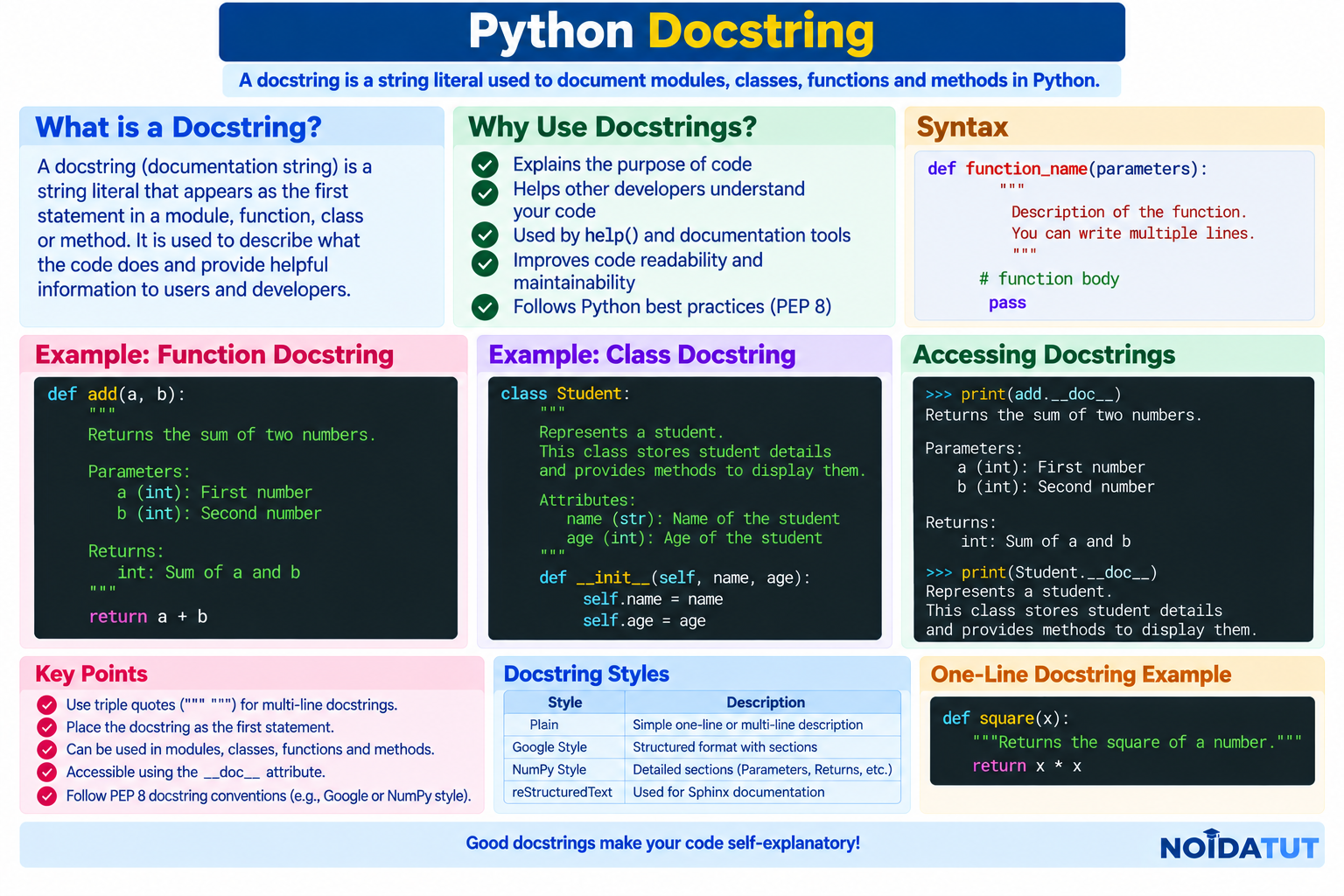
Answer: A docstring, or documentation string, is a string literal used to document a module, class, function or method. A docstring is normally placed as the first statement inside the object being documented.
Python makes docstrings accessible through the __doc__ attribute. The built-in help() function can also use documentation information provided by docstrings.
Simple Function Docstring
def add(a, b):
    """Return the sum of two numbers."""

    return a + b
The text between the triple quotation marks is the function's docstring.
Accessing a Docstring
print(add.__doc__)
Output
Return the sum of two numbers.
Docstring vs Comment
A docstring and a comment are both useful for explaining code, but they have different purposes.
| Docstring | Comment |
|---|---|
| Used to document modules, classes, functions and methods. | Used to explain or annotate source code. |
| Can be accessed through the __doc__ attribute. | Is not stored as documentation in the same way. |
| Can be displayed through tools such as help(). | Primarily provides information to programmers reading the source. |
Example of a Class Docstring
class Student:
    """Represent a student."""

    def __init__(self, name):

        self.name = name
Accessing the Class Docstring
print(Student.__doc__)
Output
Represent a student.
Example of a Module Docstring
"""
This module contains basic mathematical functions.
"""

def add(a, b):

    return a + b
A module-level docstring describes the purpose or contents of a Python module.
Multi-Line Docstring
Triple-quoted strings are commonly used when a longer description is required.
def calculate_area(length, width):
    """
    Calculate the area of a rectangle.

    Parameters:
        length: Length of the rectangle.
        width: Width of the rectangle.

    Returns:
        Area of the rectangle.
    """

    return length * width
A well-written docstring can explain what a function does, what parameters it expects and what it returns.
Benefits of Docstrings
- Improve code documentation.
- Make functions and classes easier to understand.
- Help developers maintain large projects.
- Can be accessed using the __doc__ attribute.
- Can be displayed using the help() function.
- Help documentation tools generate useful reference material.
Question 15 – Quick Revision
| Question | Answer |
|---|---|
| What is a docstring? | A string used to document Python modules, classes, functions or methods. |
| How can it be accessed? | Using the __doc__ attribute. |
| Which function can display documentation? | help() |
| Can a docstring contain multiple lines? | Yes. |
Question 16: What is Slicing in Python?
Answer: Slicing is a technique used to obtain a portion of a sequence such as a string, list or tuple. Python uses the slicing syntax:
sequence[start:stop:step]
Here:
- start specifies the starting index.
- stop specifies the ending boundary and is not included.
- step specifies the amount by which the index changes.

Basic List Slicing
numbers = [10, 20, 30, 40, 50]

print(numbers[1:4])
Output
[20, 30, 40]
The slice starts at index 1 and stops before index 4. Therefore, elements at indexes 1, 2 and 3 are selected.
Index Positions
numbers = [10, 20, 30, 40, 50]

Index:      0   1   2   3   4
Value:     10  20  30  40  50
Therefore:
numbers[1:4]
produces:
[20, 30, 40]
Omitting the Start Index
If the start index is omitted, Python starts from the beginning of the sequence.
numbers = [10, 20, 30, 40, 50]

print(numbers[:3])
Output
[10, 20, 30]
Omitting the Stop Index
If the stop index is omitted, Python continues until the end of the sequence.
numbers = [10, 20, 30, 40, 50]

print(numbers[2:])
Output
[30, 40, 50]
Using a Step
The third component of slicing specifies the step.
numbers = [10, 20, 30, 40, 50, 60]

print(numbers[0:6:2])
Output
[10, 30, 50]
A step of 2 selects every second element beginning with the specified starting position.
Negative Indexing
Python also supports negative indexes. Negative indexing begins from the end of a sequence.
numbers = [10, 20, 30, 40, 50]

print(numbers[-1])
print(numbers[-2])
Output
50
40
Reverse a Sequence Using Slicing
A negative step can be used to traverse a sequence in reverse order.
numbers = [10, 20, 30, 40, 50]

print(numbers[::-1])
Output
[50, 40, 30, 20, 10]
Slicing a String
text = "PYTHON"

print(text[1:4])
Output
YTH
Strings also support slicing because strings are sequence types.
Slicing a Tuple
numbers = (10, 20, 30, 40, 50)

print(numbers[1:4])
Output
(20, 30, 40)
Important Slicing Examples
| Expression | Meaning |
|---|---|
| sequence[:3] | First three elements. |
| sequence[2:] | Elements from index 2 to the end. |
| sequence[1:4] | Elements from index 1 up to, but not including, index 4. |
| sequence[::2] | Every second element. |
| sequence[::-1] | Sequence in reverse order. |
Question 16 – Quick Revision
| Concept | Example |
|---|---|
| Basic slicing | numbers[1:4] |
| From beginning | numbers[:3] |
| To the end | numbers[2:] |
| Step | numbers[::2] |
| Reverse | numbers[::-1] |
Question 17: How Can You Make a Python Script Executable on Unix?
Answer: On Unix-like operating systems such as Linux and macOS, a Python script can be made directly executable by adding a shebang line at the beginning of the script and giving the file execute permission.

Step 1: Write the Python Script
Create a file named hello.py.
#!/usr/bin/env python3

print("Hello, Python!")
The first line is called the shebang. It tells the operating system which interpreter should be used when the script is executed directly.
Step 2: Give Execute Permission
Use the Unix chmod command:
chmod +x hello.py
The +x permission makes the file executable for the relevant user/classification according to the file's existing permission settings.
Step 3: Execute the Script
After granting execute permission, the script can be executed using:
./hello.py
Output
Hello, Python!
Complete Process
Create Script
     |
     v
Add Shebang
     |
     v
chmod +x hello.py
     |
     v
./hello.py
     |
     v
Python Program Executes
Why is the Shebang Used?
The shebang provides a way for Unix-like systems to determine which interpreter should be used to execute a script when the script is invoked directly.
A commonly used shebang for Python 3 is:
#!/usr/bin/env python3
Using /usr/bin/env allows the system to locate python3 through the environment's executable search path.
Alternative Method
A Python script can also be executed by explicitly invoking Python without making the script itself executable:
python3 hello.py
In this case, the execute permission on hello.py is not required for invoking it this way.
Important Commands
| Command | Purpose |
|---|---|
| chmod +x hello.py | Adds execute permission according to the applicable Unix permission rules. |
| ./hello.py | Runs the executable script from the current directory. |
| python3 hello.py | Explicitly runs the script using Python 3. |
Question 17 – Quick Revision
| Question | Answer |
|---|---|
| What is a shebang? | A special first line that specifies how a script should be interpreted when executed directly. |
| How do you add execute permission? | chmod +x filename.py |
| How do you execute the script? | ./filename.py |
| Can the script be run without execute permission? | Yes, by explicitly invoking Python, for example python3 filename.py. |
Question 18: What is the Difference Between Python Arrays and Lists?
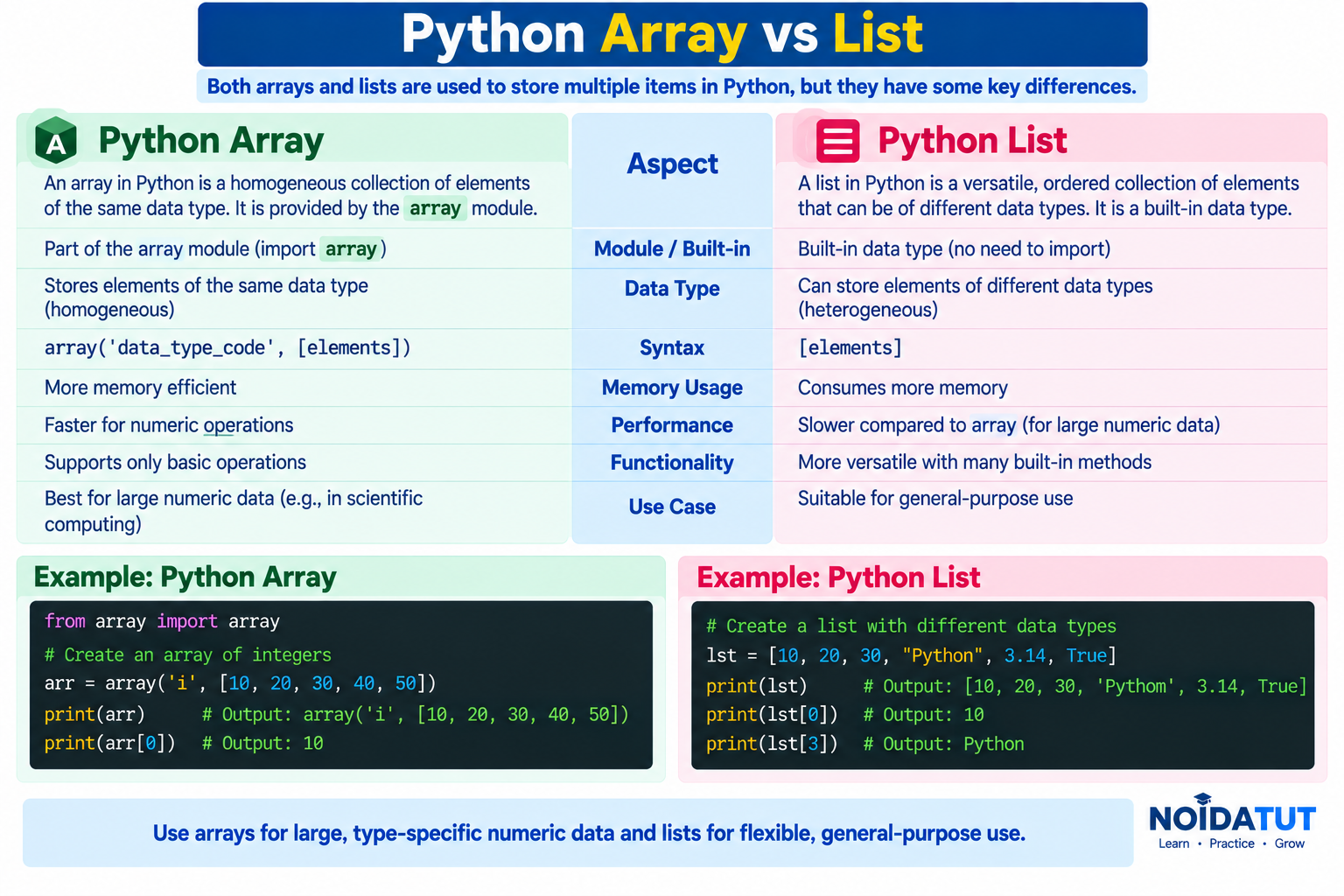
Answer: Python provides built-in lists for general-purpose collections. Python also has an array module that provides typed arrays containing elements of a specified type.
A list can store objects of different types, while an array from the standard array module stores elements of a specified primitive type code.
Python List
A list is an ordered and mutable collection. It can contain objects of different types.
Example
data = [10, 20, 30, 40]

print(data)
Output
[10, 20, 30, 40]
A list can also contain values of different types:
data = [10, "Python", 25.5, True]

print(data)
Output
[10, 'Python', 25.5, True]
Python Array
The standard Python array module provides an array type whose elements are constrained to a specified type.
Example
from array import array

numbers = array('i', [10, 20, 30, 40])

print(numbers)
Here, 'i' is the type code for a signed integer array.
Accessing Array Elements
from array import array

numbers = array('i', [10, 20, 30, 40])

print(numbers[0])
print(numbers[2])
Output
10
30
Array vs List
| Feature | List | Array |
|---|---|---|
| Module | Built into Python language syntax | Provided by the array module |
| Data Types | Can contain objects of different types. | Elements are constrained to the specified array type. |
| Flexibility | Very flexible for general-purpose collections. | Useful when a typed array of values is appropriate. |
| Syntax | [10, 20, 30] | array('i', [10, 20, 30]) |
| Common Use | General-purpose collection of Python objects. | Typed collections of numeric values and similar supported types. |
Example: Modifying a List
numbers = [10, 20, 30]

numbers.append(40)

print(numbers)
Output
[10, 20, 30, 40]
Example: Modifying an Array
from array import array

numbers = array('i', [10, 20, 30])

numbers.append(40)

print(numbers)
The array can also be modified, but values added to it must be compatible with its declared element type.
Why are Lists Commonly Used?
Lists are one of Python's most commonly used collection types because they are flexible and can store arbitrary Python objects. They provide many useful methods and are suitable for a wide variety of general-purpose programming tasks.
When Can an Array Be Useful?
The array module can be useful when a program needs a type-constrained sequence of values. For many numerical and scientific applications, specialized libraries such as NumPy provide more advanced array functionality.
Simple Comparison Example
from array import array

numbers_list = [10, 20, 30]

numbers_array = array('i', [10, 20, 30])

print(numbers_list)

print(numbers_array)
Output
[10, 20, 30]
array('i', [10, 20, 30])
The list and array may contain the same numeric values, but they are different Python object types with different characteristics.
Important Point: List vs NumPy Array
In interviews, the word array can refer either to the standard Python array module or to arrays provided by libraries such as NumPy. These should not automatically be treated as the same thing.
For this question, the comparison is between the Python built-in list type and the standard-library array.array type.
Question 18 – Quick Revision
| Feature | List | array.array |
|---|---|---|
| General-purpose? | Yes | More specialized |
| Mixed object types? | Yes | No, elements follow the specified type |
| Requires import? | No | Yes, from array import array |
| Mutable? | Yes | Yes |
| Example | [10, 20, 30] | array('i', [10, 20, 30]) |
Completion of the Freshers Question Set
The complete set of 18 Python interview questions for freshers has now been covered. These questions provide a foundation for preparing for Python-based technical interviews and placement assessments.
Students should revise the definitions, understand the examples and practise writing the Python programs independently. Interviewers may also ask follow-up questions based on the concepts discussed in these answers.
Quick Revision – 18 Python Interview Questions
| No. | Topic | Key Concept |
|---|---|---|
| 1 | Python | Definition, characteristics and benefits |
| 2 | Dynamic Typing | Types are handled during execution |
| 3 | Interpreted Language | Python runtime and bytecode execution |
| 4 | PEP 8 | Python coding style guide |
| 5 | Scope | LEGB rule |
| 6 | Lists and Tuples | Mutable vs immutable |
| 7 | Data Types | Built-in Python data types |
| 8 | pass | Null statement / placeholder |
| 9 | Modules and Packages | Code organization and reuse |
| 10 | Attributes | Global, protected convention and name mangling |
| 11 | self | Current object instance |
| 12 | __init__ | Object initialization |
| 13 | break, continue and pass | Loop control |
| 14 | Unit Testing | Testing individual units |
| 15 | Docstrings | Documentation strings |
| 16 | Slicing | Extracting part of a sequence |
| 17 | Executable Unix Script | Shebang and chmod |
| 18 | Arrays vs Lists | Typed arrays vs general-purpose lists |
How Should Freshers Prepare for a Python Interview?
Preparing for a Python interview is not only about memorizing definitions. A candidate should understand the concept, know how it works and be able to demonstrate it with a small Python program.
For example, if an interviewer asks about lists and tuples, the candidate should not simply say that lists are mutable and tuples are immutable. The candidate should also understand indexing, slicing, modification of lists, and why a tuple may be appropriate when an immutable sequence is required.
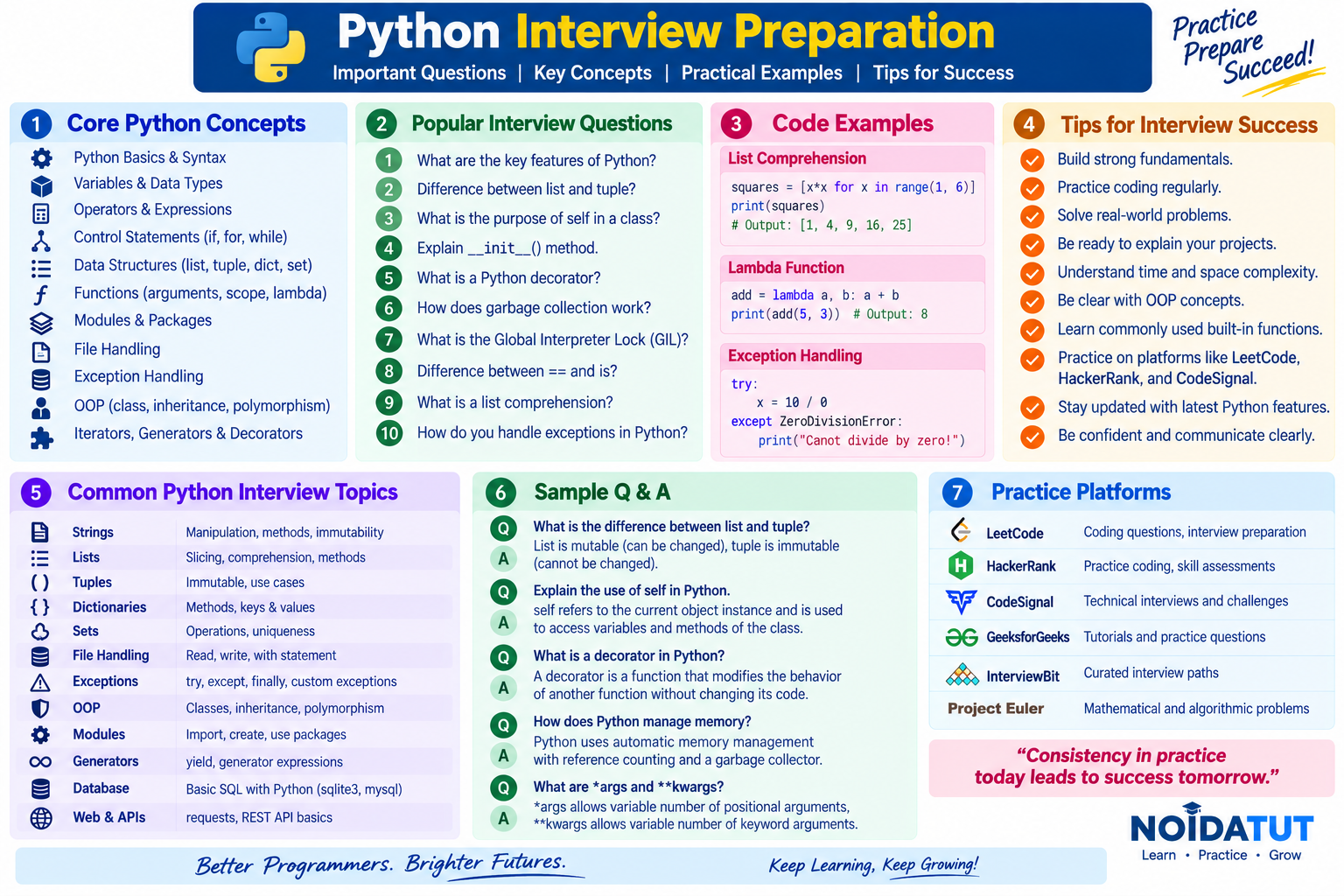
Important Areas to Revise Before the Interview
| No. | Area | What a Fresher Should Know |
|---|---|---|
| 1 | Python Fundamentals | Python characteristics, advantages, syntax and basic programming concepts. |
| 2 | Data Types | int, float, complex, bool, str, list, tuple, set, dict and NoneType. |
| 3 | Variables | Variable creation, assignment and dynamic typing. |
| 4 | Operators | Arithmetic, relational, logical, assignment, membership and identity operators. |
| 5 | Control Statements | if, elif, else, for, while, break, continue and pass. |
| 6 | Functions | Function definition, parameters, return values, scope and lambda functions. |
| 7 | Data Structures | Lists, tuples, sets and dictionaries. |
| 8 | Object-Oriented Programming | Classes, objects, self, __init__, inheritance and basic OOP concepts. |
| 9 | Modules and Packages | Creating, importing and using reusable Python code. |
| 10 | File Handling | Opening, reading, writing and closing files. |
| 11 | Exception Handling | try, except, else and finally. |
| 12 | Testing | Basic understanding of unit testing and test cases. |
Common Follow-up Questions in Python Interviews
An interviewer may begin with a simple question and then ask follow-up questions to check whether the candidate has understood the concept.
| Main Question | Possible Follow-up Question |
|---|---|
| What is Python? | Why is Python popular? |
| What is dynamic typing? | How is it different from static typing? |
| What is a list? | How is a list different from a tuple? |
| What is a tuple? | Why is a tuple immutable? |
| What is slicing? | How can you reverse a list using slicing? |
| What is self? | Why is self used inside instance methods? |
| What is __init__? | When is __init__ normally invoked? |
| What is a module? | How do you import a module? |
| What is pass? | How is pass different from continue? |
| What is unit testing? | Which testing frameworks are available in Python? |
Quick Interview Tips for Freshers
- Understand the concept before memorizing its definition.
- Practise writing small Python programs without referring to notes.
- Learn to predict the output of simple Python programs.
- Understand the difference between mutable and immutable objects.
- Practise lists, tuples, dictionaries and strings extensively.
- Understand the purpose of functions, modules and classes.
- Be familiar with common Python errors and exceptions.
- Practise explaining Python concepts using simple examples.
- Read the question carefully before answering it.
- If you do not know an answer, explain what you understand instead of guessing technical details.
Self-Assessment Checklist
Before appearing for a Python technical interview, students can use the following checklist to evaluate their preparation.
| Skill | Prepared? |
|---|---|
| Can I explain what Python is? | Yes / No |
| Can I explain dynamic typing? | Yes / No |
| Can I explain interpreted execution? | Yes / No |
| Can I explain PEP 8? | Yes / No |
| Can I explain Python scope? | Yes / No |
| Can I differentiate between lists and tuples? | Yes / No |
| Can I explain Python's common data types? | Yes / No |
| Can I explain pass, break and continue? | Yes / No |
| Can I explain modules and packages? | Yes / No |
| Can I explain self and __init__? | Yes / No |
| Can I explain unit testing? | Yes / No |
| Can I explain docstrings? | Yes / No |
| Can I perform string and list slicing? | Yes / No |
| Can I execute a Python script on Unix? | Yes / No |
| Can I differentiate between a list and array.array? | Yes / No |
Python Freshers Interview Questions – Final Revision
The following eighteen questions provide a useful foundation for freshers beginning their preparation for Python technical interviews and placement examinations.
| No. | Question |
|---|---|
| 1 | What is Python? What are the benefits of using Python? |
| 2 | What is a dynamically typed language? |
| 3 | What is an interpreted language? |
| 4 | What is PEP 8 and why is it important? |
| 5 | What is Scope in Python? |
| 6 | What are lists and tuples? What is the key difference between the two? |
| 7 | What are the common built-in data types in Python? |
| 8 | What is pass in Python? |
| 9 | What are modules and packages in Python? |
| 10 | What are global, protected and private attributes in Python? |
| 11 | What is the use of self in Python? |
| 12 | What is __init__? |
| 13 | What are break, continue and pass in Python? |
| 14 | What are unit tests in Python? |
| 15 | What is docstring in Python? |
| 16 | What is slicing in Python? |
| 17 | Explain how can you make a Python Script executable on Unix? |
| 18 | What is the difference between Python Arrays and lists? |
Download Python Freshers Interview Questions PDF
Students can download the complete Python Interview Questions for Freshers study material in PDF format for offline revision and placement preparation.
Continue Your Python Placement Preparation
After completing this fresher-level question set, students can continue with the broader Python placement material available through the Python tutorial and placement sections.