Searching: Concept of Searching, Sequential search, Index Sequential Search, Binary Search
Searching finds a target key in data. Sequential (linear) search checks items one by one in O(n) time on any list. Indexed sequential search uses an index table to jump blocks faster. Binary search halves a sorted list repeatedly in O(log n) time.
Theory & Explanation
Searching: Concept, Sequential (Linear) Search, Index Sequential Search & Binary Search
1. Concept of Searching
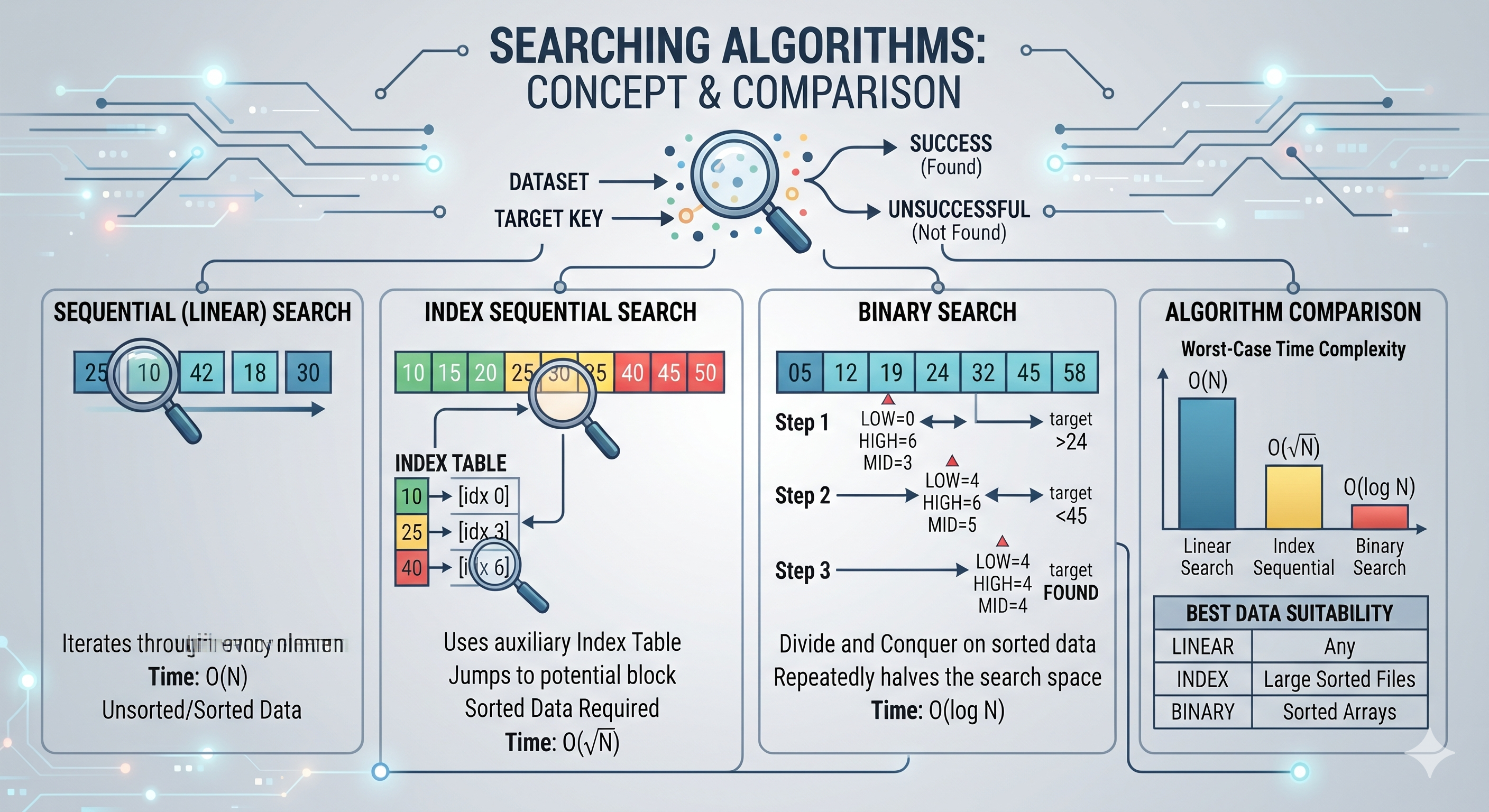
Searching is the algorithmic process of locating a specific target element (called the search key) within a collection of data items (such as an array, linked list, file, or database) and determining whether it exists, along with its position/index.
- Successful Search: The target key is found in the collection, and its index or record reference is returned.
- Unsuccessful Search: The target key is not present in the collection, and a sentinel value (commonly
-1orNULL) is returned. - Internal vs. External Searching: Internal searching happens entirely in main memory (RAM) for small-to-medium datasets, whereas external searching searches large datasets stored on secondary storage (disk/files), where indexing is especially helpful.
2. Sequential Search (Linear Search)
Sequential Search (also known as Linear Search) is the simplest searching technique. It starts from the first element of the list and compares each element one by one with the target key until either a match is found or the end of the list is reached.
- Prerequisite: Works on both unsorted and sorted data structures (arrays and linked lists).
- Algorithm:
- Set index
i = 0. - Repeat while
i < n: ifarr[i] == key, returni(search successful); otherwise incrementi = i + 1. - If the loop ends without a match, return
-1(search unsuccessful).
- Set index
- Time Complexity: Best Case =
O(1)(found at index0); Average Case =O(n); Worst Case =O(n)(found at the last position or not present). - Space Complexity:
O(1)(in-place, no extra memory needed).
Example: In arr = [25, 10, 42, 18, 30], searching for key = 18 checks 25 (index 0), 10 (index 1), 42 (index 2), and matches 18 at index 3 in 4 comparisons.
Graphical Representation: Linear Search (Target Key = 18)
3. Index Sequential Search
Index Sequential Search improves search efficiency on a sorted dataset by maintaining a smaller auxiliary Index Table alongside the main data array/file. Each entry in the index table stores a key value (typically the starting or ending key of a fixed-size block) and a pointer/index to that block in the main list.
- Prerequisite: The main list/file must be sorted in ascending (or descending) order.
- Working Steps (Two-Phase Search):
- Index Lookup: Search the small index table first to identify the specific block range where
keycan lie (such thatindexKey[i] ≤ key < indexKey[i+1]). - Sequential Block Scan: Jump directly to the starting index of that block in the main array and perform a sequential (linear) search only within that small block.
- Index Lookup: Search the small index table first to identify the specific block range where
- Example: Suppose sorted array
arr = [10, 15, 20, 25, 30, 35, 40, 45, 50](size 9) is divided into blocks of size 3 with Index Table:(10 → idx 0),(25 → idx 3),(40 → idx 6). To searchkey = 35:- Index scan finds
25 ≤ 35 < 40, so we jump straight to block starting atidx 3. - Sequential scan within indices
3..5checks25(idx 3),30(idx 4), and finds35at index 5—skipping indices0..2completely.
- Index scan finds
- Time Complexity: With
mindex entries and block sizeb(n = m * b), search takesO(m + b)comparisons (optimallyO(√n)whenm = b = √n, orO(log m + b)if binary search is used on the index table). - Space Complexity:
O(m)auxiliary space for the index table.
4. Binary Search
Binary Search is a fast Divide-and-Conquer searching algorithm that works exclusively on a sorted array. Instead of scanning sequentially, it repeatedly compares the target key with the middle element of the current search interval, eliminating half of the remaining elements at each step.
- Prerequisite: The list must be sorted and support direct/random index access (such as an array).
- Iterative Algorithm:
- Initialize
low = 0andhigh = n - 1. - While
low ≤ high:- Compute
mid = low + (high - low) / 2(prevents integer overflow). - If
arr[mid] == key, returnmid(found). - If
key < arr[mid], discard the right half by settinghigh = mid - 1. - If
key > arr[mid], discard the left half by settinglow = mid + 1.
- Compute
- If
low > high, return-1(not found).
- Initialize
- Time Complexity: Best Case =
O(1)(key is at the initialmid); Average Case =O(log2 n); Worst Case =O(log2 n). - Space Complexity:
O(1)for iterative implementation;O(log n)call-stack space for recursive implementation.
Graphical Representation: Binary Search (Target Key = 32 on Sorted Array)
Step-by-Step Trace Example (Binary Search)
Search for key = 32 in sorted array arr = [5, 12, 19, 24, 32, 45, 58] (n = 7):
| Step | low | high | mid = (low + high) / 2 | arr[mid] | Comparison & Action |
|---|---|---|---|---|---|
| 1 | 0 |
6 |
3 |
24 |
32 > 24 → Search right half (low = 3 + 1 = 4) |
| 2 | 4 |
6 |
5 |
45 |
32 < 45 → Search left half (high = 5 - 1 = 4) |
| 3 | 4 |
4 |
4 |
32 |
32 == 32 → Found at index 4! |
5. Comparison: Sequential (Linear) vs. Index Sequential vs. Binary Search
| Parameter | Sequential (Linear) Search | Index Sequential Search | Binary Search |
|---|---|---|---|
| Data Order Requirement | Works on both unsorted and sorted data | Requires sorted data | Requires sorted data |
| Working Principle | Element-by-element scan from start to end | Index table jump to block + sequential scan inside block | Divide-and-conquer (halves search range at middle) |
| Best-Case Time | O(1) |
O(1) |
O(1) |
| Worst-Case Time | O(n) |
O(√n) (for optimal block size √n) |
O(log2 n) |
| Extra Space | O(1) |
O(m) for index table |
O(1) iterative / O(log n) recursive |
| Data Structure Suitability | Arrays and Linked Lists | Large sorted arrays and indexed disk files | Sorted arrays (requires O(1) random access) |
6. C Program: Sequential, Index Sequential & Binary Search
#include <stdio.h>

// 1. Sequential (Linear) Search
int linearSearch(int arr[], int n, int key) {
    for (int i = 0; i < n; i++) {
        if (arr[i] == key)
            return i;
    }
    return -1;
}

// 2. Index Sequential Search (on sorted array)
int indexSequentialSearch(int arr[], int n, int key, int blockSize) {
    int indices[20], elements[20], idxCount = 0;

    // Build index table for start of each block
    for (int i = 0; i < n; i += blockSize) {
        indices[idxCount] = i;
        elements[idxCount] = arr[i];
        idxCount++;
    }

    if (key < elements[0]) return -1;

    int start = 0, end = n;
    for (int i = 1; i < idxCount; i++) {
        if (key < elements[i]) {
            start = indices[i - 1];
            end = indices[i];
            break;
        }
        start = indices[i];
        end = n;
    }

    // Sequential scan within the identified block
    for (int i = start; i < end; i++) {
        if (arr[i] == key)
            return i;
    }
    return -1;
}

// 3. Binary Search (Iterative on sorted array)
int binarySearch(int arr[], int n, int key) {
    int low = 0, high = n - 1;
    while (low <= high) {
        int mid = low + (high - low) / 2;
        if (arr[mid] == key)
            return mid;
        else if (key < arr[mid])
            high = mid - 1;
        else
            low = mid + 1;
    }
    return -1;
}

int main() {
    int unsorted[] = {25, 10, 42, 18, 30};
    int sorted[]   = {10, 15, 20, 25, 30, 35, 40, 45, 50};

    printf("Linear Search (18): Index %d\n", linearSearch(unsorted, 5, 18));
    printf("Index Sequential Search (35): Index %d\n", indexSequentialSearch(sorted, 9, 35, 3));
    printf("Binary Search (40): Index %d\n", binarySearch(sorted, 9, 40));
    printf("Binary Search (99): Index %d\n", binarySearch(sorted, 9, 99));

    return 0;
}
Expected Output (C):
Linear Search (18): Index 3
Index Sequential Search (35): Index 5
Binary Search (40): Index 6
Binary Search (99): Index -1
7. Python Program: Sequential, Index Sequential & Binary Search
# 1. Sequential (Linear) Search
def linear_search(arr, key):
    for i, val in enumerate(arr):
        if val == key:
            return i
    return -1


# 2. Index Sequential Search (on sorted list)
def index_sequential_search(arr, key, block_size=3):
    n = len(arr)
    if n == 0 or key < arr[0]:
        return -1

    # Build index table: (starting_value, starting_index)
    index_table = [(arr[i], i) for i in range(0, n, block_size)]

    start, end = 0, n
    for i in range(1, len(index_table)):
        if key < index_table[i][0]:
            start = index_table[i - 1][1]
            end = index_table[i][1]
            break
        start = index_table[i][1]
        end = n

    # Sequential scan inside the chosen block
    for i in range(start, end):
        if arr[i] == key:
            return i
    return -1


# 3. Binary Search (Iterative on sorted list)
def binary_search(arr, key):
    low, high = 0, len(arr) - 1
    while low <= high:
        mid = low + (high - low) // 2
        if arr[mid] == key:
            return mid
        elif key < arr[mid]:
            high = mid - 1
        else:
            low = mid + 1
    return -1


if __name__ == "__main__":
    unsorted = [25, 10, 42, 18, 30]
    sorted_arr = [10, 15, 20, 25, 30, 35, 40, 45, 50]

    print(f"Linear Search (18): Index {linear_search(unsorted, 18)}")
    print(f"Index Sequential Search (35): Index {index_sequential_search(sorted_arr, 35, 3)}")
    print(f"Binary Search (40): Index {binary_search(sorted_arr, 40)}")
    print(f"Binary Search (99): Index {binary_search(sorted_arr, 99)}")
Expected Output (Python):
Linear Search (18): Index 3
Index Sequential Search (35): Index 5
Binary Search (40): Index 6
Binary Search (99): Index -1
Theory Diagrams
searching-concept-of-searching-sequential-search-index-sequential-search-binary-search - Diagram