Theory & Explanation
1. Python Program Life Cycle
A Python program runs in distinct stages from source text to machine execution. First, your .py script is parsed into tokens and an Abstract Syntax Tree (AST), compiled into bytecode (.pyc), and executed inside the Python Virtual Machine (PVM) while objects are managed in heap memory.
Detailed Lifecycle Stages
- Source Code (
.py): Human-readable statements written in a text editor or IDE. - Lexical & Syntax Analysis: The tokenizer and parser verify grammar and build an AST; invalid syntax or indentation raises
SyntaxErrororIndentationError. - Bytecode Compilation: Python translates the AST into low-level bytecode instructions, cached in
__pycache__for faster reloads. - Python Virtual Machine (PVM): The runtime execution loop reads each bytecode instruction and executes it using call frames.
- Memory & Garbage Collection: Objects reside in the private heap; reference counting and cyclic garbage collection reclaim unused objects.
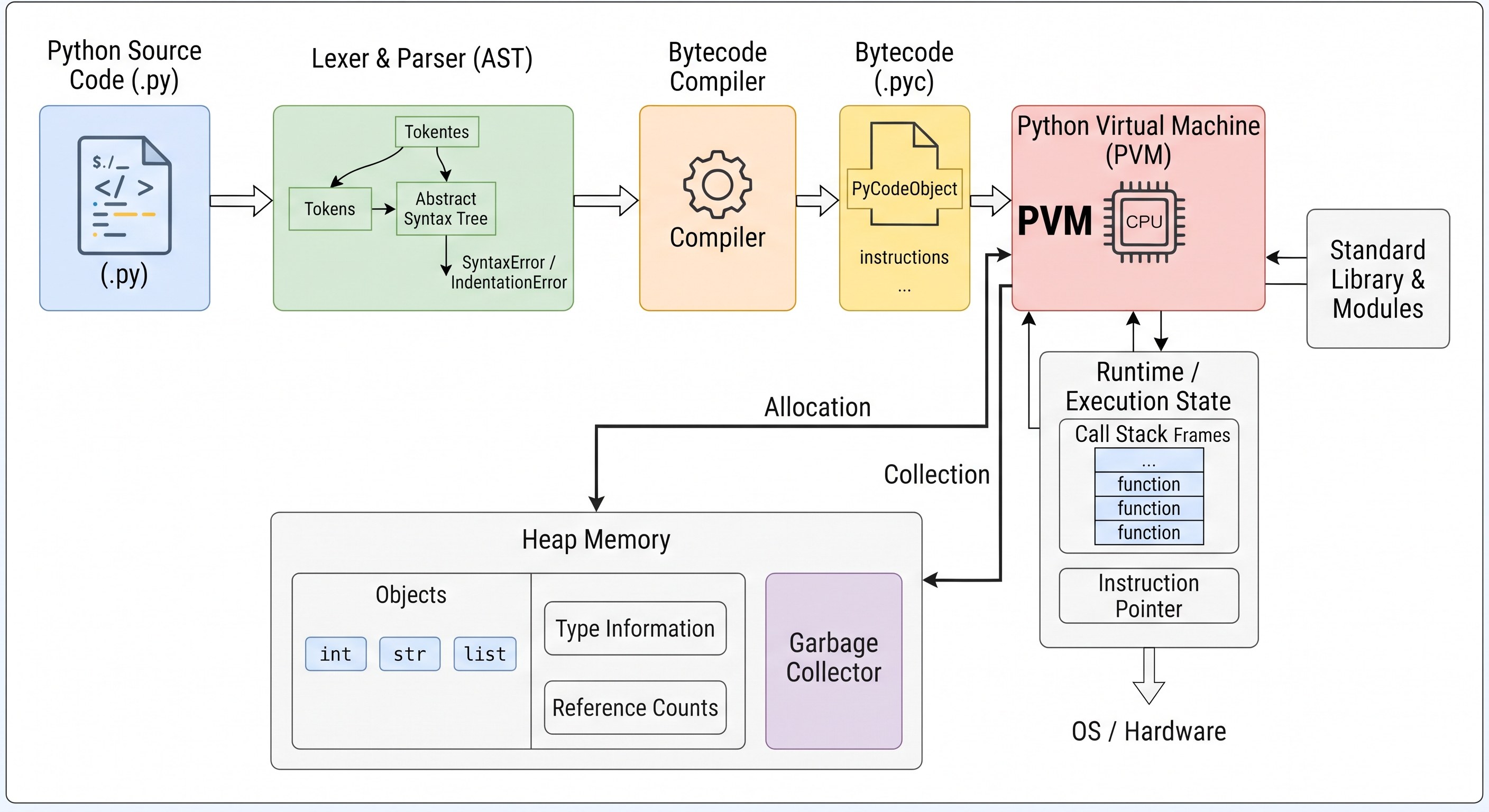
Graphical Representation of Life Cycle in Code
def show_lifecycle_bars():
    stages = [
        ("Source (.py)", 1),
        ("Parser & AST", 2),
        ("Bytecode (.pyc)", 3),
        ("PVM Execution", 4),
        ("Heap & GC", 5)
    ]
    for label, step in stages:
        bar = "#" * (step * 4)
        pad = "." * ((5 - step) * 4)
        print(f"{label:<18} [{bar}{pad}] {step * 20}%")

show_lifecycle_bars()
Expected Output:
Source (.py)       [####................] 20%
Parser & AST       [########............] 40%
Bytecode (.pyc)    [############........] 60%
PVM Execution      [################....] 80%
Heap & GC          [####################] 100%
2. Python Variables
In Python, a variable is a name bound to an object in memory rather than a fixed-size container. Assignment (=) attaches a name to an object; reassigning the name points it to another object without copying or mutating the first object unless that object is mutable and modified in place.
Detailed Explanation of Variable Concepts
- Identifiers: Names for variables, functions, and classes. They start with a letter or underscore (
_), contain letters, digits, or underscores, are case-sensitive, and cannot be reserved keywords. - Dynamic Typing: Variable types are determined at runtime from the assigned object; the same variable name can reference different types over time.
- Object Identity & Type:
id(obj)gives a unique identity for the object during its lifetime, andtype(obj)returns its data type. - Mutability vs. Immutability: Numbers (
int,float), strings (str), and tuples (tuple) are immutable; lists (list), dictionaries (dict), and sets (set) are mutable. - Aliasing: Assigning one variable to another (
b = a) makes both names refer to the same object.
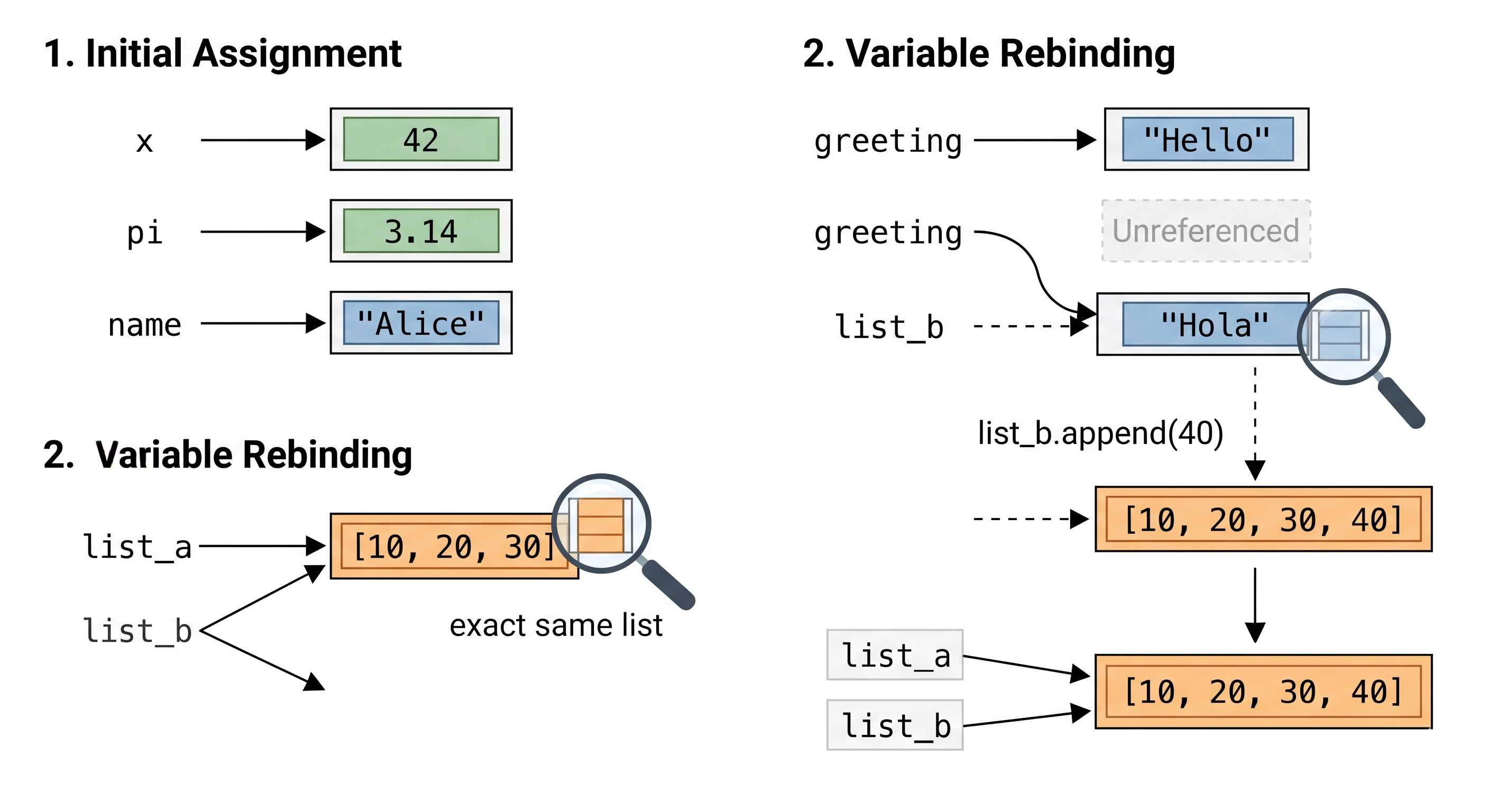
Graphical Representation of Variables in Code
marks = 70
print(f"marks = {marks:3d} ({type(marks).__name__}) | {"=" * (marks // 5)}")

marks = 85
print(f"marks = {marks:3d} ({type(marks).__name__}) | {"=" * (marks // 5)}")

scores = [60, 80]
alias_scores = scores
alias_scores.append(100)
print(f"scores = {scores} | same object: {id(scores) == id(alias_scores)}")
Expected Output:
marks =  70 (int) | ==============
marks =  85 (int) | =================
scores = [60, 80, 100] | same object: True
3. Python Basic Operators
Operators act on operands to compute values, compare data, test membership or identity, and combine logical conditions. Operator precedence sets which operations evaluate first in an expression, and parentheses () can override default precedence.
All Operator Groups Explained
| Operator Type | Symbols / Keywords | Behavior & Notes |
|---|---|---|
| Arithmetic | +, -, *, /, //, %, ** |
Math operations: add, subtract, multiply, true float division (/), floor division (//), remainder (%), and power (**). |
| Assignment | =, +=, -=, *=, /=, //=, %=, **= |
Assigns or updates values; compound operators combine an operation with assignment. |
| Comparison | ==, !=, >, <, >=, <= |
Evaluates value equality or ordering and returns True or False. |
| Logical | and, or, not |
Combines boolean expressions using short-circuit evaluation for and and or. |
| Identity | is, is not |
Checks whether two variables reference the exact same object in memory. |
| Membership | in, not in |
Checks whether an element exists inside a sequence, set, or dictionary keys. |
| Bitwise | &, |, ^, ~, <<, >> |
Operates on integer bits: AND, OR, XOR, bitwise NOT, left shift, and right shift. |
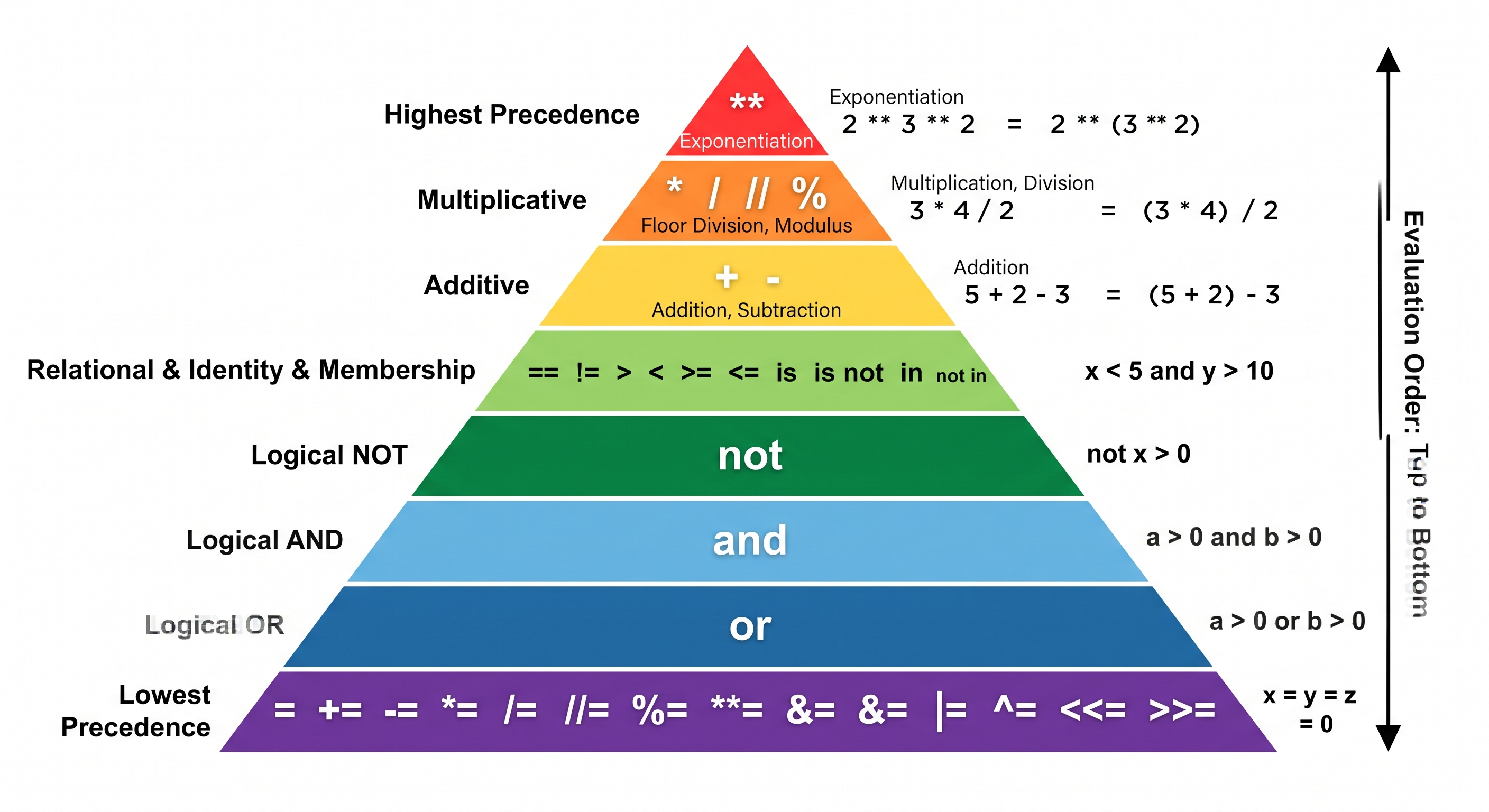
Graphical Representation of Operators in Code
a, b = 10, 4
ops = {
    "a + b": a + b,
    "a - b": a - b,
    "a * b": a * b,
    "a // b": a // b,
    "a % b": a % b,
    "b ** 2": b ** 2
}
for expr, val in ops.items():
    print(f"{expr:<8} = {val:<3} | {"*" * min(val, 40)}")

items = ["py", "sql", "git"]
print(f"sql in items : {"sql" in items}")
print(f"a > 5 and b < 6 : {(a > 5) and (b < 6)}")
print(f"6 & 3 (bin)  : {6 & 3:04b} | 6 | 3 (bin) : {6 | 3:04b}")
Expected Output:
a + b    = 14  | **************
a - b    = 6   | ******
a * b    = 40  | ****************************************
a // b   = 2   | **
a % b    = 2   | **
b ** 2   = 16  | ****************
sql in items : True
a > 5 and b < 6 : True
6 & 3 (bin)  : 0010 | 6 | 3 (bin) : 0111
4. Understanding Python Blocks
A code block (suite) in Python is a group of statements that belong together under a compound statement such as if, elif, else, for, while, def, or class. Python groups statements by indentation rather than braces {}.
How Blocks Work in Python
- Colon Header: A block begins after a header line ending with
:. - Consistent Indentation: All lines in the same block must use the same indentation (4 spaces per level is standard in PEP 8).
- Nested Blocks: Indenting further creates an inner block inside an outer block.
- Dedentation: Moving back to a lesser indentation level closes the inner block and returns control to that outer level.
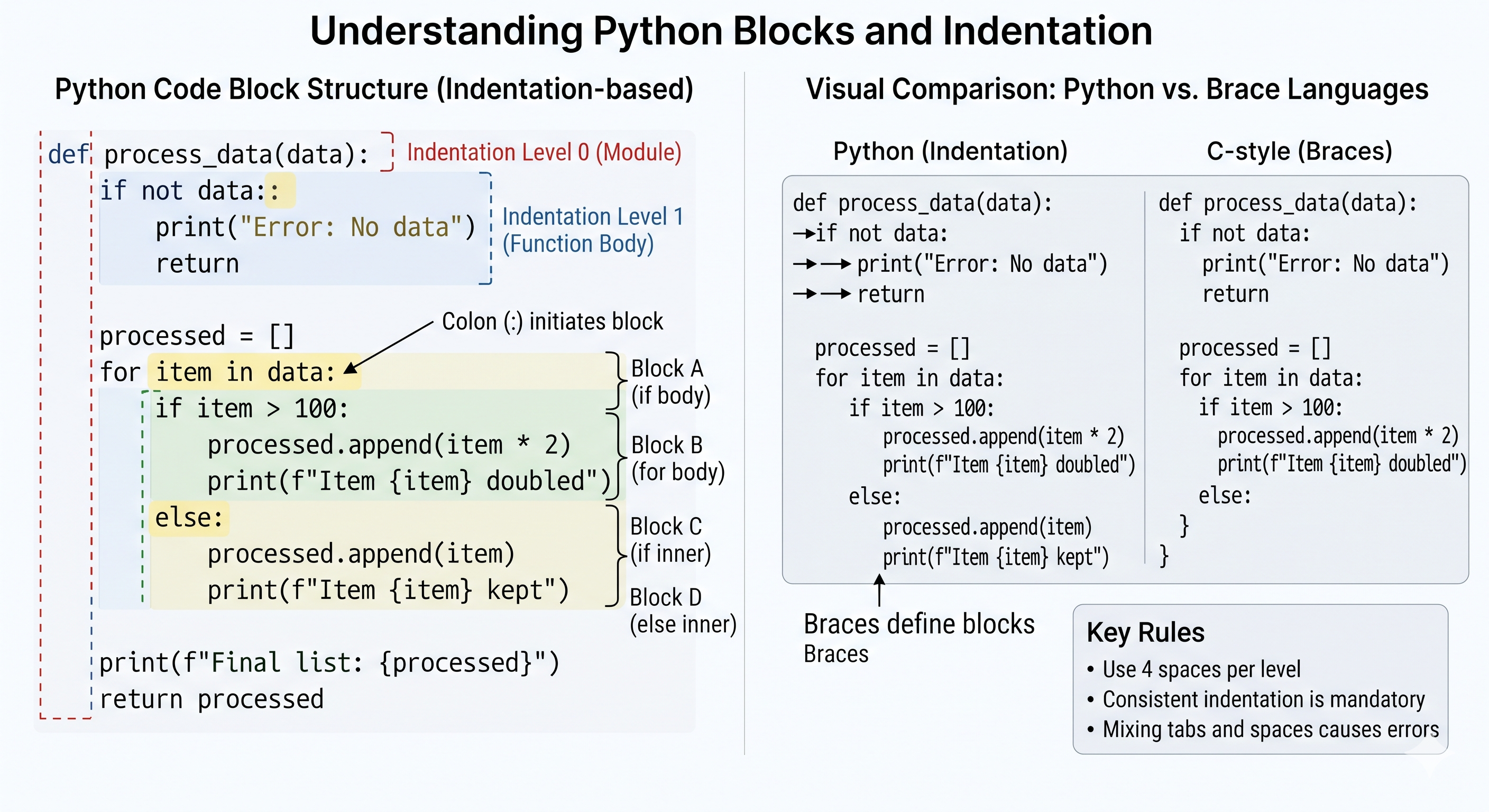
Graphical Representation of Nested Blocks in Code
def inspect_blocks():
    tree = [
        (0, "def inspect_blocks():"),
        (1, "for score in [80, 45, 90]:"),
        (2, "if score >= 50:"),
        (3, "status = Pass"),
        (2, "else:"),
        (3, "status = Retry"),
        (1, "print(score, status)")
    ]
    for level, line in tree:
        guide = "|   " * level
        print(f"{guide}+-- {line}")

inspect_blocks()
Expected Output:
+-- def inspect_blocks():
|   +-- for score in [80, 45, 90]:
|   |   +-- if score >= 50:
|   |   |   +-- status = Pass
|   |   +-- else:
|   |   |   +-- status = Retry
|   +-- print(score, status)